

Picture this. You are sitting on a train, half asleep, and you tap a link on your phone. A video starts playing before you have finished blinking. Nothing about that moment feels remarkable anymore. It feels like magic that works, the way a light switch works: you flip it, the room fills with light, and you never think about the power station.
That is the first thing to understand about how the internet works. It feels weightless because almost all of it is hidden. The network that carries your tap is not a cloud. It is glass threads on the ocean floor, humming boxes in windowless buildings, and a set of agreements — written down in plain documents anyone can read — about how machines should talk to each other. Learning how the internet works means following one small request on its whole journey: from your fingertip, across your home, out through your internet provider, under the sea, into a building full of computers, and all the way back again.
I still remember the first time I watched that journey happen in real time. I was a student, sitting at a borrowed desk in a university computer lab late at night, and a teacher showed me a tool called traceroute. We typed in the address of a website hosted on another continent and watched the reply hop from machine to machine, city to city, like a passport collecting stamps: our campus, a regional network, a transatlantic cable landing station, a data centre thousands of miles away. Thirty-odd hops, each one a real place with a real name. The internet stopped being an idea that day and became a map I could walk in my head. This article is that map, drawn out in full.
1. How the Internet Works in Sixty Seconds
Before the details, here is how the internet works in miniature. When you ask for a web page, your device does not send one big message. It chops the request into small pieces called packets, and each packet carries two things: a chunk of your message and the address of where it is going. Those packets travel independently across many different machines, each one passing them along like runners in a relay race. At the far end, the receiving computer puts the pieces back together in the right order, reads your request, and sends its answer back to you as packets too. Your browser reassembles those packets into the page you see.
Every other part of this article is a closer look at one step in that relay: how the packets are made, how addresses work, how machines know where to send them, what the physical wires and cables actually are, and how your request finds the right computer out of the billions connected to the network. If you only remember one sentence, remember this one: the internet is a postal system for tiny addressed envelopes, running on light, electricity, and a shared set of rules.
The internet is also the largest machine humans have ever built, and almost nobody owns it. No single company, government, or person controls it. It is a network of networks — thousands of independent networks that agree to exchange traffic with each other. Your home network connects to your internet service provider, which connects to larger backbone networks, which connect to each other and to the data centres where websites live. That agreement to interconnect, and the open rules that make it possible, is the real invention. The cables are impressive. The cooperation is more impressive.
2. The Internet Is Not a Cloud — It Is a Physical Thing
The word "cloud" has done the internet a disservice. It makes the network sound like weather: formless, everywhere, untouchable. The truth is far more concrete, and far more interesting.
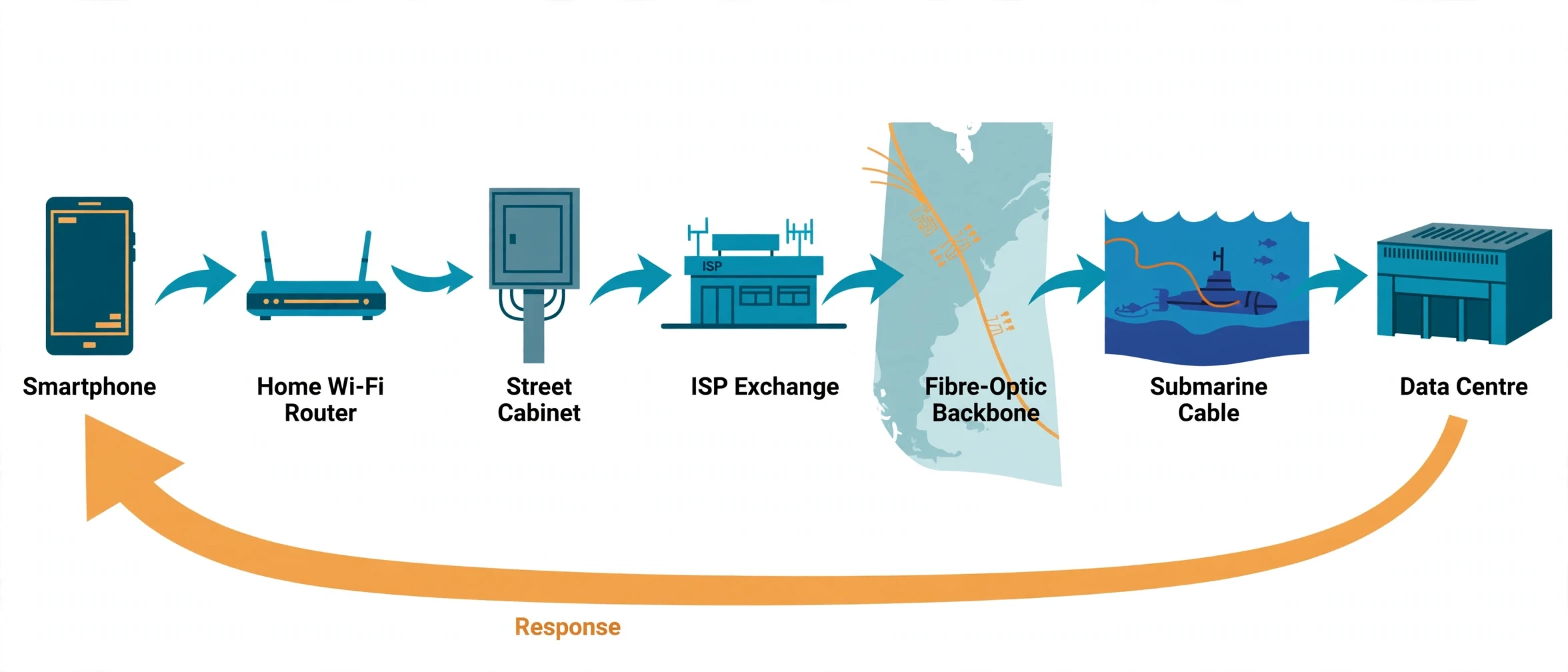
Under your street, or strung along poles outside your window, run cables. Inside your home, a small box — your router — turns your device's radio signals into electrical pulses or flashes of light and sends them onward. Those pulses travel to a cabinet at the end of your street, then to a larger exchange, then onto fibre-optic cables that run between cities. If your message is going overseas, it will almost certainly travel through a cable lying on the seabed, thinner than a garden hose, carrying pulses of laser light. At the far end, it arrives at a data centre: a vast, air-conditioned warehouse full of racks of computers, humming day and night, where the website you asked for actually lives.
I once held a piece of optical fibre in my hand at a science open day. It was thinner than a human hair, and it looked like nothing at all — a clear thread you could barely see. The demonstrator bent it into a loop and shone a red laser into one end, and the light came out the other end, trapped inside the glass by reflections off its inner walls. That hair-thin thread, the demonstrator told us, could carry more phone calls than every copper wire in the building combined. I have never forgotten the contrast: the most powerful communication tool on the planet looks like a strand of fishing line.
The physical scale is hard to grasp, so here are some numbers that help. TeleGeography, the research firm that maps the world's submarine cables, counts more than 600 cable systems in service or planned, stretching for well over 1.5 million kilometres across the ocean floor — enough to wrap around the Earth more than 35 times. More than 99 percent of the data that travels between continents moves through those cables, not through satellites. Satellites matter, especially for remote places, but the heavy lifting happens underwater. That single fact reshapes how the internet works in most people's minds: the network is not in the sky, it is on the seabed.
None of this is secret. You can look up the cable maps yourself, and you can visit a cable landing station — the unremarkable building on a coast where a cable comes ashore — without ever realising what it is. The internet hides in plain sight, in buildings with no signs and cables with no labels.
3. Packets: The Internet's Envelopes
Every message on the internet travels as packets, and packets are the single most important idea in understanding how the internet works. So let us slow down and look at one closely.
Imagine you want to send a book to a friend, but the postal service will only accept envelopes, and each envelope can hold exactly one page. You would tear the book into pages, put each page in its own envelope, write your friend's address and the page number on every envelope, and post them all. Your friend would open the envelopes, sort the pages by number, and rebuild the book. Some envelopes might arrive out of order. One might get lost and have to be re-sent. But the book would arrive, and your friend would never know or care which route each envelope took.
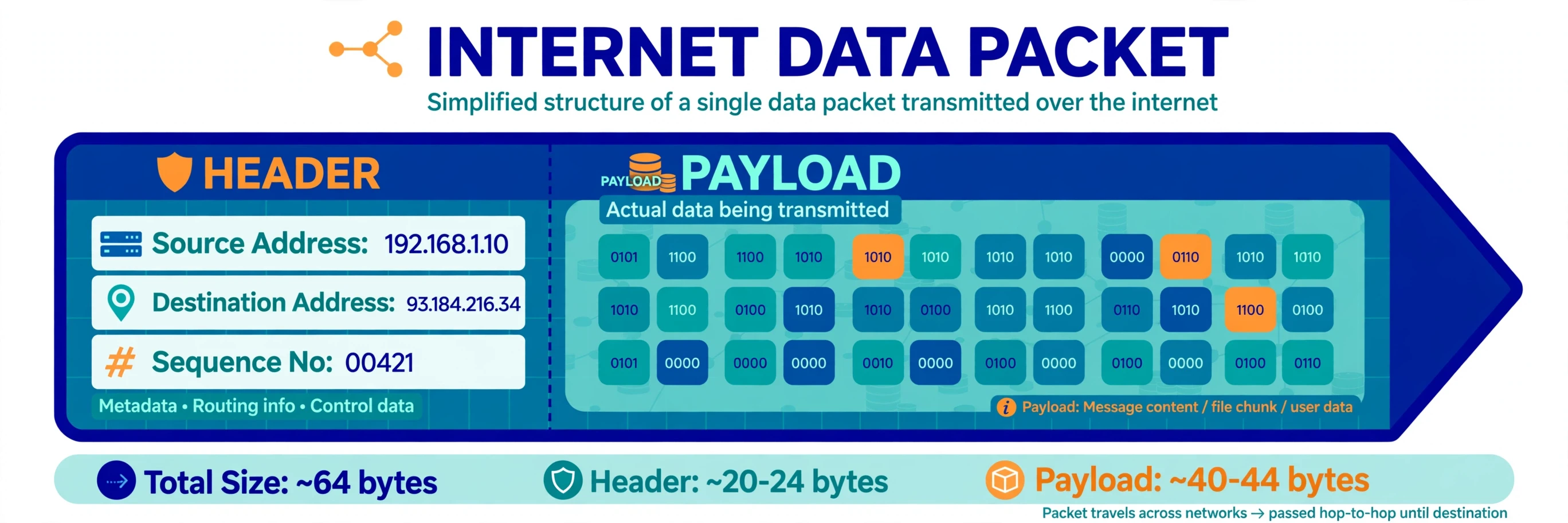
That is exactly what your computer does. When you load a web page, send an email, or start a video call, your device splits the data into packets. Each packet is typically around 1,500 bytes — roughly a page of text. Each packet has two parts: a header and a payload. The payload is the actual data — a slice of your message. The header is the envelope: it carries the destination address, the sender's address, the packet's sequence number so the receiver can reassemble everything in order, and a few control details that help routers decide what to do with it.
Why chop things up at all? The answer comes from the network's history, and it is a good example of how the internet works as a product of patient experiment. In the 1960s, researchers working on the ARPANET — the research network funded by the US Department of Defense that became the internet's ancestor — realised that a network built like a telephone system would be fragile. They worked the way good science always works: they formed a hypothesis about how a network could survive damage, built a small test network, measured what actually happened, and revised their ideas from the evidence — the same cycle described in the Sciory article on the scientific method. A phone call holds one circuit open for the whole conversation, and if that circuit breaks, the call dies. Packet switching, the idea developed by researchers including Paul Baran and Donald Davies, works the opposite way: no circuit is held open, every packet finds its own way, and the network keeps working even if some of its links fail. It was a design built for survival, and it turned out to be a design built for scale too.
Here is what that means for you in practice. When you stream a video, your device is receiving thousands of packets every second. If a few go missing — and they do, constantly — your device simply asks for them again, or the video player covers the gap. When you are on a video call, packets arrive slightly out of order and your device quietly re-sorts them before you hear a word. The choppiness you sometimes hear on a bad connection is packet loss made audible: the network dropping envelopes faster than they can be re-sent.
There is a common misconception worth correcting here. Most people assume that when they send a message, it travels in one piece along one fixed path, like a train on a track. What the data actually shows is messier and cleverer than that. Packets from a single message routinely take different routes, arrive out of order, and are reassembled at the far end. The internet does not promise a straight line. It promises delivery, and it keeps that promise by being flexible about how it gets there.
3.1 What happens when a packet gets lost
Packet loss sounds like a disaster, but the internet treats it as routine — and grasping that calm attitude is part of understanding how the internet works. Every packet carries a sequence number, so the receiving computer knows exactly which pieces are missing. If packet 47 never arrives, the receiver asks the sender to transmit packet 47 again. This request-and-resend loop happens thousands of times a day on every connection, silently, in milliseconds. You only notice it when loss climbs above a few percent — that is when video freezes, calls stutter, and web pages hang halfway loaded.
I learned this the practical way, during a video call from a hotel with a congested network. My colleague's voice kept arriving in fragments, and I blamed the app, then the laptop, then the hotel. A quick test showed the real culprit: one in every twenty packets was being dropped by an overloaded router between the hotel and the wider internet. The app was fine. The path was crowded. Once I understood that, the fix was obvious — switch to a wired connection and a less congested route — and the call cleared up immediately. Packet loss is not a mystery. It is traffic, and like road traffic, it has rush hours.
3.2 Why packets made the internet unstoppable
Packet switching has one more advantage that decided the internet's future, and it explains how the internet works at scale: it does not care what it carries. The same packets can carry a web page, a phone call, a video stream, or a file download. The network treats them all as envelopes. That indifference is why the internet could absorb every new invention — email, the web, streaming, video calls — without being rebuilt. The postal system never needed to know what was inside the envelopes. It only needed to deliver them.
4. Addresses: How Every Device Gets Found
A postal system needs addresses, and the internet's address system is called the Internet Protocol, or IP. Every device connected to the internet has an IP address: a number that says, in effect, "this is where I live on the network." When a packet leaves your device, its header carries two addresses — yours and the destination's — and every router along the way reads the destination address to decide which direction to send it next. Addresses are the foundation of how the internet works: without them, no packet could ever find its way home.
The original version, IPv4, uses 32-bit addresses written as four numbers separated by dots, like 93.184.216.34. That format gives about 4.3 billion possible addresses. In the 1970s, when the protocol was designed, 4.3 billion seemed like more addresses than humanity could ever need. By the 2010s, it was not enough. There are now more connected devices than people on Earth — phones, laptops, televisions, cars, doorbells, light bulbs — and the world simply ran out of IPv4 addresses to hand out. The regional registries that allocate them handed out their last large blocks years ago, and providers now share addresses between customers or buy them from each other.
The long-term answer is IPv6, the successor protocol — and the slow, careful migration to it is itself a lesson in how the internet works: which uses 128-bit addresses written in hexadecimal, like 2606:2800:220:1:248:1893:25c8:1946. IPv6 offers a number of possible addresses so large that it is hard to describe without reaching for astronomy: about 340 undecillion, or 340 followed by 36 zeroes. That is enough to give every grain of sand on Earth its own address, many times over. The transition has been slow — IPv4 and IPv6 have to run side by side, and every router, device, and website must support the new protocol before the old one can be retired — but it is steadily happening. Most large networks and mobile carriers already use IPv6 for a large share of their traffic.
Your own IP address is less permanent than you might think. Most home connections use a dynamic address that your provider can change, and your router gives each device in your home a private address that only works inside your house. A technique called Network Address Translation, or NAT, lets all your home devices share one public address: your router rewrites the return address on outgoing packets so replies come back to it, and it sorts them out to the right device inside. It is the reason your phone, laptop, and television can all be online at once through a single connection.
There is a useful analogy here, and it comes from the world of street addresses. An IPv4 address is like a house number on a street in a small town: short, easy to remember, and perfectly fine until the town grows into a city. IPv6 is like a full postal address with country, city, street, building, and apartment number — longer to write out, but able to describe every building on the planet without running out of combinations. Nobody memorises IP addresses the way they memorise phone numbers. That job belongs to the Domain Name System, which we will reach in section 6.
Feature | IPv4 | IPv6 |
|---|---|---|
Address length | 32 bits | 128 bits |
Written as | Four decimal numbers, e.g. 93.184.216.34 | Eight hexadecimal groups, e.g. 2606:2800:220:1:248:1893:25c8:1946 |
Total addresses | About 4.3 billion | About 340 undecillion |
Introduced | 1983, with TCP/IP | Standardised in 1998, adopted gradually since |
Status today | Still widely used; addresses exhausted | Growing steadily; the long-term standard |
5. TCP/IP: The Rules That Hold the Internet Together
If packets are the envelopes and IP addresses are the street addresses, then TCP/IP is the set of rules that tells everyone how to write the envelopes, how to hand them over, and what to do when something goes wrong. It is not one protocol but a family of them, and understanding how the internet works means understanding the two names in the middle of it.
IP, the Internet Protocol, does the addressing and the routing. It gets each packet from one machine to the next, hop by hop, until it reaches its destination. IP makes no promises. It does not guarantee that a packet will arrive, that packets will arrive in order, or that a packet will arrive only once. It is deliberately simple and deliberately unreliable — and that simplicity is a feature. Because IP promises so little, it can run on almost anything: copper wire, fibre, radio, even carrier pigeons, in one famous experiment.
TCP, the Transmission Control Protocol, sits on top of IP and adds the reliability. TCP takes your message, splits it into packets, numbers them, sends them, and waits for the receiver to confirm each one arrived. If a confirmation never comes, TCP sends the packet again. If packets arrive out of order, TCP puts them back in sequence before handing the message to the application. If the network is congested, TCP slows down — a mechanism called congestion control that keeps the whole internet from collapsing under its own load. When you load a web page or download a file, you are almost certainly using TCP.
There is a second transport protocol worth knowing: UDP, the User Datagram Protocol. UDP skips most of TCP's reliability work. It fires packets off without waiting for confirmations, and if one is lost, it is gone. That sounds reckless, but it is exactly what live video calls and online games need. In a video call, a packet that arrives a second late is useless — the moment has passed — so it is better to drop it and keep going than to stop everything and wait for a re-send. TCP is the careful courier who checks every delivery. UDP is the courier who throws the parcel over the fence and rides on. Both have their place, and your devices use both every day, often at the same time.
The two protocols were designed in the 1970s by Vint Cerf and Bob Kahn, and on 1 January 1983 — a day network engineers still call "flag day" — the ARPANET switched over to TCP/IP entirely. That date is often called the birthday of the modern internet. From that moment on, any network that spoke TCP/IP could join, and the internet stopped being a single research project and became a network of networks.
5.1 The layer cake
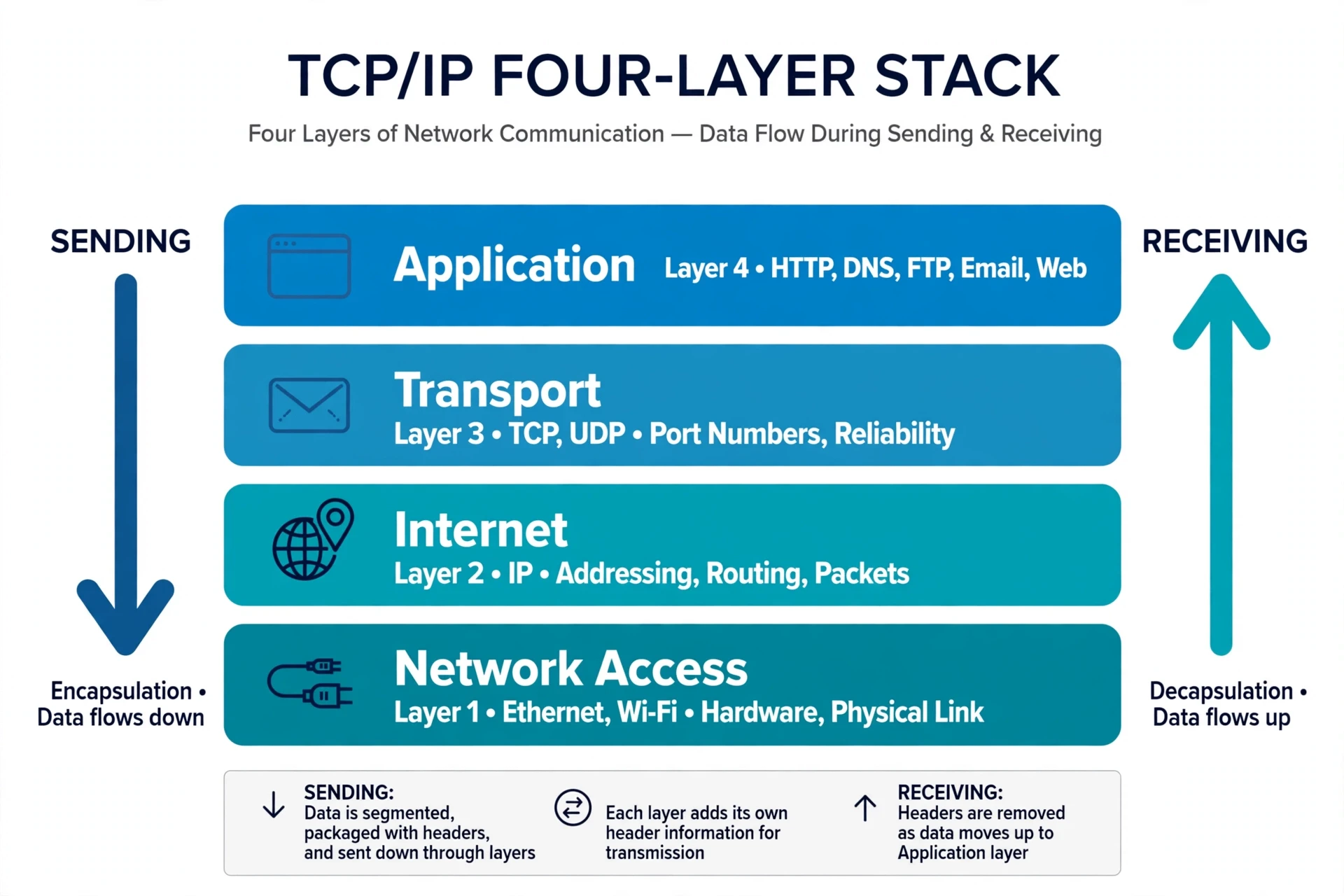
Engineers describe TCP/IP as a stack of layers, and the image is worth holding in your mind because it explains how the internet stays manageable. At the bottom is the link layer: the actual hardware — your Wi-Fi radio, the Ethernet cable, the fibre. Above it is the internet layer, where IP lives and addressing happens. Above that is the transport layer, where TCP and UDP live and reliability is handled. At the top is the application layer: the web, email, and every app you use.
Each layer only talks to the layer directly above and below it, and each layer treats the layers beneath it as a black box. That separation is the quiet organising principle behind how the internet works. Your web browser does not need to know whether its packets travel by fibre or by radio. The fibre does not need to know whether it carries a web page or a phone call. That separation is what lets each part of the internet improve independently: fibre gets faster without browsers needing to change, and browsers get smarter without the fibre needing to change. It is a design pattern borrowed from good engineering everywhere, and it is one of the reasons the internet has survived fifty years of change without a fundamental rebuild.
5.2 The handshake that starts every connection
Before any data flows over TCP, the two computers perform a short ritual called the three-way handshake — a small ceremony that sits at the heart of how the internet works. Your computer sends a packet that says, in effect, "I would like to talk." The server replies, "I hear you, and I would like to talk too." Your computer answers, "Confirmed — let us begin." Only then does the real data start moving. The whole exchange takes milliseconds, and it happens every time you load a page, send a message, or open an app. You never see it, but it is the reason your connection is reliable: both sides have agreed they are ready, and both sides know the other is listening.
The internet does not promise a straight line. It promises delivery — and it keeps that promise by being flexible about how it gets there.
6. DNS: The Phone Book of the Internet
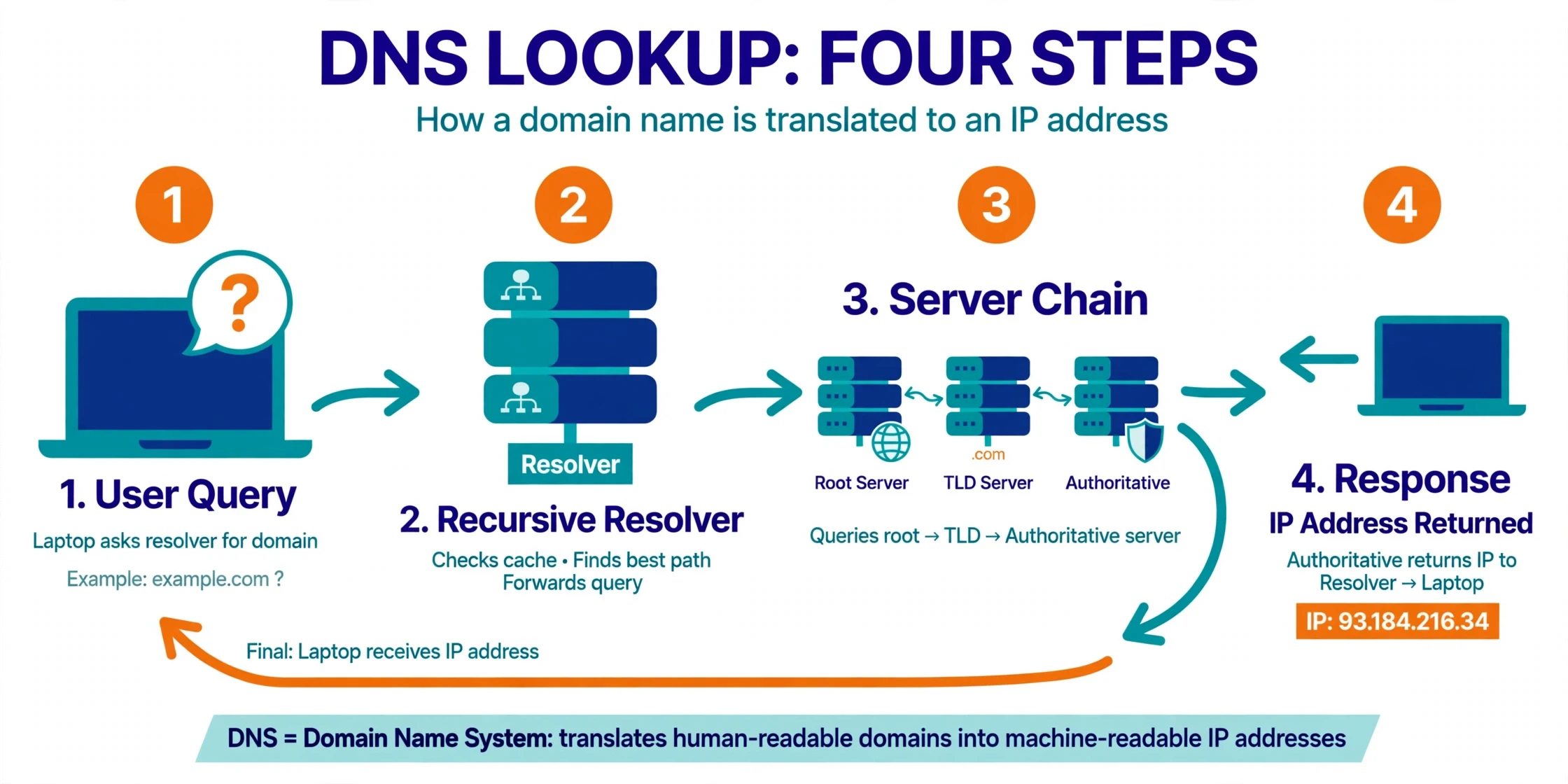
Here is a puzzle, and it sits at the centre of how the internet works. Nobody types IP addresses into a browser. You type "sciory.com" or "wikipedia.org" — names made of words. But packets can only travel to numbers. Something has to translate the name into the number, every single time, in a fraction of a second. That something is the Domain Name System, or DNS, and it is one of the most quietly important systems on the internet.
Think of DNS as a phone book, but a phone book with no single printed copy. When you type a web address, your device asks a DNS resolver — usually run by your internet provider — to look up the name. The resolver asks a chain of servers: first the root servers, which know where to find the servers for each top-level domain like .com or .org; then the servers for that domain, which know where to find the specific name you asked for. The answer comes back as an IP address, your device stores it in a cache for a while so it does not have to ask again, and your browser connects. The whole lookup usually takes a few tens of milliseconds.
The history of DNS is a good example of how the internet works as a system that grows by solving its own problems. In the early ARPANET, every computer kept a single text file called HOSTS.TXT, listing every machine on the network and its address. It worked when the network had dozens of machines. By the early 1980s, with hundreds of machines and more joining every week, a single shared file had become unworkable — every change had to be sent to everyone, and the file kept getting out of date. Paul Mockapetris designed DNS in 1983 as a distributed replacement: no single machine holds the whole phone book, and each part of the system is responsible for its own names. It has scaled from hundreds of names to hundreds of millions without a fundamental redesign.
DNS has a weakness that matters to you, and it is one of the less comfortable truths about how the internet works: by default, those lookups are not encrypted. Anyone who can watch your network traffic — a public Wi-Fi operator, for instance — can see which names you look up, even if the web pages themselves are encrypted. That is why newer standards called DNS over HTTPS and DNS over TLS now exist, wrapping the lookup in encryption so that the question itself is private. If your browser or device offers encrypted DNS, turning it on is one of the simplest privacy improvements you can make.
I once watched a whole office lose its internet for an afternoon because of DNS, and nothing else. The connection was fine. The cables were fine. Every packet could reach its destination — but nobody could look up a name, so nobody could reach anything. We typed an IP address directly into a browser and a page loaded instantly, which proved the point: the network was healthy, the phone book was down. It was a vivid lesson in how much of the internet depends on a system most people have never heard of. The network is only as usable as its directory.
7. The Last Mile: From Your Home to the Wider Internet
The journey of your packet begins in the most ordinary place in the world: your living room. Your phone or laptop connects to your router, usually by Wi-Fi. Wi-Fi is a radio technology, and like all radio, it is a shared medium — your devices take turns talking, and neighbours' networks, microwaves, and thick walls can all interfere. That is why your connection can feel fast in one room and sluggish in another: the radio link, not the internet itself, is the bottleneck.
Your router's job is translation. It takes the radio signals from your devices and turns them into electrical pulses — the same kind of signals explained in the Sciory article on the fundamentals of electricity — or, if you have a fibre connection, into flashes of light. The link between your home and your provider is called the last mile, and it is famously the most expensive and awkward part of the whole network to build. Digging up streets, laying cables to every house, and maintaining them is slow, costly work, which is why the last mile has changed more slowly than the rest of the internet. This unglamorous stretch is where how the internet works meets the real world of roadworks and utility bills.
The last mile has taken many forms over the years. Dial-up modems in the 1990s squeezed data through telephone lines at speeds that now seem comical — a single photo could take minutes to download, and you could hear the modem's handshake as a screeching song. DSL improved on the same copper phone lines. Cable internet reused television cables. Fibre to the home, now rolling out in many countries, replaces the copper with glass and can deliver speeds hundreds of times faster. And in places where laying cables makes no sense — remote villages, ships, mountain cabins — satellite internet beams data down from orbit instead.
I still remember the sound of a dial-up modem connecting, and it reminds me how much of how the internet works has changed while its core ideas stayed the same. and the household rule that went with it: nobody could use the phone while someone was online, because the modem used the phone line itself. A teenager downloading a song could hold the family phone hostage for twenty minutes. That single shared line was the last mile of its day. Today's fibre connection carries thousands of times more data, and it does so silently, in the background, while the whole household streams, calls, and plays at once. The last mile changed completely — and the rest of the internet barely noticed, because the packet system underneath never changed.
From your provider, your packets enter the middle mile: regional networks, then national backbone networks — the high-capacity fibre routes that link cities and countries. Backbones are built for volume. A single backbone fibre can carry many terabits per second, enough for hundreds of thousands of video streams at once. Your provider pays backbone operators to carry its traffic onward, and backbone operators pay each other, or exchange traffic for free under agreements called peering. Follow the money and the packets together, and you have a map of the internet's business as well as its technology.
8. The Cables Under the Sea
Now we come to the part of the internet that surprises almost everyone: the ocean floor. When your packet needs to cross from one continent to another, it almost certainly dives underwater. More than 99 percent of intercontinental data travels through submarine fibre-optic cables, and the scale of that hidden network is extraordinary. TeleGeography's submarine cable map counts more than 600 cable systems in service or planned, with a combined length of over 1.5 million kilometres. Laid end to end, they would wrap around the Earth more than 35 times. If you want to see how the internet works at planetary scale, that map is the best place to start: every glowing line on it is a real cable, on a real seabed, carrying real traffic right now.
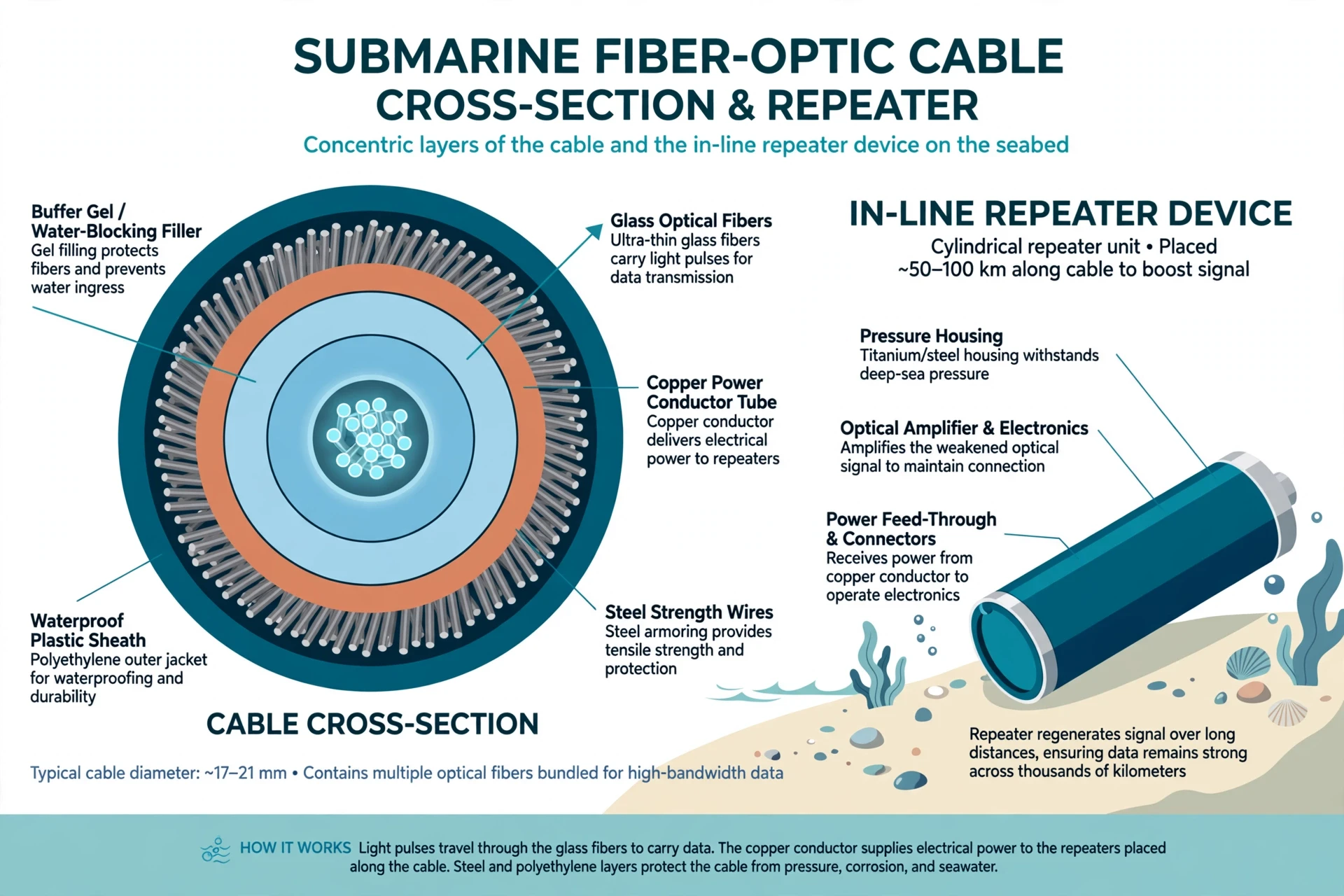
A submarine cable is a remarkable piece of engineering. At its heart are a handful of hair-thin glass fibres, each carrying pulses of laser light. Around them are layers of protection: a copper tube that carries the electrical power for the repeaters, steel wires for strength, and a waterproof plastic sheath. In shallow water near the coast, cables get extra steel armour, because that is where fishing trawlers and ships' anchors do their damage. In the deep ocean, where nothing disturbs them, the cable can be as thin as a garden hose. Every 50 to 100 kilometres along the route sits a repeater — a sealed metal cylinder that boosts the light signal, which would otherwise fade away over thousands of kilometres. The repeaters are powered by electricity sent down the cable from the shore, at thousands of volts.
Laying a cable is a slow, deliberate operation. A specialised ship, carrying thousands of kilometres of cable coiled in huge tanks, sails along a surveyed route while the cable pays out over the stern and sinks to the seabed. In shallow water, a plough towed behind the ship buries the cable in a trench in the seafloor. The whole operation for a transatlantic cable can take months. A single modern cable can carry hundreds of terabits per second — enough capacity for every person in a medium-sized country to stream video at the same time.
The first transatlantic cable was not for the internet at all. It was a telegraph cable, laid in 1858, and it failed after a few weeks. The first successful one followed in 1866, and it carried Morse code dots and dashes at a rate that would make a modern user weep. The first transatlantic fibre-optic cable, TAT-8, entered service in 1988 and could carry thousands of phone calls at once. Today's cables carry millions of times more data than TAT-8 did, on fibres not much thicker than the ones in that first cable. The glass barely changed. Everything around it did.
8.1 When cables break
Cables break more often than you might expect — roughly 150 to 200 faults a year worldwide, according to industry figures. Most are accidents: a fishing trawler dragging its net, a ship dropping anchor in the wrong place, an underwater landslide or earthquake. The most famous recent example came in January 2022, when the Hunga Tonga volcanic eruption severed Tonga's only submarine cable — a stark reminder that how the internet works depends on physical things that can break and cut the island nation off from the internet for weeks. Repairs required a ship to sail to the fault, haul the cable up from the seabed, splice in a new section, and lower it back down — work that can take days in good weather and far longer in bad.
What protects you from these breaks is redundancy. The internet was designed so that no single cable is a single point of failure for the whole system. If one transatlantic cable is cut, traffic reroutes onto others. The packets take a longer path, speeds may dip, but the connection survives. That is packet switching doing its job at planetary scale: the network routes around damage, the way water flows around a stone. Individual countries with only one cable are far more exposed than the network as a whole, which is why new cables are constantly being laid to places that depend on a single link. The cables themselves lie on the same ocean floor — abyssal plains, trenches, and continental shelves — described in the Sciory article on oceanography.
8.2 Light in glass: how fibre actually carries data
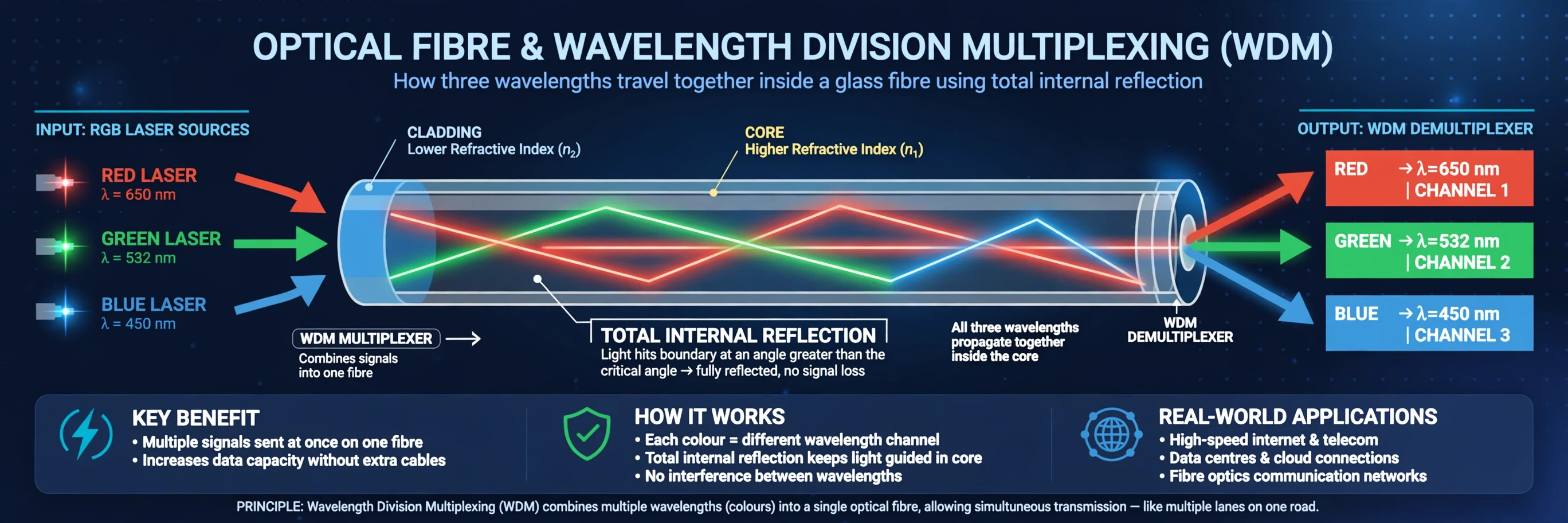
The physics inside a fibre is elegant, and it connects directly to something you may already know from science class. Light travels down a fibre by total internal reflection: the glass core is surrounded by a cladding with a slightly lower refractive index, so light hitting the boundary at a shallow angle bounces back inside instead of escaping. The light zigzags down the fibre, trapped, for thousands of kilometres. That is the same principle that makes the sky blue — light interacting with matter according to the rules of optics — applied to a thread of glass instead of the atmosphere. If you want the fuller story of how light behaves in air, the Sciory article on why the sky is blue walks through scattering and the electromagnetic spectrum in detail.
Fibre has two great advantages over copper wire, and they explain a large part of how the internet works so fast: First, light in glass loses far less energy over distance than electricity in copper, so signals travel further before they need boosting. Second, a single fibre can carry many separate streams of light at once, each at a different colour — a technique called wavelength division multiplexing. Think of it as many lanes on a motorway, each lane a different colour of light, all travelling through the same glass thread. A modern cable can carry well over a hundred of these lanes per fibre, and a cable holds many fibres. That is how a thread thinner than a hair carries the video calls of a continent.
9. Routing: How Packets Find Their Way
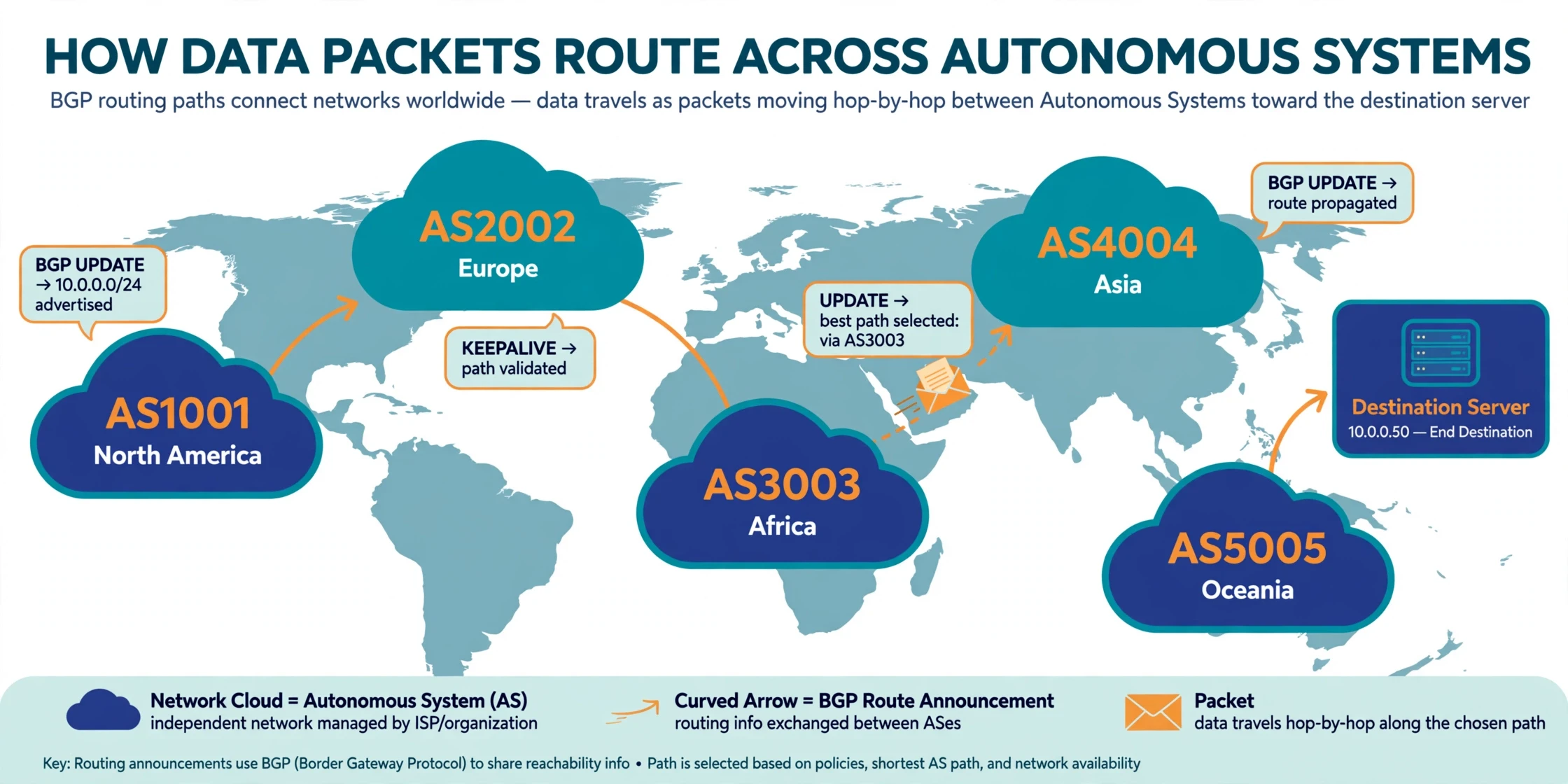
We have followed a packet from your home to the ocean floor. But who decides which cable it takes, and which route it follows across the dozens of networks between you and your destination? The answer is routing, and the internet's main routing system is called BGP — the Border Gateway Protocol.
To understand BGP, you need one more concept: the autonomous system. The internet is made of thousands of independent networks, each run by a different organisation — your provider, a backbone company, a university, a cloud provider. Each of these networks is called an autonomous system, and each one has a number. BGP is the protocol those networks use to tell each other which addresses they can reach, and it is the clearest illustration of how the internet works without a centre: no map of the whole network exists anywhere, yet every packet still finds its way. It is, in effect, a constantly updated set of directions: "If you want to reach these addresses, send the packets to me, and I will pass them on."
BGP works by trust, and that trust is its greatest weakness. Networks announce the address ranges they can reach, and other networks believe them. Most of the time that works beautifully — it is how a packet from your phone finds a server on another continent without any central map of the internet existing anywhere. But the announcements are not verified by default, so mistakes and mischief can send traffic astray. In 2008, a Pakistani internet provider accidentally announced that it owned the addresses of YouTube, and for a few hours a large part of the world's YouTube traffic was sent to Pakistan and dropped. In other cases, announcements have been used deliberately to intercept traffic. The internet community has been building fixes — a system called RPKI that lets networks cryptographically prove they own the addresses they announce — but adoption has been gradual, and routing security remains one of the internet's open problems.
Routers themselves are less mysterious than they sound, and they are the workhorses of how the internet works. A router is a specialised computer whose only job is to read packet headers and forward each packet toward its destination, using a table of routes that BGP and other protocols keep up to date. When you run a traceroute, you are watching your packets pass through router after router, each one making a small, local decision: "Not mine. Send it that way." No router knows the whole journey. Each one only knows the next step. The journey emerges from thousands of local decisions, and that is why the internet is so resilient: there is no central brain to fail.
The speed of light sets the ultimate limit on how fast all of this can happen. Light in a fibre travels at roughly two-thirds of the speed of light in a vacuum — about 200,000 kilometres per second. A packet crossing the Atlantic, roughly 6,000 kilometres of cable, takes at least 30 milliseconds one way, and real journeys take longer because of router processing and the indirect routes packets actually follow. That is why a video call to someone on the other side of the world always has a slight delay, no matter how fast your connection is. You cannot beat physics. You can only build a straighter cable.
10. The Web on Top: HTTP, HTTPS, and the Browser
So far we have described the internet: packets, addresses, routing, cables. But most people never meet the internet directly. They meet the World Wide Web, which is one application running on top of the internet — and confusing the two is the most common misunderstanding in this whole subject. The internet is the road network. The web is one kind of traffic that drives on it. Email, video calls, file transfers, and online games are other kinds of traffic, using the same roads under different rules.
The web runs on a protocol called HTTP, the Hypertext Transfer Protocol. When your browser wants a page, it sends an HTTP request to the server: "Please send me this page." The server replies with an HTTP response containing the page's code, and your browser turns that code into the words, images, and layout you see. The request and the response both travel as packets, over TCP, exactly as described above. A modern page is not one file but dozens or hundreds — text, images, stylesheets, scripts — each fetched by its own request, often from different servers. Loading a page is a small storm of packets, coordinated in milliseconds, and it is the most visible daily demonstration of how the internet works.
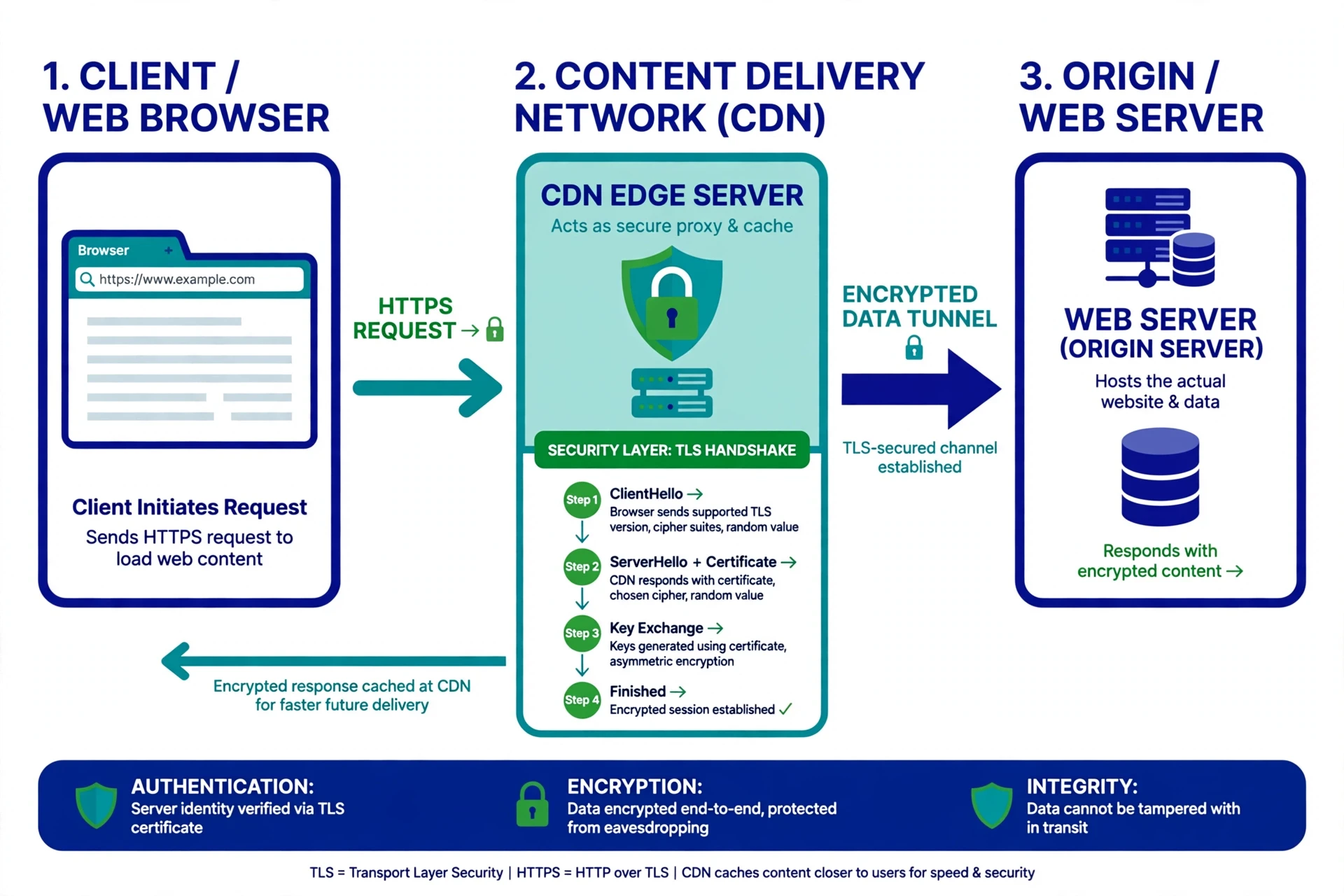
The secure version, HTTPS, adds a layer of encryption between your browser and the server. When you see the padlock icon, it means the connection is encrypted using a system called TLS, and nobody watching the network can read what passes between you and the site. The encryption is set up with a handshake of its own: the server presents a digital certificate — a kind of identity document issued by a trusted authority — your browser checks it, and the two sides agree on a secret key that only they know. Everything after that is scrambled to outsiders. NIST, the US National Institute of Standards and Technology, publishes the standards and guidance behind much of this encryption, and its cybersecurity resources are a good place to see how seriously the field takes getting these details right. HTTPS does not make a website honest or accurate. It only makes the conversation private. That distinction matters: a scam site can have a valid padlock, and a trustworthy site can be read by anyone if it still uses plain HTTP.
Behind the server sits another layer you rarely see: the content delivery network, or CDN. Popular websites do not serve every visitor from one building. They copy their content to servers all over the world, and when you ask for a page, you are served from the copy nearest to you. That is why a video hosted in California can start instantly on a phone in London: the video is not travelling from California. It is travelling from a server in London that already has a copy. CDNs are the internet's way of moving the library closer to the reader.
10.1 What your browser actually does
Your browser is a busy machine, and watching what it does is a good way to see how the internet works from the user's side. When it receives a page, it reads the HTML to learn the structure, fetches the images and stylesheets, runs the scripts, and paints the result on your screen — all while managing the network connections, the caches, and the security checks. A slow page is rarely slow because of one thing. It can be a slow server, a congested network, a faraway CDN, an overloaded device, or a page that asks for hundreds of files before it can draw anything. When a page feels instant, it is because every link in that chain is working well at the same time.
The web is not the internet. The internet is the road network, and the web is one kind of traffic that drives on it.
11. What Can Go Wrong: Outages, Cuts, and Congestion
A system this large breaks somewhere every day, and the fact that you rarely notice is a compliment to its design. But the failures are worth understanding, because they show which parts of how the internet works are strong and which are fragile.
The most common failure is local: your router, your Wi-Fi, or the last mile. A loose cable, an overloaded home network, a provider outage in your neighbourhood. These affect a household or a street, and they are fixed by restarting a box or repairing a line.
The next level is a cable cut, as in section 8: a trawler, an anchor, an earthquake. Traffic reroutes, speeds dip, and life goes on. The countries most at risk are those served by a single cable, where one cut means a national outage.
The most dramatic failures are routing failures. Because BGP runs on trust, a single wrong announcement can misdirect traffic for millions of people. In 2021, a configuration error at a large social media company withdrew the routing announcements for its own network, and its services vanished from the internet for hours — not because the servers were down, but because nobody could find them. The servers were healthy. The directions were gone. It was the DNS story from section 6, at planetary scale.
Then there is congestion. The internet has no central traffic controller — a fact that shapes how the internet works under pressure — so when too many packets arrive at a router at once, the router's buffers fill up and packets are dropped. TCP responds by slowing down, which usually clears the jam. But during major live events — a World Cup final, a product launch — the surge can overwhelm even well-built networks, and streams buffer and pages crawl. Engineers plan for these peaks the way cities plan for rush hour: with extra capacity, and with the knowledge that some congestion is unavoidable.
Finally, there is the human layer: cyberattacks. A distributed denial-of-service attack floods a target with traffic from thousands of compromised devices, overwhelming it the way a crowd overwhelms a single doorway. Phishing and malware exploit people rather than protocols. None of these attacks break the internet itself. They exploit the fact that the internet was designed to connect willing participants, and it assumes — mostly correctly — that the participants are who they say they are. Security has been added in layers over the original design, and the work is still going on.
Failure | What happens | What protects you |
|---|---|---|
Home router or Wi-Fi fault | Your devices cannot reach the internet | Restarting the router; wired connection as a backup |
Submarine cable cut | Traffic to a region slows or stops | Redundant cables; traffic reroutes automatically |
DNS outage | Names stop resolving; sites seem down | Cached answers; alternative resolvers |
BGP misannouncement | Traffic sent to the wrong network | Route filtering; RPKI validation |
Congestion | Packets dropped; video buffers | TCP congestion control; extra capacity |
12. Common Misconceptions About How the Internet Works
After fifty years, a few wrong ideas about how the internet works refuse to die. Here are the ones I hear most often, corrected in plain language.
"The internet and the web are the same thing." They are not. The internet is the network of networks — the cables, the routers, the protocols. The web is one application that runs on it, invented in 1989. Email predates the web by nearly two decades. Confusing the two is like confusing the road system with the postal service.
"The internet lives in the cloud." There is no cloud, in the physical sense. Your data lives on computers in buildings, in specific places, owned by specific organisations. "The cloud" is a useful shorthand for renting someone else's computers, but those computers are as real and as physical as the phone in your hand.
"Satellites carry most internet traffic." They do not. Satellites are vital for ships, planes, and remote communities, and new low-orbit constellations are expanding what they can do. But more than 99 percent of intercontinental traffic travels through cables on the seabed. Space gets the romance. The ocean floor does the work.
"The internet is owned by someone." No government or company owns the internet. It is governed — loosely — by a collection of organisations that manage names, numbers, and standards, and by the thousands of networks that agree to interconnect. That distributed ownership is not an accident. It is the design.
"Faster internet always means a better experience." Not quite. Speed matters, but so does latency — the delay before data starts arriving — and so does reliability. A connection with high speed and high packet loss will feel worse than a slower, steadier one. For video calls and games, low latency and low loss matter more than raw download speed.
"Deleting something from the internet removes it." Almost never. Copies live in caches, archives, backups, and other people's devices. The internet was designed to copy and distribute data, not to forget it. That is a feature with real consequences, and it is worth remembering before you post anything.
13. The Internet Today — and What Comes Next
The internet of today looks very different from the ARPANET of 1969, and not only in size. Roughly two-thirds of humanity is now online, and the typical user reaches the internet through a phone, not a desktop computer. Much of the traffic is video. Much of it flows through a handful of very large platforms and cloud providers, which is a concentration of power the early designers never anticipated. The network itself remains decentralised, but the services on top of it have become centralised in ways that worry researchers and regulators alike.
The next decade will bring changes that are already visible. Low-orbit satellite constellations are bringing internet access to places cables cannot reach. The rollout of IPv6 continues, slowly solving the address shortage. Engineers are pushing more of the network's work to the edge — small servers close to users, so that responses arrive faster. And the protocols themselves keep evolving: newer versions of HTTP and TLS make connections faster and more private, and encrypted DNS is quietly closing one of the network's oldest privacy gaps.
There are open questions too, and honest science admits them. Researchers still debate how to secure BGP fully without breaking the openness that made it work. Policymakers argue about who should govern the internet's names and numbers, and whether the network should be split into national pieces — a "splinternet" — or kept whole. And the environmental cost of the internet — the energy consumed by data centres and networks — is a real and growing concern, even as the industry shifts toward renewable power.
What will not change is the core idea. Packets, addresses, and shared rules have carried the internet from four computers in 1969 to billions of devices today, absorbing every new technology without a fundamental rebuild. That is a rare achievement in engineering: a design so simple and so flexible that it outlived every prediction of its limits. The timeline below is the whole story of how the internet works in one picture — each step solved a problem the previous step had created, and none of them required tearing the network down and starting again.
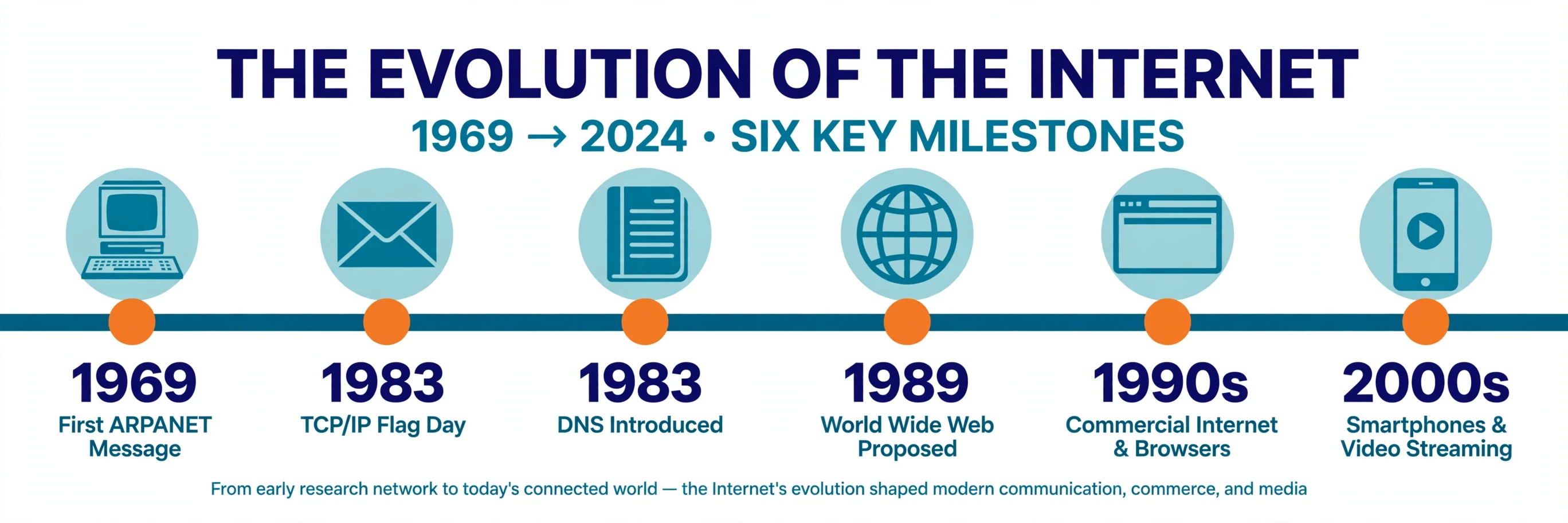
I think back to that night in the computer lab, watching packets hop across the world on a flickering screen. What struck me then, and still strikes me now, is how ordinary it all was. No drama, no ceremony. Just machines, following rules, passing envelopes along. The internet is not magic. It is better than magic: it is a system that ordinary people built, that anyone can understand, and that still works — most of the time, for most of the people on Earth — because the rules are open and the design expects things to break. The next time you tap a link and a page appears, you will know what happened in that half second. A small piece of your message crossed the world on light, through glass, under the sea, and came home again. That is how the internet works. That is how the internet works.
Frequently Asked Questions
How does the internet work in simple terms?
The internet works by breaking every message into small addressed pieces called packets, sending those packets independently across many connected networks, and reassembling them at the destination. Your device connects to your internet provider, which connects to larger backbone networks, and routers pass each packet from network to network until it reaches the right computer. The receiving computer sends its answer back the same way.
Is the internet the same as Wi-Fi?
No. Wi-Fi is only the short wireless link between your device and your router inside your home or office. The internet is the vast network beyond your router — the cables, fibre, routers, and data centres that carry your traffic to the rest of the world. Wi-Fi gets you to the front door. The internet is everything past it.
How do undersea cables work?
Undersea cables are fibre-optic cables laid on the ocean floor, and they are the physical answer to how the internet works across oceans. Inside are hair-thin glass fibres that carry pulses of laser light, protected by copper, steel, and waterproof sheathing. Repeaters spaced every 50 to 100 kilometres boost the light signal so it can cross entire oceans. More than 99 percent of intercontinental internet traffic travels through these cables.
What is the difference between the internet and the World Wide Web?
The internet is the physical network and the protocols that connect computers around the world. The World Wide Web is one application that runs on the internet — a system of linked pages accessed through a browser, invented by Tim Berners-Lee in 1989. Email, video calls, and online games also run on the internet but are not part of the web.
What is an IP address?
An IP address is a number that identifies a device on the internet, so packets can be delivered to it — the addressing trick on which how the internet works depends — the way a street address identifies a house. IPv4 addresses look like 93.184.216.34, and IPv6 addresses are longer, like 2606:2800:220:1:248:1893:25c8:1946. The Domain Name System translates human-readable names like sciory.com into IP addresses automatically.
Why is the internet sometimes slow?
Slowness usually comes from one of four places: a weak Wi-Fi signal or overloaded home network, congestion on your provider's network, a faraway or busy server, or packet loss along the route. Speed is only part of the story — latency and packet loss matter just as much, especially for video calls and games. Restarting your router fixes the local causes; the rest is outside your control.
Who owns the internet?
Nobody owns the internet. It is a network of thousands of independent networks that agree to exchange traffic using shared open protocols. Organisations such as the Internet Society, ICANN, and the Internet Engineering Task Force help coordinate names, numbers, and technical standards, but no single company or government controls the network as a whole.