

My old phone died on a train once, halfway through a journey, with the battery at 41 percent. One minute I was reading a map, the next the screen went black and nothing I pressed brought it back. A fellow passenger shrugged and said the battery had probably given up. He was wrong, and so was I, because I blamed the battery too. Weeks later, when I opened that phone with a repair kit on my kitchen table, I found the real story: a swollen battery had pressed against a ribbon cable, a tiny connector had worked loose, and the whole machine had stopped because one small link in a long chain had failed. That afternoon taught me something I have carried into every explanation of this technology since. A smartphone is not one invention. It is dozens of inventions, fitted together so tightly that we forget they are separate at all.
That is the question this article answers: how smartphones work, from the chip that thinks to the glass you tap, from the radio waves you cannot see to the battery chemistry that quietly limits everything else. You do not need an engineering degree to follow it. You only need curiosity about the rectangle in your pocket, and a willingness to look at it as what it really is — a computer, a camera, a radio station, a sensor laboratory, and a power plant, all shrunk to the size of a chocolate bar.
1. What a Smartphone Actually Is
1.1 A computer that happens to make calls
Most people still think of a phone as a phone first and a computer second. The hardware disagrees. The device in your hand has more in common with a laptop than with the landline telephone your grandparents used. It has a processor, memory, storage, an operating system, input devices, output devices, and a network connection. The fact that it can also place a voice call is almost a side effect — one app among many, running on the same general-purpose computer as your maps, your camera, and your messages.
Learning how smartphones work starts with that shift in perspective. Once you see the phone as a computer, every other part falls into place. The touchscreen is its keyboard and mouse. The cameras are its eyes. The radios are its voice. The battery is its fuel tank. And the operating system is the manager that keeps all of these parts from arguing with each other.
1.2 The short history that made the modern phone possible
The first mobile phones were bricks with a single job: voice. They had tiny monochrome screens, physical keypads, and batteries that lasted days because there was almost nothing to power. The turning point came when three separate technologies matured at roughly the same time. Processors became fast enough and small enough to run a real operating system. Capacitive touchscreens made it possible to drop the keypad and give the whole front of the device to the display. And fast mobile data — first 3G, then 4G, now 5G — made the internet genuinely usable away from a desk.
I remember the first time I used a phone with a proper touchscreen, years ago, in a shop where the demonstrator kept saying "just tap it, like paper." I tapped, and a photo opened. I pinched, and it shrank. It felt like a trick, and in a sense it was — a trick of physics, played on a grid of invisible electrodes under the glass. We will come back to that trick in Section 4, because it is one of the most elegant ideas in the whole device.
None of this happened because one company had one big idea. It happened because chip designers, battery chemists, display engineers, radio engineers, and software developers each solved a hard problem, and then someone fitted all their answers into a single slab of glass and metal. Understanding how smartphones work means understanding each of those answers, and then understanding how they cooperate.
1.3 The parts, at a glance
Before we go deep, here is the whole machine in one paragraph. A system-on-a-chip, or SoC, does the thinking: it runs apps, draws graphics, and handles artificial intelligence tasks. RAM holds whatever you are doing right now; flash storage holds everything else, from photos to apps. The touchscreen senses your fingers and the display shows you the result. Cameras turn light into digital images. A cluster of sensors measures motion, light, distance, and your fingerprint or face. Radios connect the phone to cell towers, Wi-Fi routers, headphones, and payment terminals. A lithium-ion battery powers all of it. And the operating system — Android or iOS — coordinates every part, decides what runs when, and keeps your data safe.
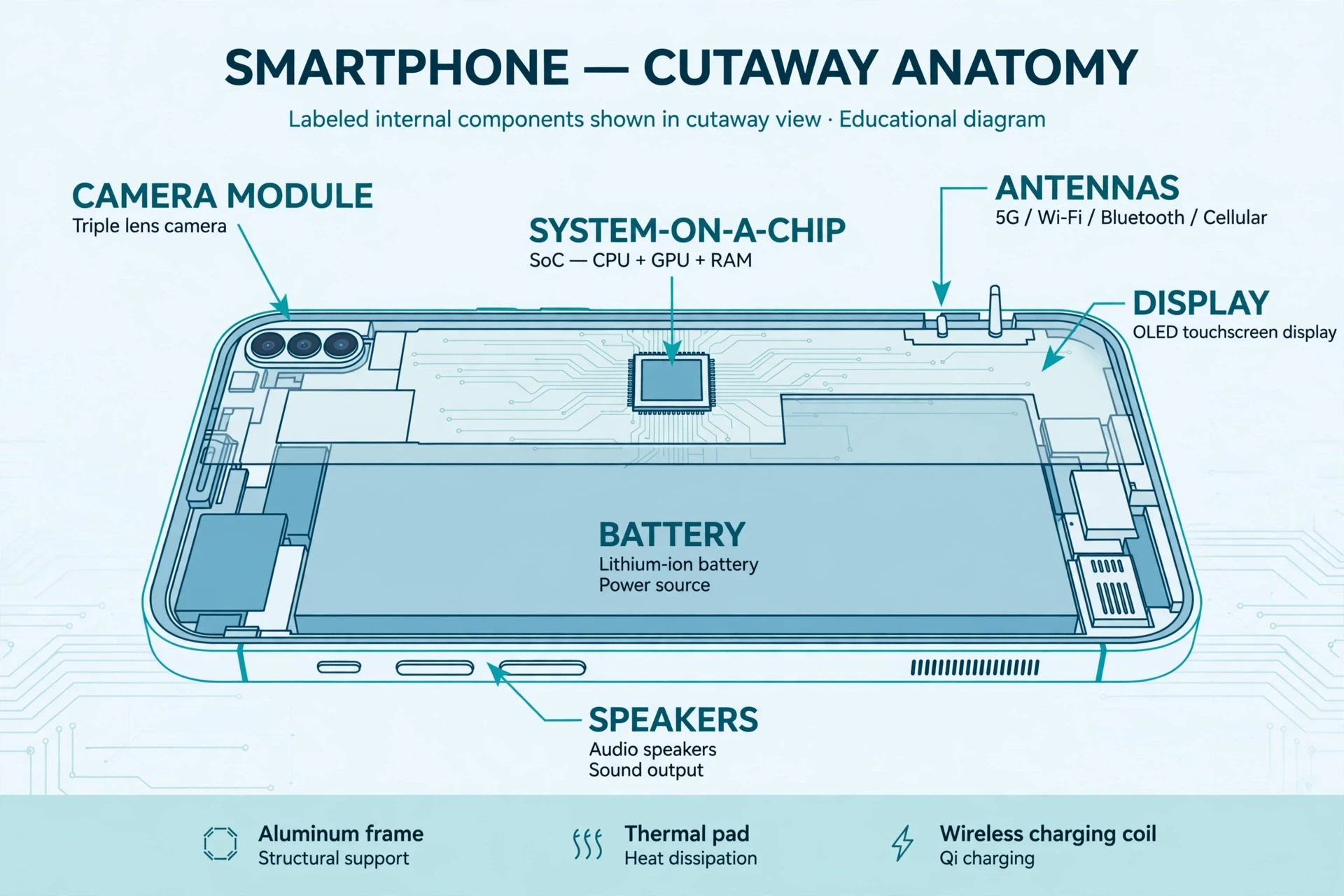
That is the map. The rest of this article walks it, part by part, and shows how smartphones work when you tap, swipe, photograph, navigate, and stream.
2. The System-on-a-Chip: The Brain of the Phone
2.1 Why everything lives on one chip
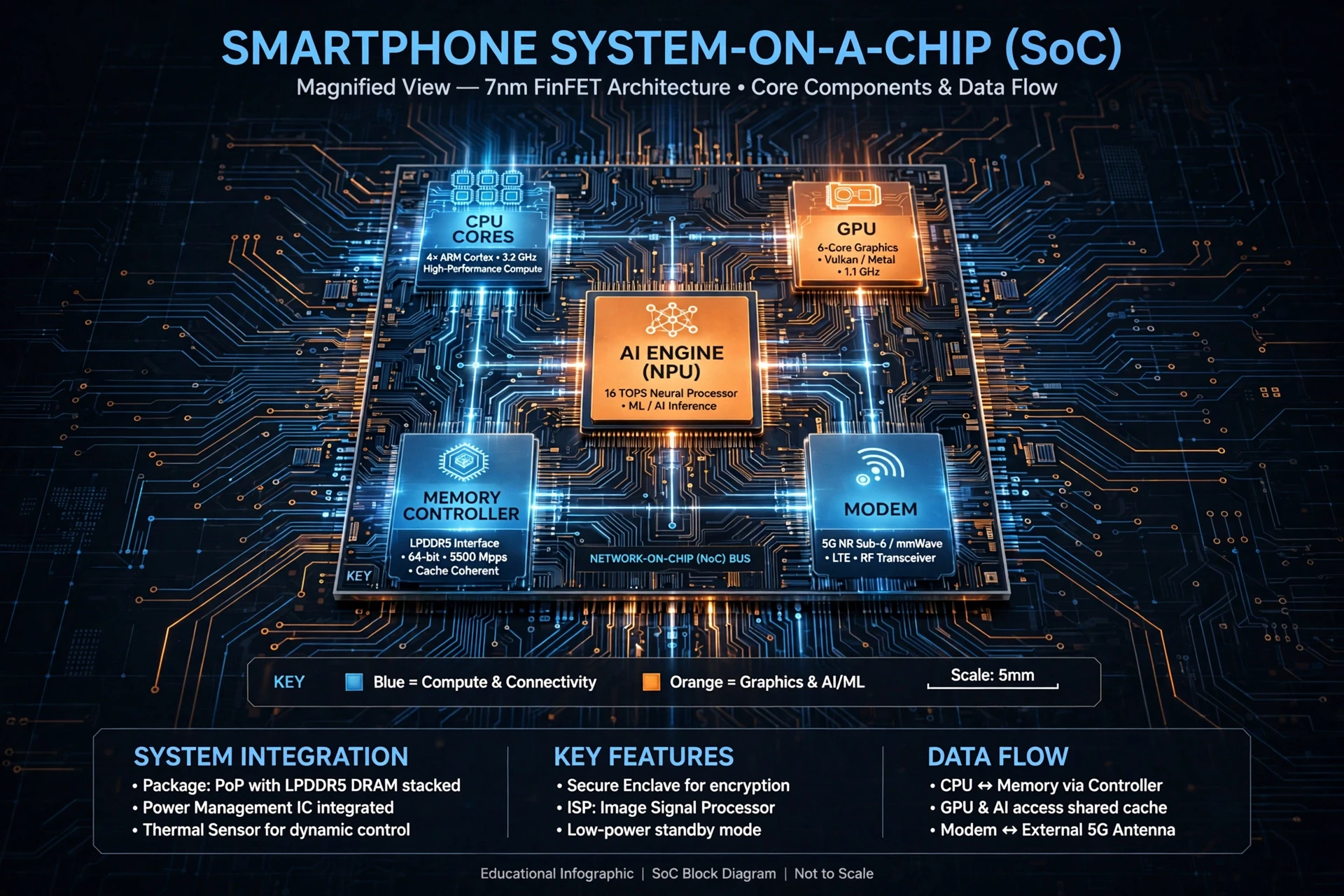
Open a phone and you will not find a motherboard full of separate chips the way a desktop computer has them. Instead you will find one small square, roughly the size of a fingernail, doing most of the work. That square is the system-on-a-chip, and its name is literal: a whole system — processor, graphics, memory controller, modem, image processor, and AI accelerator — built onto a single piece of silicon.
The reason is space and power. A phone has no fan, no room for a big circuit board, and a battery that must last all day. Putting everything on one chip shortens the distances signals must travel, which saves energy and time. It also lets the chip's designers share resources cleverly: when you are reading a static page, most of the chip can sleep, and only a tiny low-power core stays awake, listening for your next tap.
If you want to understand how smartphones work at the deepest level, start here, because almost every other part of the phone exists to feed this chip information or to carry out its orders.
2.2 The CPU: billions of tiny switches
At the heart of the SoC sits the central processing unit, the CPU. A CPU is made of billions of transistors — microscopic switches that can be on or off. By combining those switches in clever patterns, the chip can add numbers, compare values, follow instructions, and make decisions. A modern phone CPU can do billions of these simple operations every second, and that raw speed is what makes complex apps feel instant.
Phone CPUs are usually built around designs from Arm, whose processor architecture powers the vast majority of smartphones. Arm designs the blueprint; companies such as Qualcomm and Apple then build their own chips from it. Qualcomm's Snapdragon family is the best-known example in Android phones, and its product pages describe how each generation balances speed against battery life.
Phone CPUs also use a trick called big.LITTLE, or heterogeneous computing. Instead of eight identical cores, the chip has a few powerful cores for demanding work — gaming, video editing, photo processing — and several efficient cores for everyday work such as scrolling, messaging, and playing music. The operating system moves tasks between them constantly, like a manager assigning heavy lifting to strong workers and light errands to quick ones. This is a large part of how smartphones work so efficiently: they do not run at full power all the time. They run at exactly the power each moment needs.
2.3 The GPU: painting 60 pictures a second
Beside the CPU sits the graphics processing unit, the GPU. Where the CPU is good at doing a few complicated things in sequence, the GPU is good at doing thousands of simple things at once. That makes it ideal for drawing screens. Every time you scroll, the GPU redraws the image on your display, typically 60 or 120 times a second. Every game, every animation, every smooth transition is the GPU doing an enormous amount of parallel arithmetic and making it look effortless.
The GPU also helps with photography. When you take a photo in night mode, the phone captures several frames and merges them — aligning them, reducing noise, brightening shadows. Much of that merging runs on the GPU or on a dedicated image signal processor, which is why a modern phone can produce a usable photo in light so dim that your own eyes struggle.
2.4 The AI engine: a specialist for pattern matching
The newest part of the SoC is the neural processing unit, or NPU — sometimes called the AI engine. It is a specialist chip-within-a-chip, designed for one job: running machine-learning models quickly and with little power. It recognises faces, transcribes speech, translates languages, blurs backgrounds in video calls, and sharpens photos. It does this on the device itself, rather than sending your voice or face to a distant server, which is faster and more private.
Here is a common misconception worth correcting: the AI engine does not "understand" anything the way you do. It matches patterns. It has been trained on vast numbers of examples — millions of faces, millions of spoken sentences — and it has learned which patterns of numbers tend to go with which labels. When it "recognises" your face, it is really saying that the pattern of your features is closer to the pattern it stored than to any other pattern it knows. That is still a remarkable feat of engineering, but it is arithmetic, not awareness.
2.5 How the chip stays cool without a fan
A phone chip can generate real heat. Anyone who has played a demanding game for twenty minutes and felt the back of their phone grow warm has felt it. But phones have no fans, so engineers cool the chip in other ways. Heat spreads from the chip into a thin vapour chamber or a graphite sheet, which carries it across the body of the phone so it can escape slowly through the case. The chip also protects itself: when it gets too hot, it deliberately slows down, a process called thermal throttling. That is why a phone can feel sluggish after long gaming sessions — it is choosing to run slower rather than damage itself.
I once spent an afternoon testing this with a thermal camera borrowed from a lab, watching a phone's hot spot bloom and fade as I opened and closed apps. What struck me was how deliberate it all was. The phone was not overheating by accident. It was managing heat the way a runner manages pace — sprinting when it could, easing off before the damage set in.
A smartphone chip is not a single brain but a small committee: a CPU for decisions, a GPU for pictures, an AI engine for patterns, and a modem for the outside world, all sharing one piece of silicon and one battery.
2.6 The modem: the chip's connection to the world
The final major block on the SoC is the modem, which handles mobile data — 4G and 5G. The modem translates between the digital world inside the chip and the radio waves outside it. It encodes your data onto a radio signal, sends it to the nearest cell tower, and decodes the reply. It also negotiates with the tower constantly: how strong is the signal, how much data can the channel carry, should the phone switch to a different tower as you move?
We will look at radios in detail in Section 7. For now, remember the modem as the SoC's ambassador to the outside world — the part that turns a pocket computer into a connected one.
3. Memory and Storage: Remembering Now, Remembering Forever
3.1 RAM: the desk you are working on
If the SoC is the brain, RAM — random-access memory — is its desk. RAM holds the apps you are using right now, the web page you are reading, the photo you are editing. It is fast, but it is temporary: turn the phone off, and RAM forgets everything. It also uses power constantly, because each memory cell must be refreshed many times a second to hold its contents.
Think of it this way. Your storage is a filing cabinet. Your RAM is the desk in front of it. You can only work on the papers that are on the desk. When you open an app, the phone copies it from storage onto the desk. When you switch apps, the old app may stay on the desk for a while, so switching back is instant. But desks are small, and a phone's RAM — typically 8 or 12 gigabytes in a modern flagship — can only hold so much. When it fills up, the operating system quietly puts some apps back in the cabinet, which is why an app you have not used for hours sometimes reloads from scratch.
This is one of the most practical answers to how smartphones work when they feel fast or slow. A phone with plenty of RAM keeps more apps ready on the desk. A phone with too little RAM spends its time fetching papers from the cabinet, and you feel that as a pause.
3.2 Storage: the filing cabinet
Long-term storage in a phone is flash memory, the same basic technology as a USB stick or a solid-state drive, but built to the UFS standard used in phones. Flash memory has no moving parts. It stores data as electric charge trapped in tiny cells, and it keeps that charge without power, which is why your photos survive a dead battery and a switched-off phone.
Flash storage has a trade-off. Writing to it is slower than reading from it, and each cell wears out slightly with every write. Phone makers manage this with clever controllers that spread writes evenly across the chip, so no single cell wears out early. They also reserve spare cells to replace any that fail. You will never notice this happening, which is the point: good engineering is invisible.
Storage capacity matters more than most people realise. A phone with 128 gigabytes sounds generous until you count the operating system, your apps, and a few thousand photos and videos. Video is the hungriest of all: a minute of 4K footage can consume hundreds of megabytes. That is why, when people ask me how to make a phone feel new again, my first suggestion is usually not a new phone at all. It is deleting the videos you will never watch again.
3.3 How the two work together
Here is the journey of a single photo, and it shows how smartphones work as a system rather than a collection of parts. You press the shutter. The camera sensor captures light and hands raw data to the image processor on the SoC. The processor cleans it up, compresses it, and writes the finished file to flash storage. At the same time, it copies a small preview into RAM so you can see it instantly on screen. Later, when you open your gallery, the operating system reads the file from storage back into RAM, the GPU draws it, and the display shows it. Four parts — sensor, chip, storage, RAM — each doing a small job, in sequence, in less than a second.
Part | What it holds | Speed | Survives power off? |
|---|---|---|---|
RAM | Apps and data in use right now | Very fast | No |
Flash storage | Apps, photos, videos, files | Fast | Yes |
Processor cache | Data the CPU needs in the next instant | Fastest of all | No |
Cloud storage | Backups and files kept on distant servers | Depends on connection | Yes |
The table above makes the hierarchy clear. The closer memory sits to the processor, the faster it is — and the smaller and more temporary it becomes. Good phone design is a balancing act between these layers.
4. The Touchscreen and the Display: How a Tap Becomes an Action
4.1 Capacitive touch: feeling electricity, not pressure
The touchscreen is the part of the phone you touch most, and also the part most people understand least. It does not sense pressure. It senses electricity — specifically, the tiny electric field of your finger.
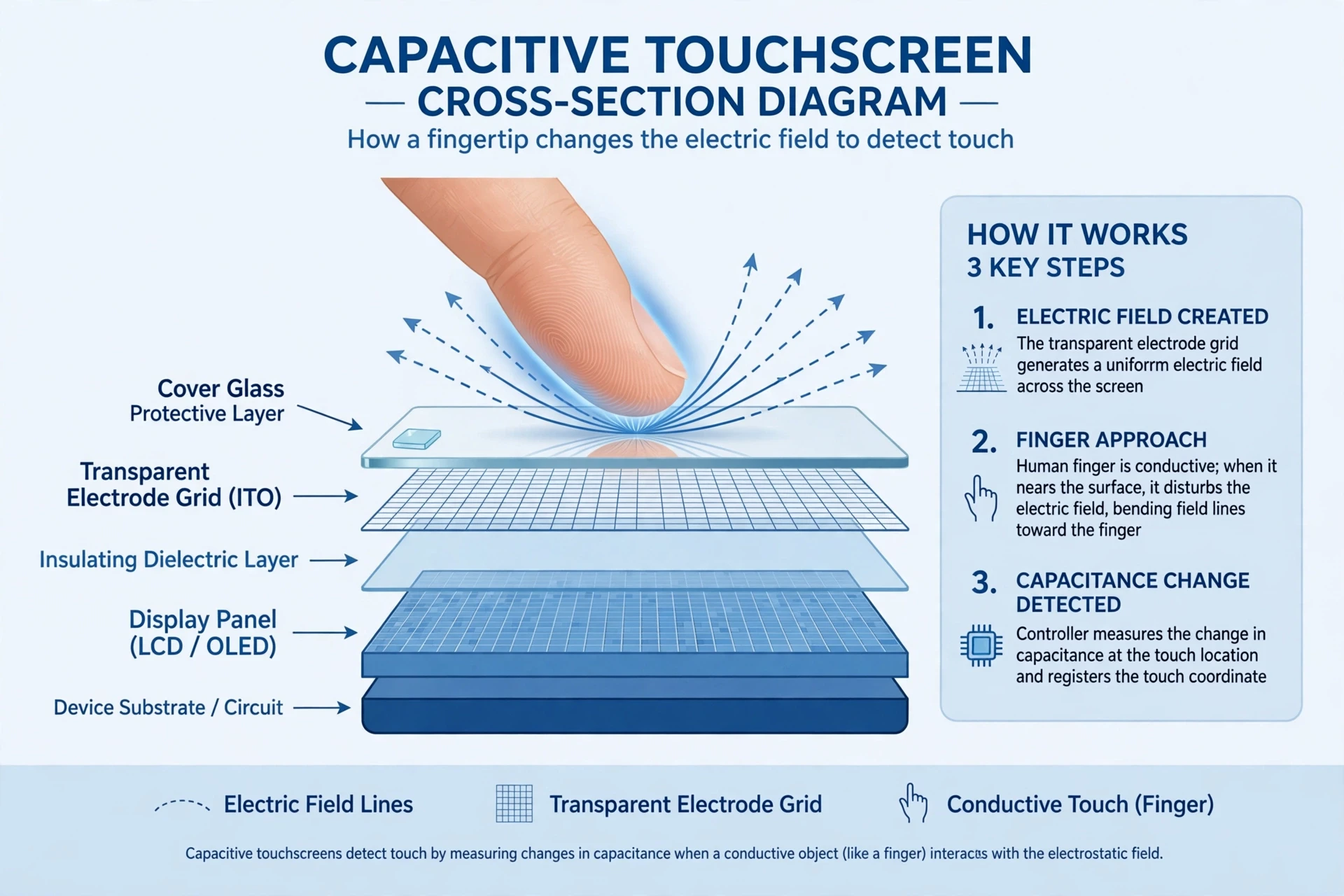
Under the glass sits a grid of transparent electrodes, usually made of indium tin oxide, a material that conducts electricity while letting light through. The phone charges this grid with a small alternating voltage, creating an electrostatic field at every intersection of the grid. Your body is mildly conductive, and when your finger comes close to the glass, it draws a tiny amount of charge away from the nearby electrodes, changing the capacitance — the ability to store charge — at that point. The phone's touch controller measures that change, works out exactly where it happened, and reports a touch at those coordinates. The whole process is described in detail in the reference on capacitive sensing.
This is why a touchscreen does not work with a gloved hand or a dry wooden stylus: neither conducts electricity well enough to disturb the field. It is also why a touchscreen can sense a hover — your finger changes the field slightly before it even touches the glass — and why it can track several fingers at once, each one disturbing a different part of the grid.
I learned this the hard way on a winter walk, trying to answer a call with gloves on and growing steadily more annoyed at a phone that seemed to be ignoring me. It was not ignoring me. It was listening for electricity, and my gloves were speaking the wrong language. A capacitive stylus, or a glove with conductive thread in the fingertip, speaks the right one.
4.2 From touch to action: the journey of a tap
When you tap an icon, a chain of events fires in a few hundredths of a second. The touch controller detects the change in capacitance and converts it into coordinates. It sends those coordinates to the operating system, which works out which app is on screen and where the tap landed inside it. The app receives a "touch event" and decides what to do — open a message, play a song, zoom a photo. Then the SoC draws the new screen, the GPU renders it, and the display shows the result. Your finger has barely left the glass before the whole loop is complete.
How smartphones work, in this moment, is a loop: sense, decide, draw, show. Break any link and the phone feels broken. A cracked screen can damage the electrode grid, so touches register in the wrong place or not at all. A slow chip can delay the "decide" step, so taps feel laggy. A dim display can make the "show" step hard to see. Each part matters, and the loop is only as fast as its slowest link.
4.3 The display: millions of tiny lights
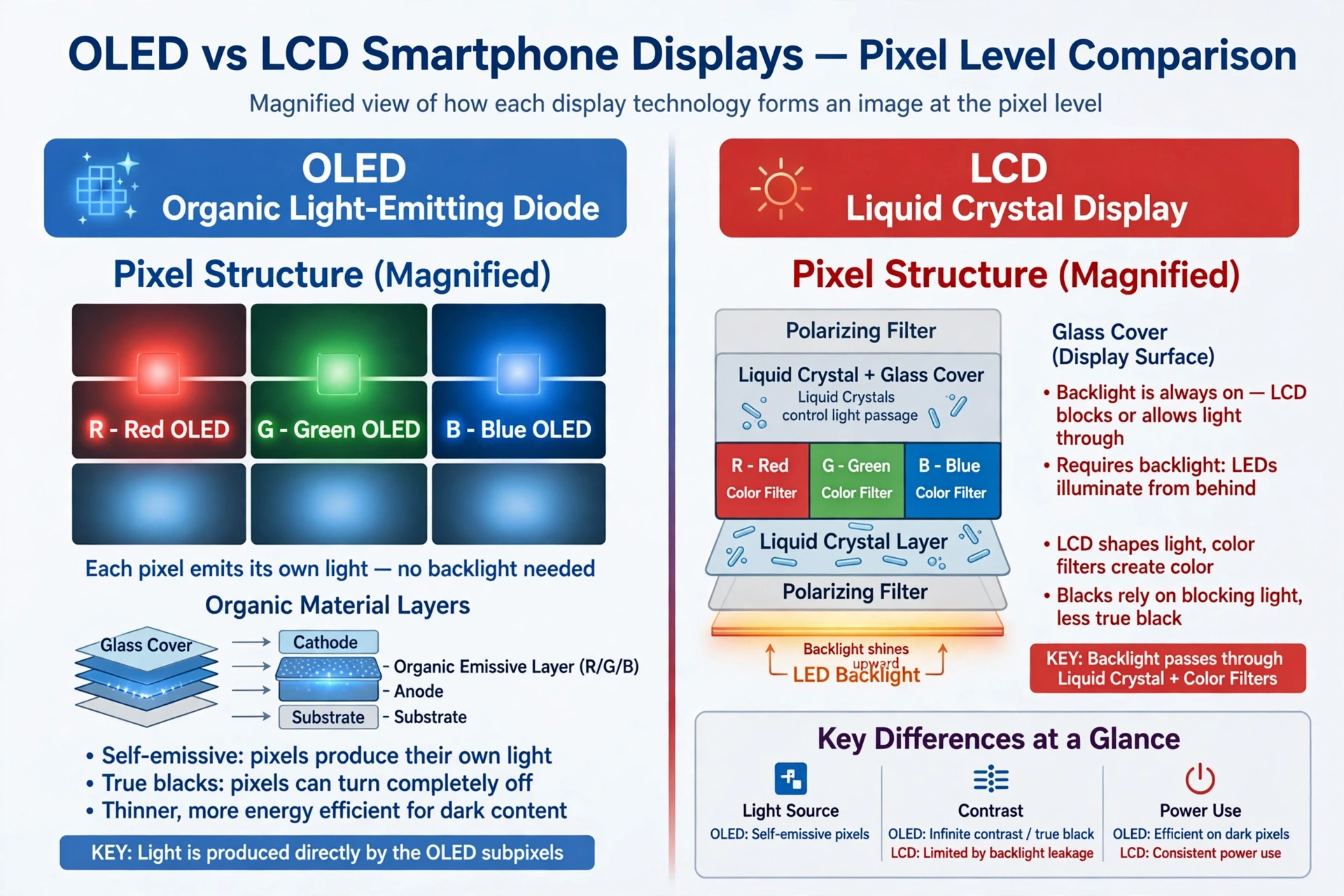
Below the touch layer sits the display itself, and modern phones use one of two technologies: OLED or LCD. In an OLED display, each pixel is made of organic material that produces its own light when electricity passes through it. That means a black pixel is truly off — it emits nothing — which gives OLED screens their deep blacks and excellent contrast. It also means the display can be thin and flexible, which is why foldable phones use OLED.
In an LCD display, the pixels do not produce their own light. Instead, a backlight shines through a layer of liquid crystals, which twist to let more or less light through, and then through colour filters that produce red, green, and blue subpixels. LCD screens are bright and cheap to make, but they cannot produce a true black, because the backlight is always on behind the whole screen.
Both types build every colour you see from just three subpixels — red, green, and blue — mixed in different proportions. Your eye blends them into the millions of colours in a photograph. The screen's refresh rate — how many times per second it redraws the image — determines how smooth scrolling feels. At 120 hertz, the screen redraws twice as often as at 60 hertz, and your eye notices the difference immediately, even if you cannot name it.
4.4 Why your screen looks right in sunlight and in the dark
Two more sensors help the display behave well. The ambient light sensor, a tiny photodiode near the front camera, measures how bright your surroundings are, and the operating system adjusts the screen brightness to match. Outdoors, it pushes the display brighter so you can read it. In a dark bedroom, it dims it so you are not blinded.
The display also adjusts its colour. Many phones shift the screen towards warmer tones in the evening, reducing blue light. The science of whether blue light meaningfully harms sleep is still debated, but the comfort effect is real: a warm screen at night feels gentler on the eyes. This is a small example of how smartphones work as a whole — hardware sensing the world, software responding to it, without you ever asking.
5. Cameras and Image Sensors: A Darkroom in Your Pocket
5.1 How a phone camera sees
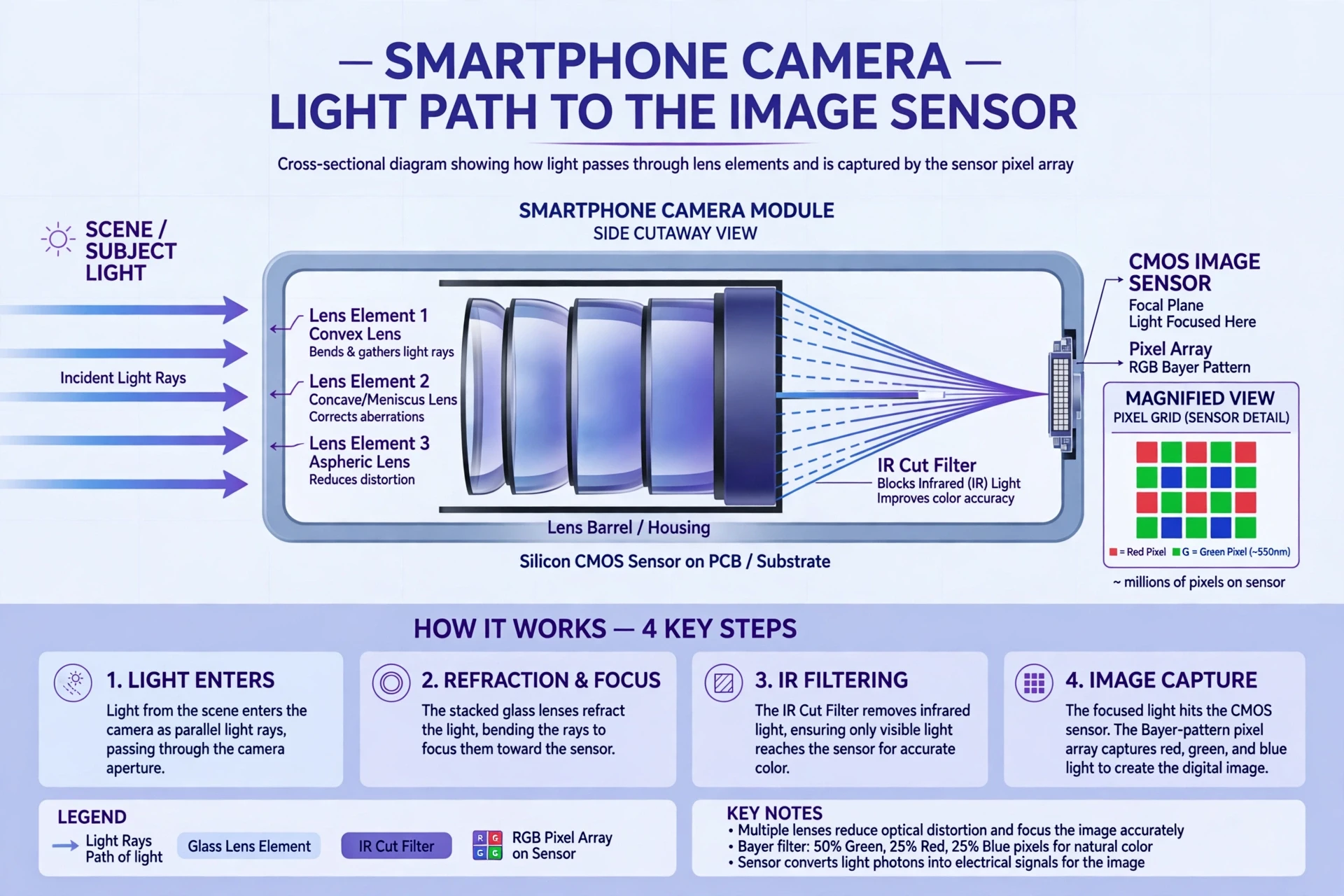
A phone camera is, at its core, a very small version of the camera in a professional's hands: a lens gathers light, and a sensor turns that light into numbers. The lens focuses the scene onto the image sensor, a silicon chip covered in millions of tiny light-sensitive wells called pixels — not to be confused with the pixels on your display, though the idea is similar. Each well collects photons, and the more photons it collects, the stronger its electrical signal. The sensor reads out all those signals, and the image processor turns them into a photograph.
Phone sensors are small, and small sensors collect less light than large ones. That is the fundamental challenge of phone photography, and everything else in the camera system is a workaround for it. Phone makers use larger apertures to let in more light, stack multiple lenses to cover different focal lengths, and use software to combine several exposures into one cleaner image. The image sensors themselves, made by companies such as Sony, are described in detail on the manufacturer's own pages for mobile image sensors.
5.2 Why your phone has three cameras
Look at the back of a modern phone and you will usually find two or three lenses, sometimes four. Each is a separate camera with its own lens and sensor, tuned for a different job. The main camera has the largest sensor and the best image quality. The ultra-wide camera captures a broad scene — a landscape, a group of friends in a small room. The telephoto camera magnifies distant subjects without the blur of digital zoom. When you pinch to zoom, the phone quietly switches between these cameras, and sometimes blends their images together, so the transition feels smooth.
The front camera, the selfie camera, is a separate system, smaller and optimised for faces. It works with the phone's depth-sensing hardware — sometimes an infrared projector that maps the shape of your face — to blur backgrounds in portrait mode and to unlock the phone with your face.
5.3 Computational photography: the software is the lens
Here is the part that surprises most people: the photo your phone shows you is not the photo its sensor captured. It is a reconstruction. The moment you press the shutter, the phone captures several frames at different exposures, aligns them to cancel out your hand shake, merges the brightest parts of one with the darkest parts of another, reduces noise, sharpens edges, and adjusts colours. This is computational photography, and it is the reason a phone can take a decent photo in a candle-lit restaurant where a traditional camera would produce a dark, grainy mess.
I tested this once by photographing the same street scene at dusk with my phone and with an old film camera I keep on a shelf. The film photo was honest and nearly black. The phone photo was bright, detailed, and slightly unreal — the sky bluer than it had looked, the shadows cleaner than my eyes remembered. Neither was "true" in a simple sense. The phone had simply made a series of educated guesses about what the scene should look like, and its guesses were good ones. That is worth remembering whenever you look at a phone photo: you are looking at the sensor's data, interpreted by software.
The camera in your phone is not a tiny version of a professional camera. It is a small sensor plus a large amount of software, and the software does most of the work.
5.4 Video, stabilisation, and slow motion
Video adds a further challenge: the phone must capture, process, and store 30 or 60 frames every second, without pause. It does this with the same hardware — sensor, image processor, GPU — running in a continuous pipeline. Optical image stabilisation moves the lens or the sensor slightly to counteract your hand shake, while electronic stabilisation crops the frame a little and shifts it digitally. Together they produce the smooth footage that once required a bulky stabiliser rig.
Slow motion works by capturing far more frames per second than normal — 120 or 240 — and then playing them back at 30. Each frame gets less light, because the exposure time is shorter, which is why slow-motion video often looks darker or noisier than normal video. Physics, again, sets the limit, and software does its best within it.
6. Sensors: How Your Phone Knows Where It Is and What You Are Doing
6.1 The accelerometer and gyroscope: feeling motion
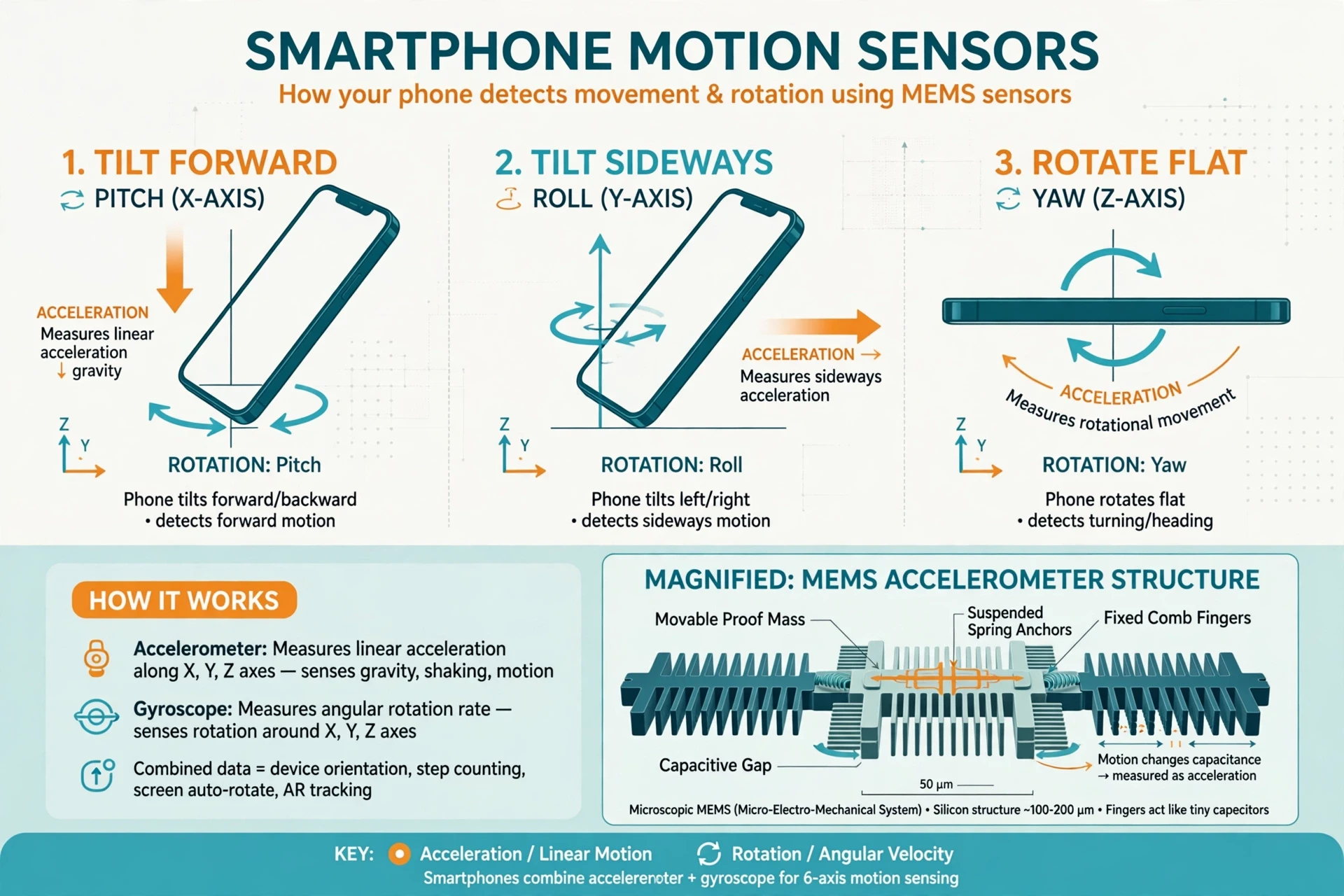
Your phone knows when you rotate it, shake it, or drop it, because it contains motion sensors built with microscopic machines. The accelerometer measures acceleration — changes in speed or direction — along three axes. Inside it, a tiny silicon structure, smaller than a grain of sand, moves slightly when the phone moves, and that movement changes the capacitance between microscopic comb-like fingers. The phone measures the change and works out how fast it is accelerating, and in which direction.
The gyroscope measures rotation. It uses a tiny vibrating structure: when the phone rotates, the vibration shifts in a measurable way, a consequence of the Coriolis effect — the same physics that shapes weather systems on a rotating Earth. Together, the accelerometer and gyroscope tell the phone its orientation and movement with remarkable precision. They rotate the screen when you turn the phone sideways, count your steps, stabilise your video, and power the motion controls in games. Android's developer documentation gives a clear overview of how apps read these sensors.
The most famous use of these sensors is also the most sobering: when a phone detects the sudden acceleration pattern of a car crash, some models can call emergency services automatically. A tiny silicon machine, built to rotate your screen, can also save a life.
6.2 The magnetometer, barometer, and proximity sensor
The magnetometer is a compass. It measures the Earth's magnetic field and works out which direction the phone is pointing. It is what makes map apps show you facing the right way, and what lets augmented-reality apps anchor virtual objects to the real world.
The barometer measures air pressure. Because pressure falls as you climb, the phone can estimate changes in altitude — useful for counting climbed floors in a fitness app, or for helping emergency services locate you in a multi-storey building.
The proximity sensor sits near the earpiece, usually invisible. It shines a beam of infrared light and watches for the reflection. When you hold the phone to your ear during a call, the reflection tells the phone your face is close, and it switches the screen off so your cheek cannot accidentally tap buttons. When you pull the phone away, the screen wakes again. It is a small courtesy, performed by invisible light, hundreds of times a day.
6.3 Biometrics: your fingerprint and your face
Fingerprint sensors come in three main types. Capacitive sensors, the oldest, measure the tiny differences in capacitance between the ridges and valleys of your fingerprint — the same physics as the touchscreen. Optical sensors take a photograph of your finger through the display. Ultrasonic sensors send sound waves into your fingertip and listen for the echoes, building a three-dimensional map of the ridges. Each method has strengths and weaknesses, but all of them share the same idea: your fingerprint is a pattern, and the phone stores a mathematical summary of that pattern, not a photograph of your finger, and compares each new scan against it.
Face unlock works differently. An infrared projector casts a grid of invisible dots onto your face, and an infrared camera reads how the dots are distorted by the shape of your nose, cheekbones, and jaw. The phone builds a depth map — a three-dimensional model of your face — and compares it against the stored model. Because it uses infrared rather than visible light, it works in the dark. Because it measures depth, a photograph of your face will not fool it.
Both systems store their data in a secure enclave, a locked-off part of the chip that even the operating system cannot read directly. Your fingerprint template never leaves the phone. That is an important design choice, and it answers a question many people ask about how smartphones work with such personal data: the phone is designed so that it does not need to send your body to a server in order to recognise it.
6.4 Why sensors matter beyond the obvious
Sensors are what turn a phone from a computer into a companion. They let a fitness app count steps without a separate pedometer. They let a navigation app know you have turned a corner. They let the phone dim its screen in your pocket, silence itself when you flip it face down, and wake when you pick it up. Each sensor is simple on its own. Together, they give the phone a rough sense of its situation in the world — where it is, how it is moving, what is around it — and the software uses that sense to behave helpfully rather than blindly.
That behaviour has a cost, and it is worth naming honestly. Sensors that are always on consume power, and sensor data can reveal a great deal about you. A phone that knows your location, your movements, and your routines knows a great deal about your life. The same sensors that make a phone useful also make privacy settings worth understanding. Knowing how smartphones work, in this sense, is also knowing what they know about you.
7. Radios: Talking to Towers, Routers, and Everything Else
7.1 The invisible conversation
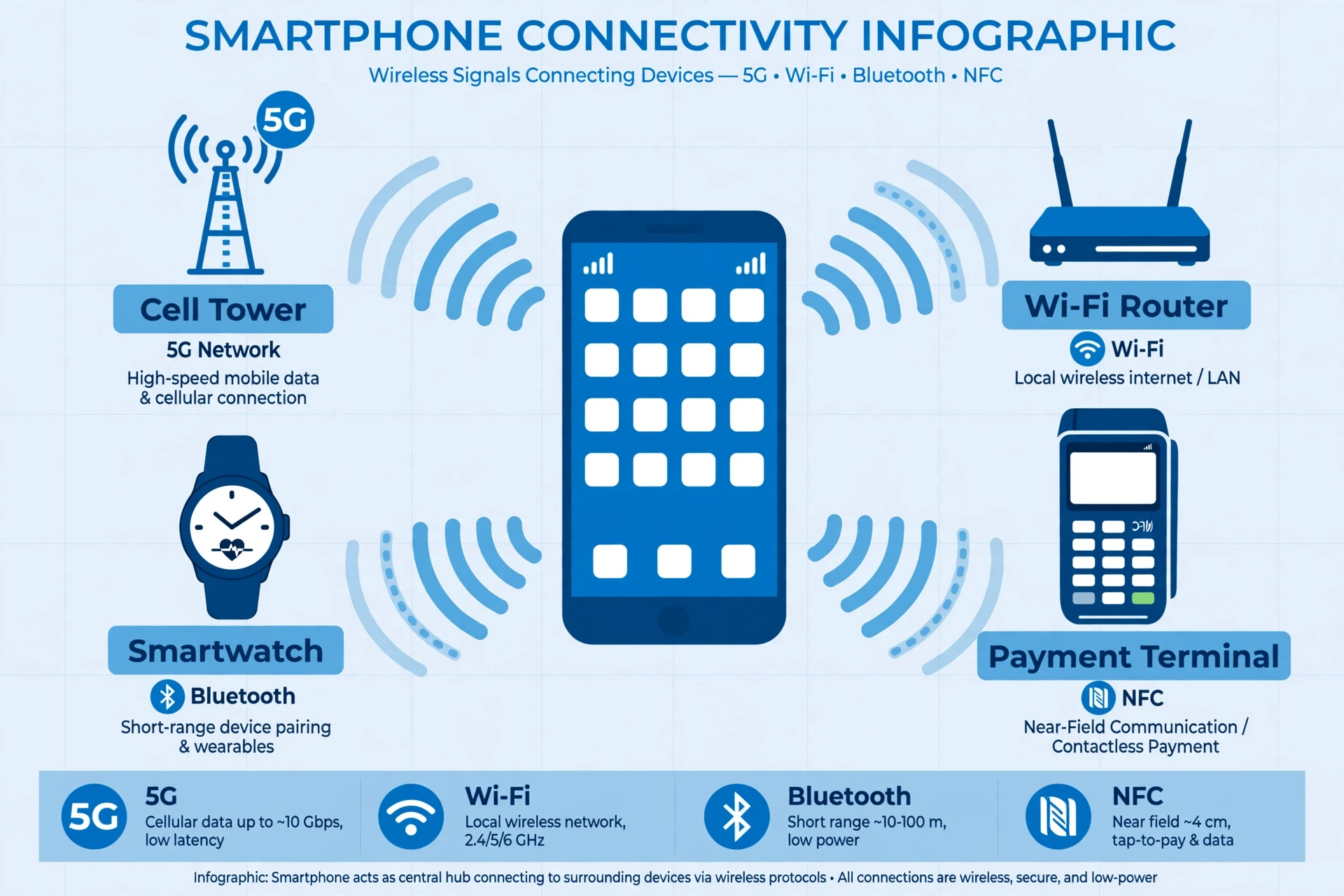
A phone is in constant conversation with the world around it, in a language of radio waves. Radio waves are a form of light, just at frequencies too low for your eyes to see. The phone's radios generate these waves, send them out through tiny antennas built into its frame, and listen for the replies. Different radios use different frequencies and different rules, which is why a phone needs several of them.
This is also where the phone's design becomes a puzzle. Metal blocks radio waves, which is why phone bodies use carefully placed antenna lines and why holding a phone in a particular way can, in some designs, weaken the signal slightly. Glass and plastic let waves through more easily, which is one reason many phones use glass backs. Every material choice in a phone is partly a radio choice.
7.2 Cellular: 4G and 5G
Cellular data is the phone's longest-distance conversation. Your phone talks to a cell tower, which may be hundreds of metres or several kilometres away, and the tower connects onward to the internet. The phone and the tower agree on a frequency band, a data rate, and a schedule for who talks when — thousands of phones share each tower, so the conversation is carefully organised to avoid everyone shouting at once.
5G is the latest generation of this technology, and it is worth understanding what it actually changes. Qualcomm's explainer on what 5G is describes it as a system designed for three things: faster peak speeds, lower latency (the delay before data starts flowing), and the ability to connect many more devices at once. The fastest form of 5G uses very high frequencies, called millimetre wave, which carry enormous amounts of data over short distances but are easily blocked by walls and even windows. The more common form uses lower frequencies, similar to 4G, and offers a more modest speed improvement with much better range.
A common misunderstanding is that 5G is simply "faster internet." Speed is part of it, but the lower latency matters just as much. When a self-driving car, a surgeon operating remotely, or a factory robot needs a reply in a few thousandths of a second, latency is the difference between useful and useless. For watching videos on a train, the difference between 4G and 5G is often barely noticeable. For the machines that will talk to each other in the coming years, it could be decisive.
7.3 Wi-Fi, Bluetooth, and NFC
Wi-Fi is the phone's conversation with your home or office router. It uses higher frequencies than cellular, which gives it more bandwidth over short distances but a shorter range. When you walk away from your router, the phone eventually hands the conversation back to the cellular network. Modern Wi-Fi standards can carry gigabit speeds, fast enough that the bottleneck is usually your internet connection, not the Wi-Fi link itself.
Bluetooth is the phone's short-range conversation, used for headphones, watches, cars, and speakers. It uses very little power, which is why your wireless earbuds can last hours on a tiny battery. Bluetooth devices pair by exchanging keys, and then hop between frequencies many times a second to avoid interference — a technique invented, remarkably, by the film actress and inventor Hedy Lamarr during the Second World War, working on a system to guide torpedoes without enemy jamming. The technology in your earbuds has a more interesting history than most people realise.
NFC — near-field communication — works over just a few centimetres. It is what lets you tap your phone to pay, or tap it against another device to share a contact. NFC works by magnetic induction: the payment terminal generates a field, the phone's NFC coil draws power from it, and the two exchange a small amount of data. Because the range is so short, it is hard to intercept, which is one reason it is trusted for payments.
7.4 Antennas: hidden in plain sight
A phone contains several antennas, often built into the metal frame itself, with small plastic lines breaking the frame into separate antenna segments. If you look closely at the edge of a modern phone, you can see those thin lines. They are not decoration. They are the gaps that let each antenna segment radiate independently.
The phone constantly monitors signal strength and switches between antennas and networks to find the best connection. Walk from your living room to your garden and the phone may switch Wi-Fi bands, or from Wi-Fi to cellular, or between cell towers, all without you noticing. That seamless handover is one of the quiet triumphs of how smartphones work: the radio system is always working, always choosing, and almost never needs your attention.
8. The Battery: Chemistry in a Flat Pouch
8.1 Lithium-ion, in plain language
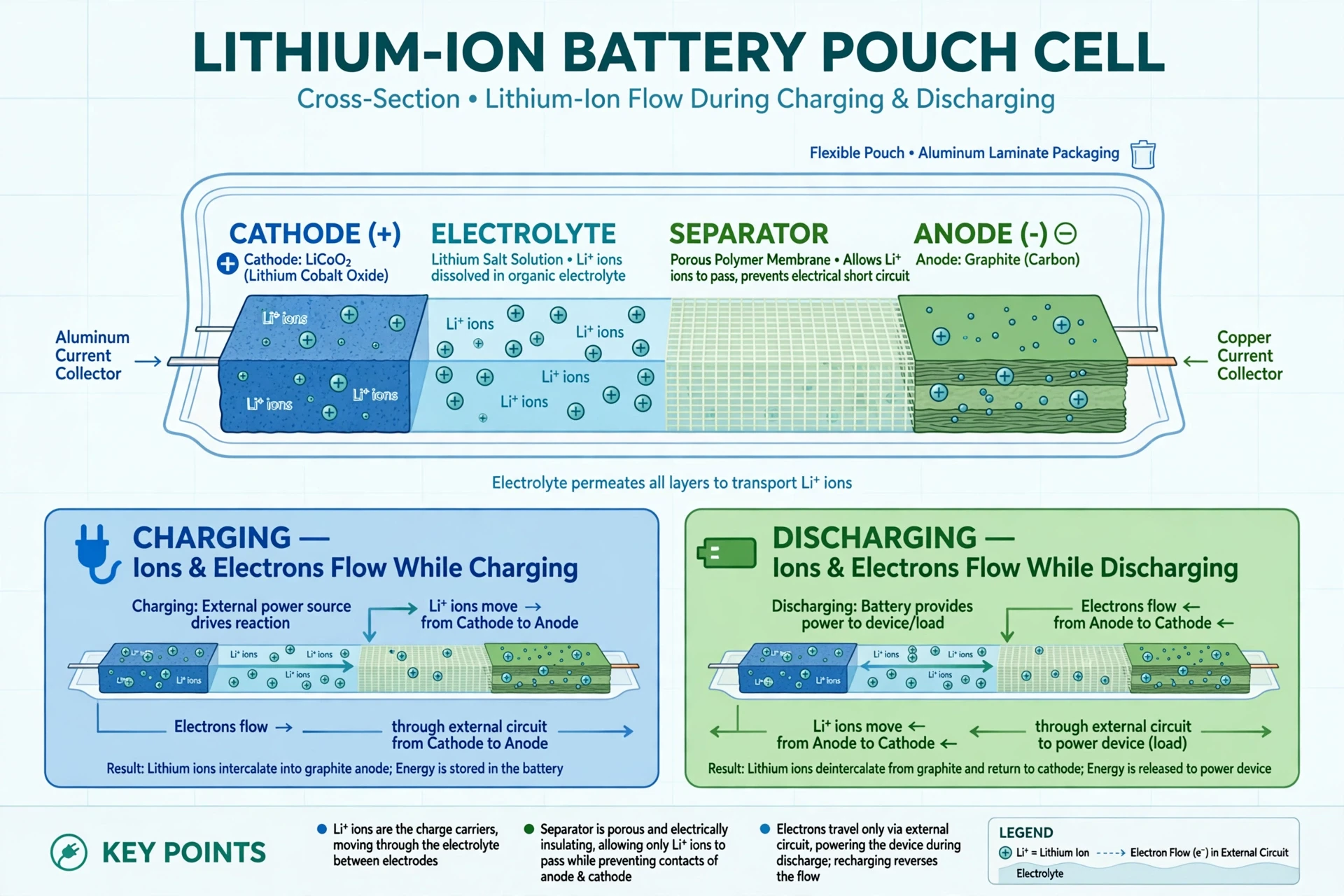
Every part of the phone we have described so far consumes power, and all of that power comes from a single flat pouch tucked inside the case. Almost every modern phone uses a lithium-ion battery, and its chemistry is elegant. Inside the pouch are two electrodes — a graphite anode and a metal-oxide cathode — separated by a thin barrier and soaked in an electrolyte, a liquid that lets ions move but blocks electrons.
When you use the phone, lithium ions flow from the anode to the cathode through the electrolyte, while electrons flow the other way around the outside circuit, through the phone's electronics, providing the current that powers everything. When you charge the phone, the process reverses: the charger pushes the ions back to the anode, storing energy for later. The US Department of Energy publishes accessible explainers on this chemistry through its DOE Explains series, and the technical detail is covered in the reference on lithium-ion batteries.
The key point is that a battery is not a fuel tank. It is a reversible chemical reaction, and like all chemical reactions, it wears out. Each charge cycle leaves a little residue on the electrodes, traps a few ions where they cannot be recovered, and slowly reduces the battery's capacity. After two or three years of daily charging, a phone battery may hold only 80 percent of its original charge. That is not a defect. It is chemistry.
8.2 Why batteries degrade, and what helps
Heat is the battery's worst enemy. A phone left on a car dashboard in summer ages faster than one kept at room temperature. Charging to 100 percent and leaving it there for hours also stresses the chemistry, as does draining it to zero repeatedly. This is why many phones now offer "optimised charging": they charge quickly to about 80 percent, then wait, finishing the last 20 percent just before you usually wake up. The phone has learned your routine and is protecting its own battery from itself.
Fast charging adds another trade-off. Pushing more current into the battery charges it sooner, but generates more heat and stresses the electrodes more. Phone makers manage this with careful thermal design and charging circuits that slow down as the battery fills. The result is a compromise: fast enough to be useful, gentle enough to keep the battery healthy for years.
I once kept a phone for four years, and by the end I knew its battery the way you know an old car — its quirks, its limits, the way it would drop from 20 percent to 5 percent in a cold snap. When I finally replaced the battery, the phone felt new again, not because the chip had changed but because the chemistry had been renewed. It was a useful reminder that the most advanced computer in the world is still, in the end, powered by a chemical reaction in a pouch.
8.3 Power management: the operating system's other job
The battery's capacity is only half the story. The other half is how carefully the phone spends it. The operating system watches every app, measures how much power each one uses, and restricts the greedy ones. It dims the screen when you are not looking at it, puts unused apps to sleep, and turns off radios you are not using. The SoC's efficient cores, the display's adaptive refresh rate, the modem's sleep modes — all of them exist to stretch a finite chemical store across a whole day.
This is why two phones with the same battery size can last very different lengths of time. The difference is not the chemistry. It is the management. How smartphones work, when it comes to battery life, is as much about restraint as it is about capacity.
9. The Operating System: The Manager of It All
9.1 Android and iOS: two ways to run the same machine
The operating system is the software that sits between you and the hardware. The two main systems are Android, made by Google and used by many manufacturers, and iOS, made by Apple for the iPhone. They do the same fundamental jobs — run apps, manage memory, handle security, connect to networks — but they make different trade-offs. Android is open and customisable, running on hundreds of different devices. iOS is tightly controlled, running only on Apple's own hardware, which lets Apple optimise the software and hardware together.
Neither is simply better. The difference is philosophical: Android gives manufacturers and users more freedom to change things; iOS gives Apple more control over the whole experience. What matters for understanding how smartphones work is what both systems have in common: they are the managers, and every app is an employee that must ask the manager for resources.
9.2 What the operating system actually does all day
The operating system's jobs are mostly invisible, which is why people underestimate them. It schedules the CPU, deciding which app gets processor time and for how long. It manages memory, keeping your current apps in RAM and clearing space when needed. It controls the file system, keeping your photos, messages, and app data organised and separated so one app cannot read another's private files. It handles security, checking apps before they install and asking your permission before an app uses your camera, microphone, or location. And it manages power, putting parts of the phone to sleep whenever they are not needed.
When you install an app, you are not just downloading a program. You are asking the operating system to give that program a home, a set of permissions, and a share of the phone's resources — and to take them away cleanly when you delete it. The operating system is also what keeps the phone secure over time. Software updates patch vulnerabilities, and those updates matter: a phone that stops receiving them becomes gradually less safe, even if its hardware still works perfectly.
9.3 Apps, permissions, and the sandbox
Apps on a modern phone run in a sandbox — a walled-off area where each app can play with its own toys but cannot reach into another app's space. When an app wants to use the camera, it must ask the operating system, which asks you. When it wants your location, the same process applies. This design limits the damage a malicious app can do, because even if it misbehaves, it is confined to its own box.
This is also why the permissions screen matters. Every permission you grant is a door you open. A torch app does not need your contacts. A photo editor does not need your location. Understanding how smartphones work includes understanding these doors, because the operating system can only protect you if you let it.
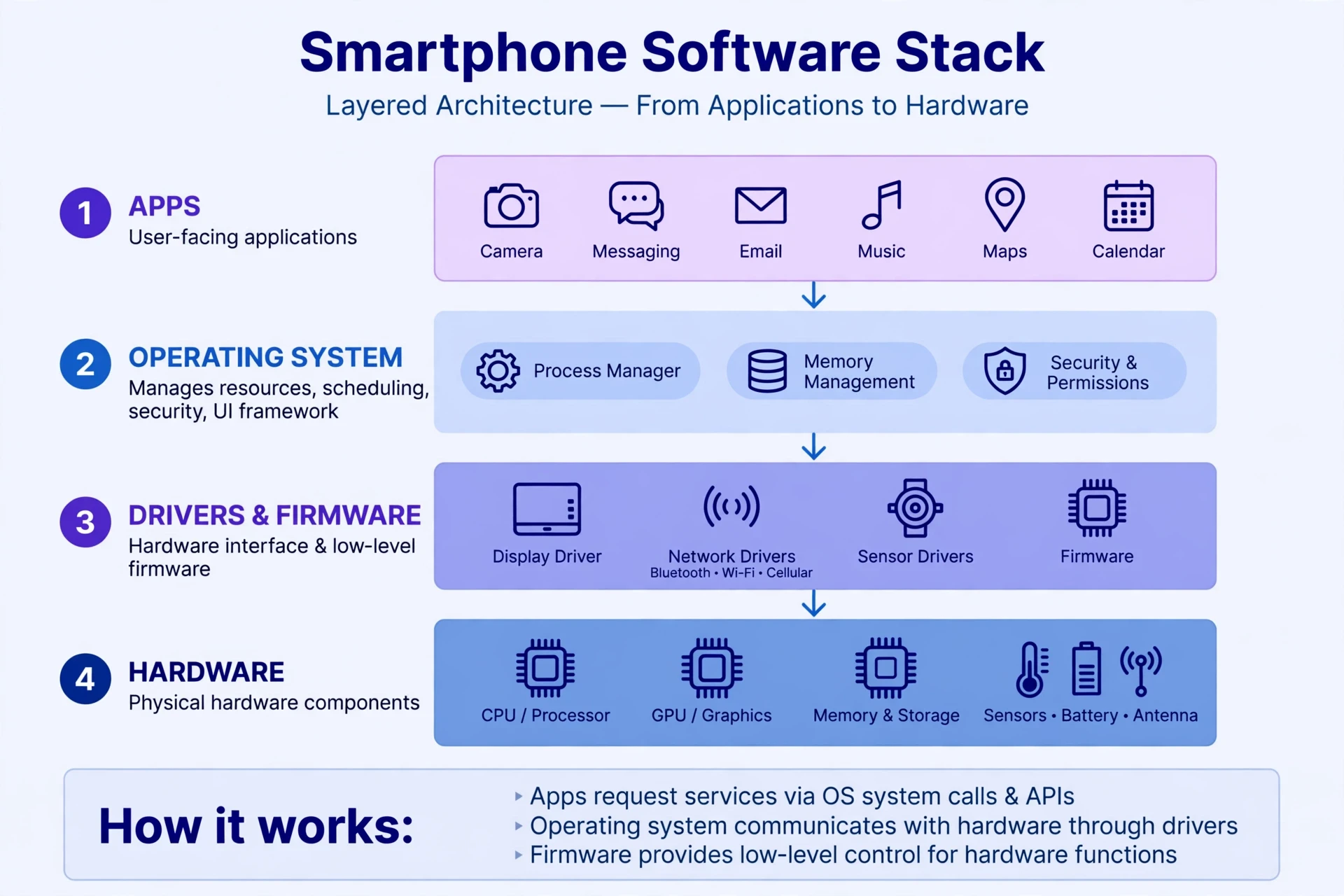
10. How Smartphones Work Together: The Journey of a Single Tap
10.1 One tap, a dozen parts, a fraction of a second
So far we have examined the parts separately. Now let us watch them cooperate, because the real answer to how smartphones work is found in the cooperation. Imagine you open your phone, tap the camera icon, and take a photo of a friend. Here is what happens, in order, in roughly a second.
Your finger touches the glass, and the capacitive grid senses the change in the electric field. The touch controller reports the coordinates. The operating system wakes the camera app, which asks the SoC to power up the image sensor. The lens focuses, the sensor captures light, and the image processor merges several frames into one photo. The SoC writes the finished file to flash storage and copies a preview into RAM. The GPU draws the preview, the display shows it, and the haptic motor gives a tiny vibration to confirm the shot. Meanwhile the modem, in the background, quietly checks for messages, and the battery supplies power to every part involved.
Twelve parts, one second, no conscious thought from you. That is the achievement. A smartphone is not impressive because any single part is miraculous, although several of them are. It is impressive because the parts cooperate so smoothly that the cooperation itself becomes invisible.
10.2 Why your phone feels fast — or slow
When a phone feels fast, it usually means the cooperation is working well: the chip is cool, RAM has room, storage is not full, and the operating system is not fighting background apps for resources. When a phone feels slow, one of those links is struggling. Storage nearly full slows down writes. A hot chip throttles itself. Too many background apps crowd the RAM. An old battery, unable to supply peak current, can cause the operating system to slow the chip deliberately to avoid a shutdown.
This is useful knowledge, because it tells you where to look when a phone misbehaves. A slow phone is rarely "just old." It is usually one part, or one habit, that needs attention — freeing storage, closing a runaway app, replacing a worn battery, or installing a software update. The machine is a system, and systems can be diagnosed.
11. Common Misconceptions About Smartphones
11.1 "More megapixels means a better camera"
This is the most persistent myth in phone marketing. Megapixels count the number of pixels on the sensor, not their quality. A sensor with more, smaller pixels can actually perform worse in low light than a sensor with fewer, larger pixels, because each small pixel collects less light. What matters more is sensor size, lens quality, and the software that processes the image. A 12-megapixel phone with a large sensor and good processing will often beat a 108-megapixel phone with a tiny sensor in the conditions that matter most — dim rooms, evening streets, candle-lit dinners.
11.2 "Closing apps saves battery"
It feels logical: fewer apps running, less power used. In practice, the opposite is often true. The operating system already freezes apps you are not using, and reopening a closed app from scratch costs more energy than waking a frozen one from RAM. Constantly swiping apps away forces the phone to do extra work, and it can make the phone slower as well as thirstier. The operating system is better at managing apps than you are — let it do its job, and only close an app that is actually misbehaving.
11.3 "You must drain the battery to zero before charging"
This was true for older nickel-based batteries, which suffered from a "memory effect." It is not true for lithium-ion. In fact, deep discharges stress a lithium-ion battery more than partial ones. The healthiest habit is the boring one: charge when you can, avoid leaving the phone at zero or at 100 percent for long periods, and keep it cool. Your phone's battery will still age — chemistry guarantees that — but it will age more slowly.
11.4 "5G is dangerous" and other radio fears
Radio waves from phones are non-ionising radiation, which means they do not carry enough energy to break chemical bonds or damage DNA the way X-rays do. They can warm tissue slightly at high power, which is why exposure limits exist, but a phone operates far below those limits, and decades of research have not established a link between phone radio waves and disease at normal exposure levels. That is not a claim that the science is finished — research continues, as it should — but the current evidence does not support the fear. If you want to reduce exposure anyway, the effective steps are simple and free: use speakerphone or earphones, and keep the phone away from your body when you are not using it. The physics behind this is the same physics behind every radio in the phone, and it is worth understanding on its own terms rather than through rumour. The fundamentals of electricity and electromagnetism behind all of this are explained in Sciory's guide to the Fundamentals of Electricity.
11.5 "My phone listens to me"
Many people are convinced their phone records their conversations to target advertisements, usually because an ad appeared for something they had just discussed aloud. Researchers who have tested this carefully have generally found a simpler explanation: the ad was triggered by something else — a search, a location, a friend's activity, a purchase, or the sheer coincidence that follows when you see thousands of ads a week. That does not mean phones never listen — voice assistants do listen for a wake word, locally, on the device — but continuous recording and uploading of every conversation would consume enormous battery and bandwidth, and it would be detectable. The more likely explanation is that the advertising system knows you better than you think, from the data you have already given it. That is a different concern from secret listening, and it is worth taking seriously on its own. The psychology of why phones hold our attention so powerfully is a separate story, explored in Sciory's article on Why Your Phone Is So Addictive.
Most of what people believe about phones is half true: the camera really is remarkable, the battery really does age, the radios really do fill the air — but the reasons are usually quieter and more interesting than the myths suggest.
12. Where Smartphones Are Heading
12.1 Smarter chips, thinner phones, longer life
The direction of travel is clear. Chips keep getting smaller and more efficient, with transistors now measured in a few nanometres — so small that counting atoms becomes a meaningful way to describe them. AI engines keep growing, moving more tasks onto the device itself: live translation, photo editing, and voice transcription without a network connection. Batteries improve slowly, because chemistry improves slowly, but power management improves quickly, and that is where most of the real gains in battery life come from.
Displays are changing too. Foldable screens, already on the market, use flexible OLED panels that bend without breaking. Under-display cameras hide the selfie camera beneath the screen itself, removing the notch. And refresh rates keep climbing, making motion smoother still. None of these are revolutions on their own. Together, they point to a phone that disappears further into the background — a device you notice less, because it works more smoothly.
12.2 New materials and new questions
Researchers are also working on the phone's most stubborn limits. Solid-state batteries, which replace the liquid electrolyte with a solid one, promise higher capacity and better safety, though they remain expensive and difficult to manufacture at scale. New sensor types could let phones measure blood sugar or blood pressure without a needle, turning the phone into a health monitor as well as a communicator. Satellite connectivity, already appearing in some phones, lets you send an emergency message from places with no cell coverage at all.
These advances raise questions that are not technical at all. As phones sense more about our bodies and our surroundings, who controls that data? As AI runs more of our lives on the device, how do we check its work? As phones last longer and do more, how do we repair them rather than replace them? The answers will be decided not by engineers alone, but by all of us — by what we buy, what we demand, and what we refuse. Understanding how smartphones work is the first step towards deciding how they should work for us.
12.3 What to do with this knowledge
You do not need to remember every detail of this article. Remember the shape of it. A phone is a computer with senses: a chip that thinks, memory that remembers, a screen that listens to your fingers, cameras that see, sensors that feel, radios that speak, a battery that powers it all, and software that keeps the peace. When something goes wrong, one of those parts is usually the cause, and knowing which one turns a mystery into a diagnosis. When something works beautifully — a photo in the dark, a map that knows where you are, a call from the other side of the world — you now know the chain of small miracles that made it possible.
And the next time your phone dies at 41 percent on a train, you will know better than to blame the battery straight away. You will know to ask a better question: which link in the chain broke, and what was it trying to tell you?
Conclusion
How smartphones work is not a single secret but a system of answers, each one earned by a different branch of science. Physics gives us the transistor and the touchscreen. Chemistry gives us the battery. Optics gives us the camera. Radio engineering gives us the connection. Computer science gives us the operating system that holds it all together. None of these fields set out to build a phone. Together, they built something none of them could have built alone — a machine that fits in a pocket and carries, in miniature, the whole history of modern technology.
The phone in your hand is easy to take for granted, and that is the highest compliment engineering can receive. It means the machine has become so reliable, so smooth, and so ordinary that we forget it is there at all. Look at it again, though, with fresh eyes. Behind the glass is a chip with billions of switches, a battery running a reversible chemical reaction, a camera that rebuilds the world from light, and radios whispering to towers you cannot see. It is, quietly, one of the most remarkable objects humans have ever made. The more you understand it, the more remarkable it becomes — and the better you can use it, fix it, and choose what comes next.
Frequently Asked Questions
How do smartphones work in simple terms?
A smartphone works as a small computer: a chip called a system-on-a-chip runs apps and processes data, memory holds what you are doing now, storage keeps your files, a touchscreen senses your fingers, cameras and sensors gather information about the world, radios connect to networks, a battery powers everything, and an operating system coordinates all the parts. Each part does a small job, and they cooperate in fractions of a second.
What is a system-on-a-chip (SoC)?
A system-on-a-chip is a single piece of silicon that contains most of a phone's computing hardware: the CPU, GPU, AI engine, memory controller, modem, and image processor. Putting them on one chip saves space and power, shortens the distances signals must travel, and lets the phone switch parts on and off as needed.
How does a touchscreen detect your finger?
A capacitive touchscreen has a grid of transparent electrodes under the glass. Your finger's natural electric field disturbs the charge at the nearest point of the grid, changing its capacitance. The touch controller measures that change and works out the exact coordinates. This is why gloves usually do not work on touchscreens, and why the screen can track several fingers at once.
Why do smartphone batteries degrade over time?
Lithium-ion batteries degrade because each charge cycle leaves small amounts of residue on the electrodes and traps some lithium ions where they cannot be recovered, slowly reducing capacity. Heat speeds this up, as does keeping the battery at 100 percent or zero for long periods. After two or three years of daily use, a battery may hold around 80 percent of its original charge, which is normal chemistry rather than a fault.
What is the difference between RAM and storage in a phone?
RAM is fast, temporary memory that holds the apps and data you are using right now; it forgets everything when the phone switches off. Storage is slower, permanent flash memory that keeps your apps, photos, and files even without power. Think of RAM as the desk you work on and storage as the filing cabinet behind it.
How does 5G differ from 4G?
5G offers faster peak speeds, lower latency (less delay before data flows), and the ability to connect many more devices at once than 4G. The fastest form of 5G uses high-frequency millimetre waves over short distances, while the more common form uses lower frequencies with better range. For everyday browsing and video, the difference is often small; for applications that need instant replies, such as remote control of machines, the lower latency matters more.
Can a smartphone camera really replace a professional camera?
For most everyday photography — family photos, travel, social media — a modern phone camera produces excellent results, thanks to computational photography that merges several frames and corrects their flaws. A professional camera still wins where physics matters most: a much larger sensor collects more light, interchangeable lenses offer more creative control, and manual settings give the photographer finer command. The phone wins on convenience and software; the dedicated camera wins on sensor size and control. The display itself also shapes what you see: your eyes and brain interpret the image the screen shows, a process explored in Sciory's article on How Optical Illusions Work, and the way memories of those images form is covered in How the Human Brain Forms Memories.