

Every photo you have ever taken on your phone, every document you have ever edited in a browser, every film you have ever streamed on a rainy evening — where do those things actually live? Not in the sky, and not in your phone, not really. They live on racks of humming machines in windowless buildings scattered across the world, machines you will probably never see, tended by people you will probably never meet. That is cloud computing, and it has quietly become the foundation under almost everything digital in our lives.
I learned this the hard way, years ago, when a research server I depended on died the night before a deadline. The hard drive in that grey box under my desk held months of work, and when it stopped spinning, the work stopped with it. A colleague across the hall shrugged and said her copy was safe — she had put everything "in the cloud." I remember thinking that sounded like a euphemism, a polite way of saying she had no idea where her files were either. She did, though. She knew exactly where they were: copied, in triplicate, on machines in three different cities, guarded by people whose entire job was keeping those machines alive. That night taught me the first real lesson about cloud computing — it is not magic, and it is not a metaphor. It is engineering, on an enormous scale, built to solve a very ordinary problem: computers break, and we hate losing things.
Cloud computing is the delivery of computing services — servers, storage, databases, networking, software, and intelligence — over the internet, on demand, paid for by use rather than owned outright. Instead of buying a server and keeping it in a cupboard, you rent a slice of one, or a thousand of them, for exactly as long as you need. The National Institute of Standards and Technology (NIST), the US federal agency that wrote the definition the whole industry uses, describes it as a model for enabling convenient, on-demand network access to a shared pool of configurable computing resources that can be rapidly provisioned and released with minimal management effort. That definition, published as NIST Special Publication 800-145, is worth knowing, because nearly every cloud provider, textbook, and exam question traces back to it. It is the product of the same careful, evidence-first process behind all good science, as described in The Scientific Method Explained.
This article explains how the cloud actually works, from the warehouse floor to the moment your tap on a screen becomes an answer. We will look inside a data center, take apart the trick called virtualization that makes the whole thing possible, walk through the five characteristics NIST says define cloud computing, compare the three service models and the four ways clouds are deployed, follow a single request on its journey across the internet, and face the honest questions: how safe is your data up there, and what does all of this cost the planet in electricity? Along the way, there are stories from the people who build and run these systems, and a few of my own mistakes, because the cloud is best understood through the problems it was built to solve.
1. What "the Cloud" Actually Is
1.1 Someone else's computer — and why that matters
The oldest joke in computing is also the most accurate definition: there is no cloud, just someone else's computer. Every file you store online, every app you run in a browser, every photo that appears on your phone a second after you took it on another device — all of it sits on a physical hard drive, in a physical machine, in a physical building, somewhere on Earth. The cloud is not a place in the sky. It is a way of organizing those machines so that you never have to think about them.
Think of it like the electricity grid. A century ago, a factory that wanted electric light had to build its own generator, hire someone to run it, and keep coal coming. Today you flip a switch and the grid delivers power from somewhere far away, and you pay for what you use. You do not own the power station. You do not know which turbine spun to light your kitchen. You do not care, as long as the light comes on. Cloud computing does the same thing for computing power. The data center is the power station. The internet is the grid. Your laptop is the light switch.
That analogy holds up further than you might expect. Just as the grid smooths out demand — millions of homes drawing power at different times — a cloud provider smooths out computing demand. One customer needs a thousand servers for three hours on a Friday; another needs two servers all year. The provider owns a vast pool of machines and lends them out by the minute, so the peaks and troughs cancel out. This is why the cloud can be cheaper than owning your own machines for most people, most of the time: you are sharing the cost of the hardware with thousands of strangers, the same way you share the cost of a power station with your whole town.
I once visited a friend who ran the IT for a small hospital. In the basement, behind a locked door, stood a single server rack that ran the patient records, the appointment system, and the email. When the air conditioning in that room failed one August afternoon, the temperature climbed past 40 degrees Celsius, the server shut itself down to protect its own circuits, and the hospital went back to paper for a day. That is the problem the cloud solves for a small organization: you should not need a perfect basement to keep your work safe.
1.2 Inside a data center
A data center is a building designed around one job: keeping thousands of computers cool, powered, and connected. From the outside, most of them are deliberately unremarkable — low, grey, windowless boxes on the edge of town, near cheap power and fast fibre-optic cables. Inside, the scale is hard to grasp until you have stood in one. I remember the first time I walked down an aisle between server racks: the noise hit first, a deep roar of fans, like standing beside a waterfall, and then the cold. The air was kept near 20 degrees Celsius, and the floor hummed faintly under my feet because the cables ran beneath it.
Each rack is a tall metal cabinet, about two metres high, holding dozens of servers stacked like pizza boxes. Each server is a computer stripped down to essentials: processors, memory, storage, and a network connection, with no screen and no keyboard. Row after row of racks fills a hall the size of a football field, and a large data center can hold hundreds of thousands of servers. The halls are arranged in hot aisles and cold aisles — cold air is pumped in front of the racks, the servers suck it through their cases, and the hot air that comes out the back is carried away to be cooled again. Some newer facilities cool servers by immersing them in special liquid, or by piping cold water directly to the processors.
Power arrives in layers of redundancy. A data center typically draws power from the grid through multiple separate feeds, keeps giant batteries that can carry the load for minutes, and runs diesel generators that can carry it for days. The point is simple: the machines must never go dark. Network connections are redundant in the same way, with fibre cables entering the building from different directions, so that a digger cutting one cable cannot silence the whole facility. Security is physical as well as digital — fences, cameras, badge readers, and in some places biometric scanners — because the building holds other people's most valuable possession: their data.
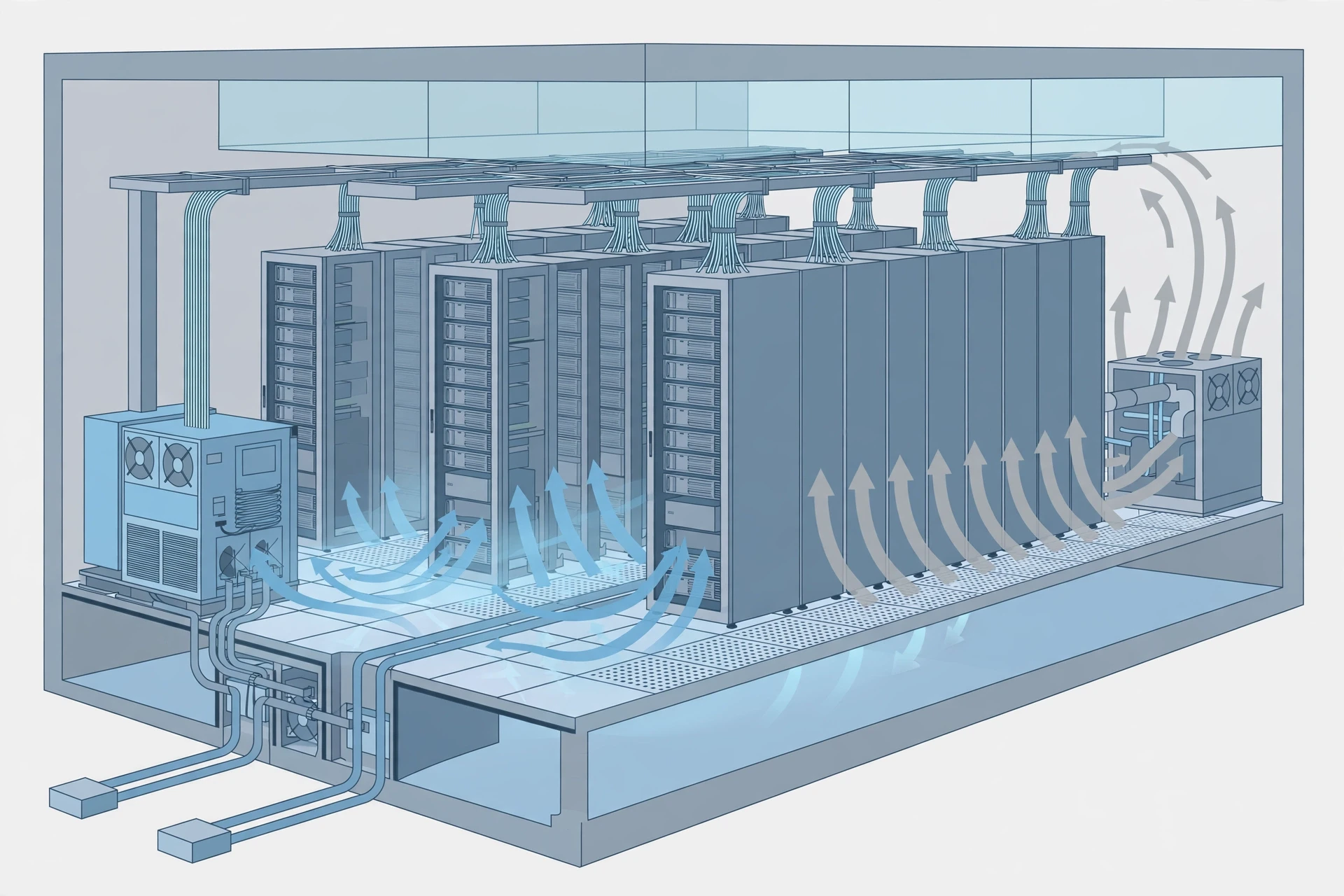
None of this is cheap, and that is exactly the point. Building and running a data center at this standard costs a fortune, which is why so few organizations do it themselves anymore. A cloud provider builds one enormous, excellent facility and rents it out in slices to thousands of customers, spreading the cost of the generators, the cooling, and the security guards across all of them. The customer gets a level of reliability they could never afford alone, and the provider gets a business. That bargain is the economic engine of cloud computing.
2. Virtualization: One Machine, Many Computers
2.1 The trick that made the cloud possible
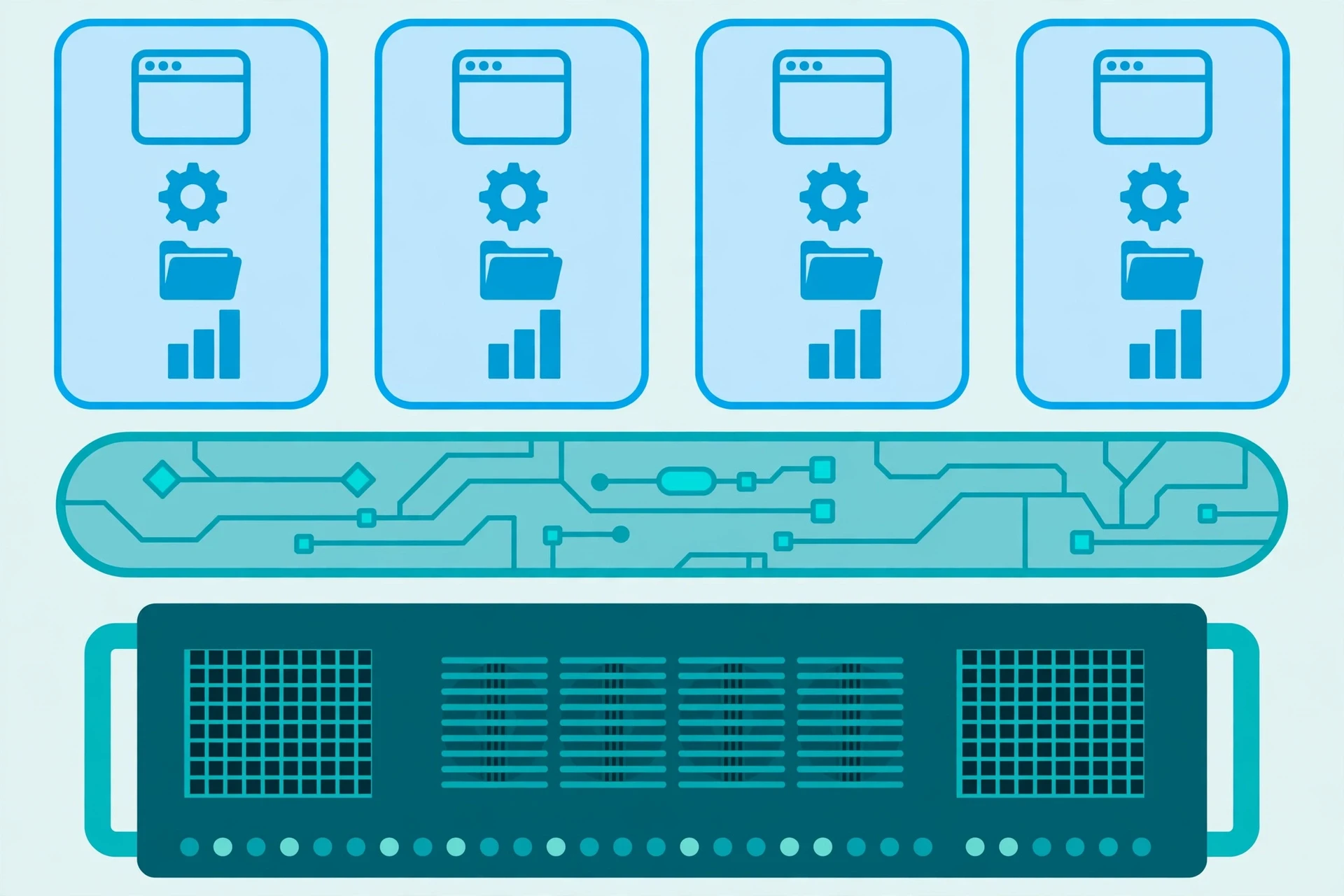
The single most important idea behind cloud computing is virtualization, and it is older than the cloud itself. In the 1960s, IBM engineers faced a problem: their mainframe computers were enormously powerful and enormously expensive, and most programs used only a fraction of that power at any moment. The machine sat idle most of the time, waiting. Their solution was to divide one physical computer into several "virtual" computers, each believing it had the machine to itself. One physical machine could run many jobs at once, each sealed off from the others.
That idea lay mostly dormant for decades, then came roaring back in the 2000s, and it is what lets a cloud provider rent you a server in seconds. When you ask a cloud provider for a computer, nobody walks into a warehouse and plugs in a new machine for you. Instead, software called a hypervisor carves a slice out of a physical server that is already running — a portion of its processor, a portion of its memory, a portion of its storage — and presents that slice to you as a complete computer. This slice is called a virtual machine. To you, it behaves exactly like a real computer: it has an operating system, it runs your programs, it stores your files. To the provider, it is one of dozens of virtual machines sharing a single physical box, each one isolated from its neighbours.
The isolation matters. If your virtual machine crashes, your neighbour's keeps running. If your neighbour's machine is attacked, yours is sealed off behind the hypervisor's walls. And because virtual machines are software, they can be created, copied, moved, and destroyed in seconds. Need ten more servers for a busy afternoon? The provider spins up ten more virtual machines on hardware that is already humming. Need none of them by evening? They are deleted, and the hardware is handed to someone else.
2.2 Containers: virtualization, lighter and faster
A newer variation on the same idea is the container. Where a virtual machine includes a whole operating system, a container shares the host machine's operating system and packages just the application and the libraries it needs. Containers start in fractions of a second, where a virtual machine might take a minute, and dozens or hundreds of them can pack onto one server. They have become the standard way to run modern cloud applications, especially the kind built from many small services that talk to each other — the architecture engineers call microservices.
I once watched a team deploy a new version of a web application the old way: a planned outage at 2 a.m., a nervous engineer with a checklist, a rollback plan, and a pot of coffee. The same team, a year later, deployed the same application as containers: the new version rolled out gradually, a few containers at a time, while the old version kept serving users, and if anything went wrong, the system simply switched back. Nobody stayed up until 2 a.m. That is what virtualization and containers buy you — not just efficiency, but the freedom to change things without fear.
3. The Five Characteristics That Define the Cloud
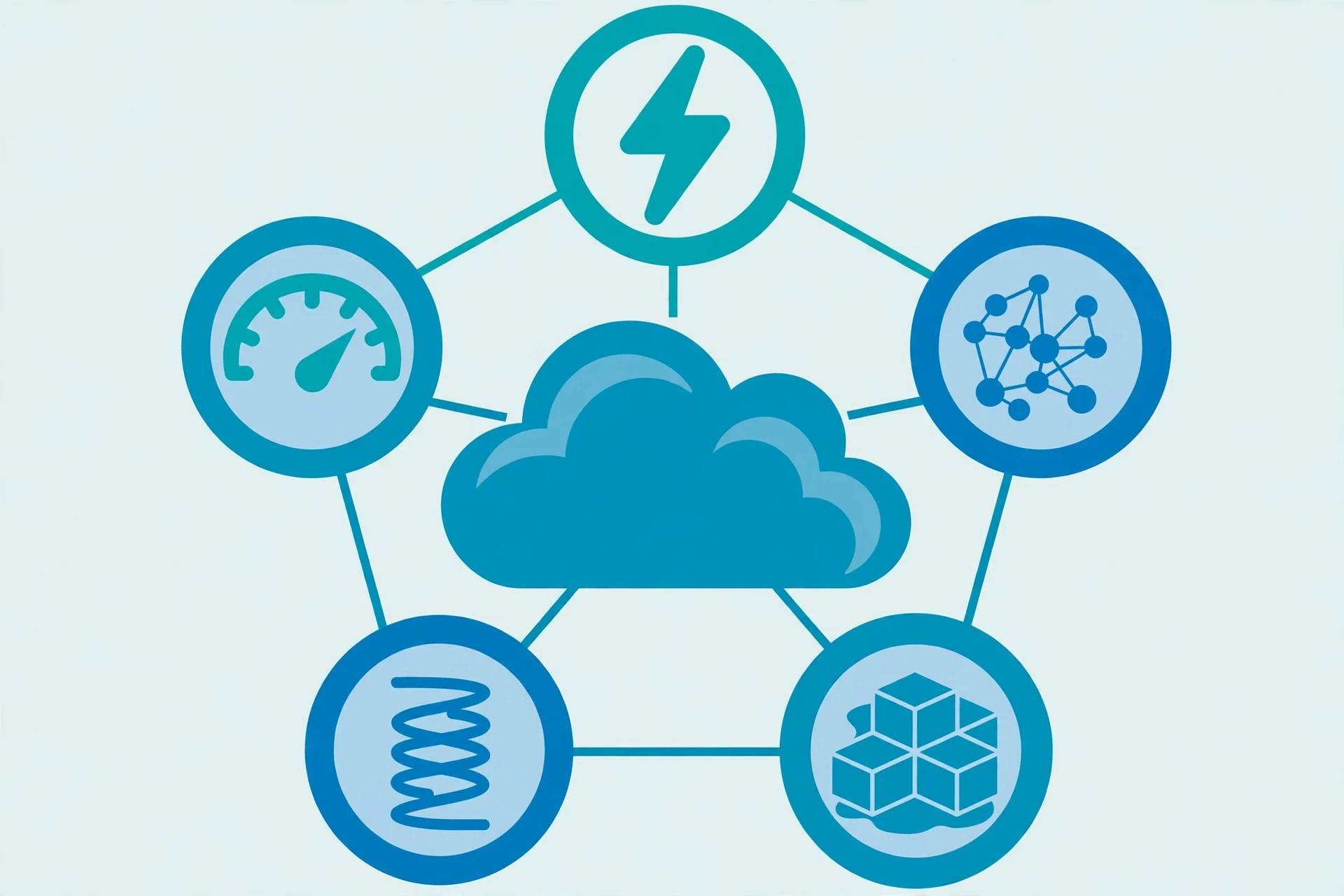
NIST's definition rests on five essential characteristics. If a service does not have all five, it may be useful, it may be hosted elsewhere, but by the official definition it is not cloud computing. The five are worth learning, because they explain why the cloud feels different from simply renting a server in someone else's building. The NIST Cloud Computing Program continues to develop standards and guidance around these ideas, and the original definition remains the reference point for the industry.
3.1 On-demand self-service
You can get computing power when you want it, without phoning anyone or waiting for a human to approve the request. You open a dashboard or send an automated request, and the resources appear. This sounds trivial until you remember how computing used to be bought: a purchase order, a vendor, a delivery truck, a week of installation. On-demand self-service collapses that into seconds, and it changes how people plan. A student can rent a powerful machine for an evening's experiment; a small business can launch a website on a Tuesday and be serving customers by lunch.
3.2 Broad network access
Cloud resources are available over the network, from almost any device — a laptop, a phone, a tablet, a sensor in a field. The cloud does not care what you connect with, as long as you can reach the internet. This is why your photos appear on your tablet a moment after you take them on your phone, and why a doctor can pull up a patient's scan from a different hospital. Broad network access is the characteristic that turned computing from something that happened at a desk into something that happens everywhere.
3.3 Resource pooling
The provider's machines are pooled together and shared among many customers, with different physical and virtual resources assigned and reassigned according to demand. You do not know — and do not need to know — exactly which physical server your work runs on, or in which city it sits, though providers do let you choose a broad region, such as "Europe" or "US East," for legal and speed reasons. This pooling is what makes the economics work: the provider's hardware is rarely idle, and your bill reflects only what you actually used.
3.4 Rapid elasticity
Resources can be scaled up and down quickly, sometimes automatically. A news website that normally serves a few thousand readers can, within minutes, serve millions when a big story breaks, then shrink back to normal when the rush passes. Elasticity is the difference between the cloud and a server you own: your own server has a fixed size, and if the crowd is bigger than the server, the site falls over. In the cloud, the crowd gets more servers, automatically, and you pay for the extra capacity only while the crowd is there.
3.5 Measured service
Everything is metered, like electricity or water. The provider measures how much storage you use, how much processing time you consume, and how much data you send, and bills you accordingly. This is why cloud bills can surprise people — the meter never stops — but it is also what makes the cloud honest. You can see exactly what you used, when, and what it cost, and you can set alarms to warn you when the meter spins faster than expected.
The five NIST characteristics are not marketing language. They are a test: on-demand self-service, broad network access, resource pooling, rapid elasticity, and measured service. A service that offers all five is a cloud. A service that offers only some of them is something else — perhaps hosting, perhaps outsourcing — but not the cloud as the standards define it.
4. IaaS, PaaS, and SaaS: Three Ways to Rent the Cloud
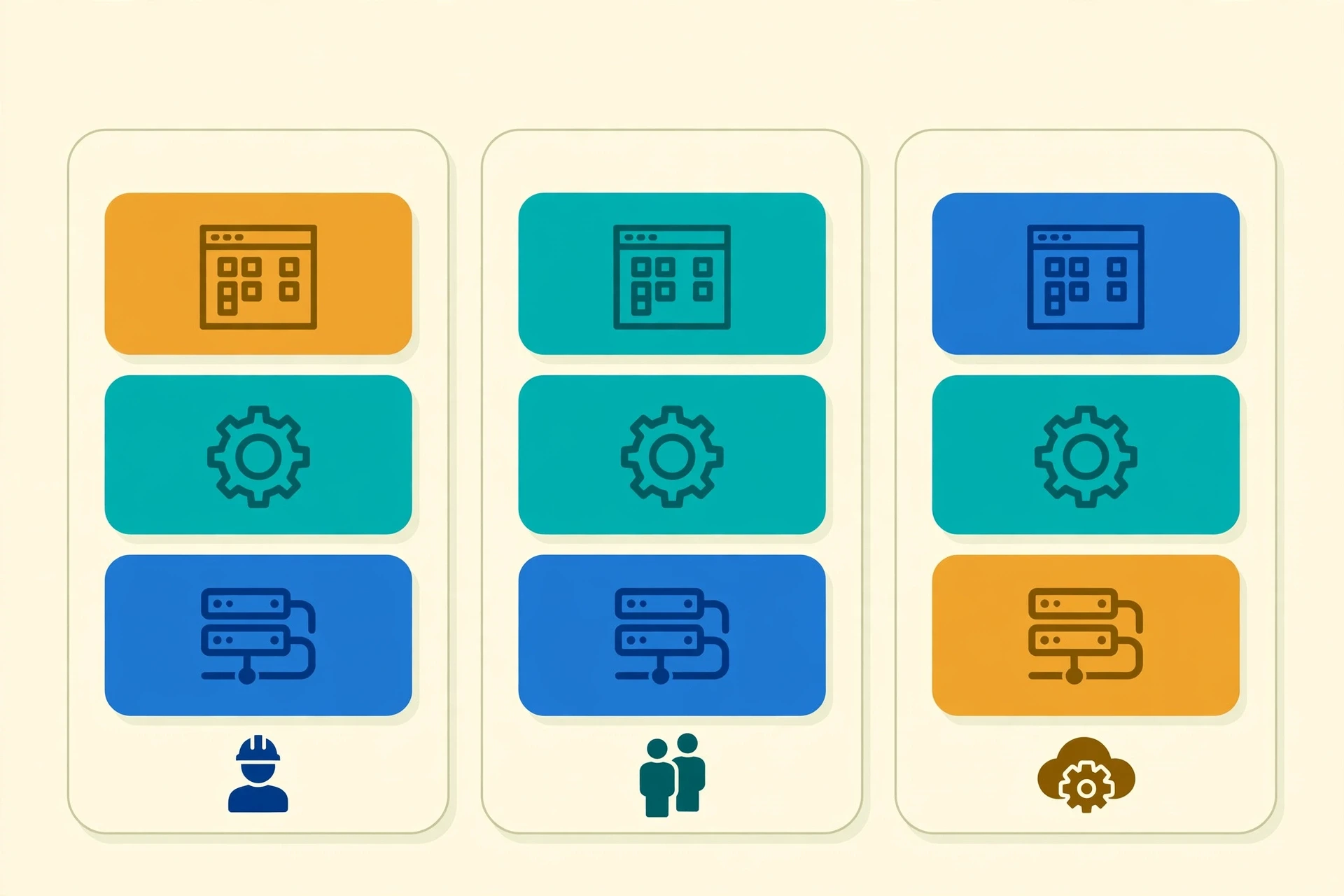
Cloud computing services come in three broad layers, and the difference between them is a question of how much you want to manage yourself. The classic analogy is pizza: you can buy the ingredients and cook at home, buy a ready-made base and add your own toppings, or order a finished pizza to your door. Cloud computing offers the same three choices.
4.1 Infrastructure as a Service (IaaS)
IaaS is the raw ingredients. The provider rents you virtual machines, storage, and networking, and you install the operating system and the software yourself. You control almost everything, and you are responsible for almost everything. IaaS suits teams that need full control — a research group running a custom simulation, a company migrating its existing systems, a startup that wants to build its own platform from the ground up. The biggest IaaS providers run data centers on every continent, and their catalogues list hundreds of machine sizes, from a tiny computer barely stronger than a phone to a machine with hundreds of processor cores and terabytes of memory.
4.2 Platform as a Service (PaaS)
PaaS is the ready-made base. The provider supplies the operating system, the runtime, the database, and the tools, and you simply bring your code. You write your application, push a button, and the platform runs it, scales it, and keeps it alive. You never log into a server. You never patch an operating system. PaaS trades control for convenience, and it is enormously popular with developers, because it lets a small team run a serious application without hiring anyone to tend the servers. The trade-off is real, though: you are building on someone else's platform, and if the platform changes its rules, you change with it.
4.3 Software as a Service (SaaS)
SaaS is the finished pizza, delivered to your door. The provider runs the whole application, and you simply use it through a browser or an app. Your email, your online documents, your video calls, your photo storage, your accounting software — most of the software ordinary people use every day is now SaaS. You never install anything, you never update anything, and your data follows you from device to device. The provider handles the servers, the security, the backups, and the updates, and you pay a subscription. SaaS is the layer of cloud computing most people touch every day, often without ever hearing the term.
Layer | What the provider manages | What you manage | Typical examples |
|---|---|---|---|
IaaS — Infrastructure as a Service | Physical hardware, virtualization, networking, storage | Operating system, applications, data | Virtual machines, cloud storage, virtual networks |
PaaS — Platform as a Service | Everything in IaaS, plus the operating system, runtime, and databases | Your application code and your data | Application hosting platforms, managed databases |
SaaS — Software as a Service | Everything, including the application itself | Your data and your settings | Email, online documents, video calls, photo storage |
The three layers stack. A SaaS application usually runs on a PaaS platform, which usually runs on IaaS infrastructure. A single company might use all three at once: SaaS for its email, PaaS for the application its developers built, and IaaS for the heavy number-crunching that needs raw machines. The NIST Cloud Computing Reference Architecture maps these layers and the roles around them in detail, and it is a useful document for anyone who wants to see the formal picture.
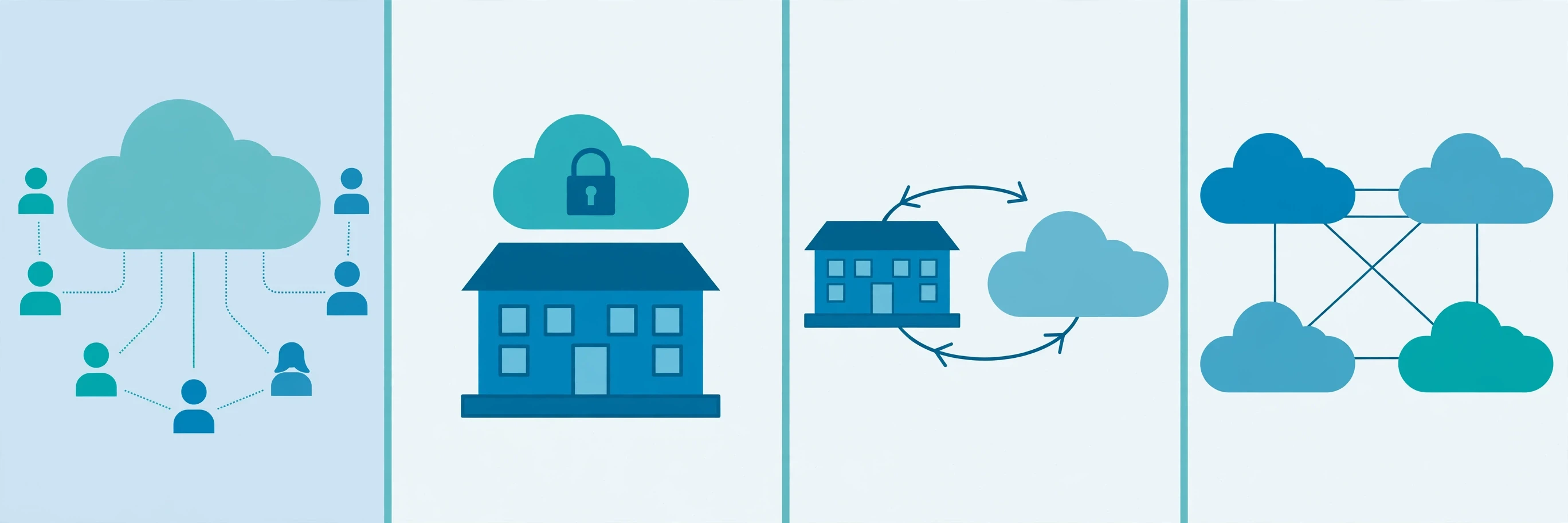
5. Public, Private, Hybrid, and Multi-Cloud
Cloud computing deployments also differ in who they belong to and where they run. There are four deployment models, and choosing between them is one of the first decisions any organization makes.
5.1 Public cloud
A public cloud is owned and operated by a third-party provider, and its resources are shared among many customers over the public internet. This is what most people mean when they say "the cloud." The advantages are scale, price, and the fact that you can start in minutes with a credit card. The disadvantage is the one that worries people most: your data sits on machines you do not own, alongside other customers' data, separated only by software. For most uses, that separation is strong and well tested. For some uses — a hospital's patient records, a government's classified files — it is not enough on its own.
5.2 Private cloud
A private cloud is used by a single organization, on hardware dedicated to it, whether that hardware sits in its own building or is hosted by a provider. It offers more control and more privacy, and it can be tuned to meet strict rules about where data lives and who can touch it. The price is that you lose much of the cloud's economic magic: you are paying for the whole facility, not a slice of it, and you are back to managing capacity yourself. Large banks, hospitals, and government agencies often run private clouds for their most sensitive work, and public clouds for everything else.
5.3 Hybrid cloud
A hybrid cloud combines public and private clouds, with tools that let data and applications move between them. A hospital might keep patient records in its private cloud and run its public website on a public cloud. A retailer might keep its core systems private and burst into the public cloud for the holiday shopping rush. Hybrid is the most common arrangement for large organizations, because it lets them keep sensitive work close and rent extra capacity when they need it.
5.4 Multi-cloud
Multi-cloud means using more than one public cloud provider at the same time, deliberately. The reasons are practical: one provider may be better at machine learning, another cheaper for storage, another faster in a particular country. Multi-cloud also protects against dependence on a single provider — if one goes down, or raises its prices, you have somewhere else to go. The cost is complexity: each provider has its own tools, its own billing, and its own quirks, and managing several at once takes real skill.
Deployment model | Who uses it | Main strength | Main trade-off |
|---|---|---|---|
Public cloud | Many customers, shared infrastructure | Lowest cost, fastest to start, enormous scale | Less direct control over hardware and location |
Private cloud | One organization, dedicated infrastructure | Most control and privacy | Higher cost, you manage capacity |
Hybrid cloud | One organization, public plus private | Sensitive work stays private, bursts use public capacity | More complex to manage across two worlds |
Multi-cloud | One organization, several public providers | Best tool for each job, no single-provider dependence | Highest complexity, several bills and toolsets |
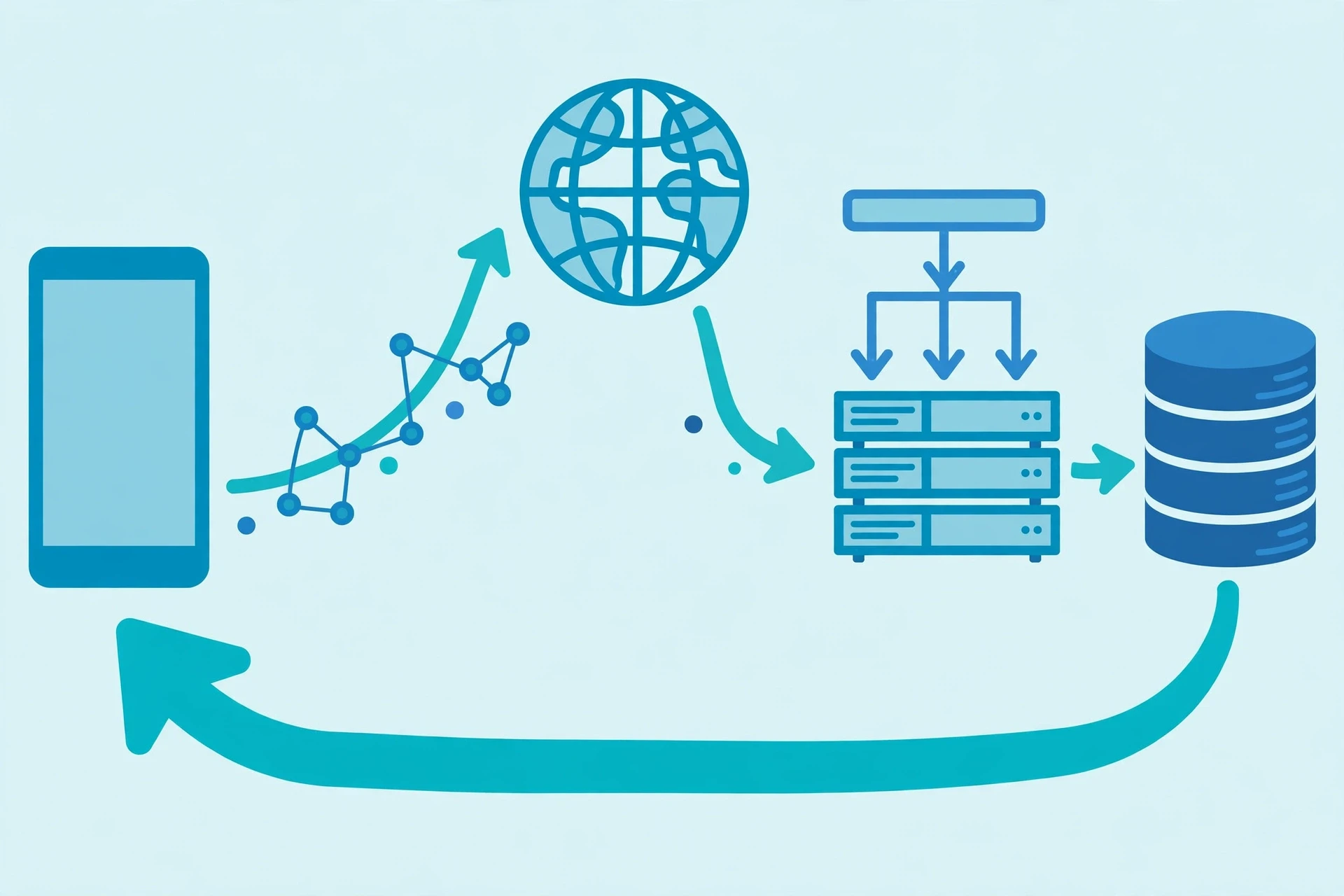
6. How a Request Travels: The Journey of a Single Click
So what actually happens, inside a cloud computing system, when you tap a button in an app, or load a web page? The journey is fast — usually well under a second — but it crosses continents and passes through many hands.
It starts with your device. Your phone or laptop turns your tap into a request, a small packet of data addressed to a server. That packet travels from your device to your home router, then to your internet provider, then across a web of fibre-optic cables, often under the ocean, toward a data center. The internet is a network of networks, and your packet hops from one network to another, each hop guided by routers that read the address and pass it on, like a letter moving through sorting offices.
When the packet arrives at the data center, it meets a load balancer, a piece of software (or dedicated hardware) whose job is traffic control. The load balancer looks at the incoming requests and spreads them across the many servers running the application, so no single server is overwhelmed. It also checks which servers are healthy; if one has failed, it stops sending it work, and the user never notices.
Your request then reaches an application server — a virtual machine running the code that answers your question. That server may need data, so it asks a database, which may live on another machine, or several machines, in the same data center. The database finds your record, sends it back, and the application server assembles the answer: a page, a photo, a video stream, a search result. The answer travels back along the same path, in reverse, to your device.
Several tricks make this journey fast. A content delivery network (CDN) keeps copies of popular content — images, videos, web pages — on servers close to you, so the answer may come from a city near yours rather than a data center on another continent. Caching keeps frequently requested answers ready-made, so the server does not have to compute them from scratch each time. And the whole system is built with redundancy at every step, so that the failure of any single piece — a server, a cable, a whole building — is absorbed by the rest.
I once traced a request like this with a group of students, using a simple network tool that shows each hop. We watched a packet leave a classroom, cross our city, jump to a hub in another country, and arrive at a data center thousands of kilometres away — in about a tenth of a second. One student said it felt like watching a letter arrive before it had been posted. That is the everyday miracle of the cloud: distance has almost stopped mattering.
7. Storage and Redundancy: Why Your Files Do Not Disappear
7.1 Three kinds of cloud storage
Cloud computing storage comes in three main forms. Object storage treats each file as an "object" with a unique identifier and some descriptive information, and it is the workhorse of the cloud — it holds photos, videos, backups, and the data behind most websites. Block storage divides data into fixed-size blocks, like the hard drive in your own computer, and it is used for the disks attached to virtual machines. File storage presents data as a familiar hierarchy of folders and files, shared across many machines, and it suits applications that expect a traditional file system.
Which form you meet depends on what you are doing, but the principle is the same in all three: your data is not stored once, in one place. It is copied.
7.2 Redundancy: the art of expecting failure
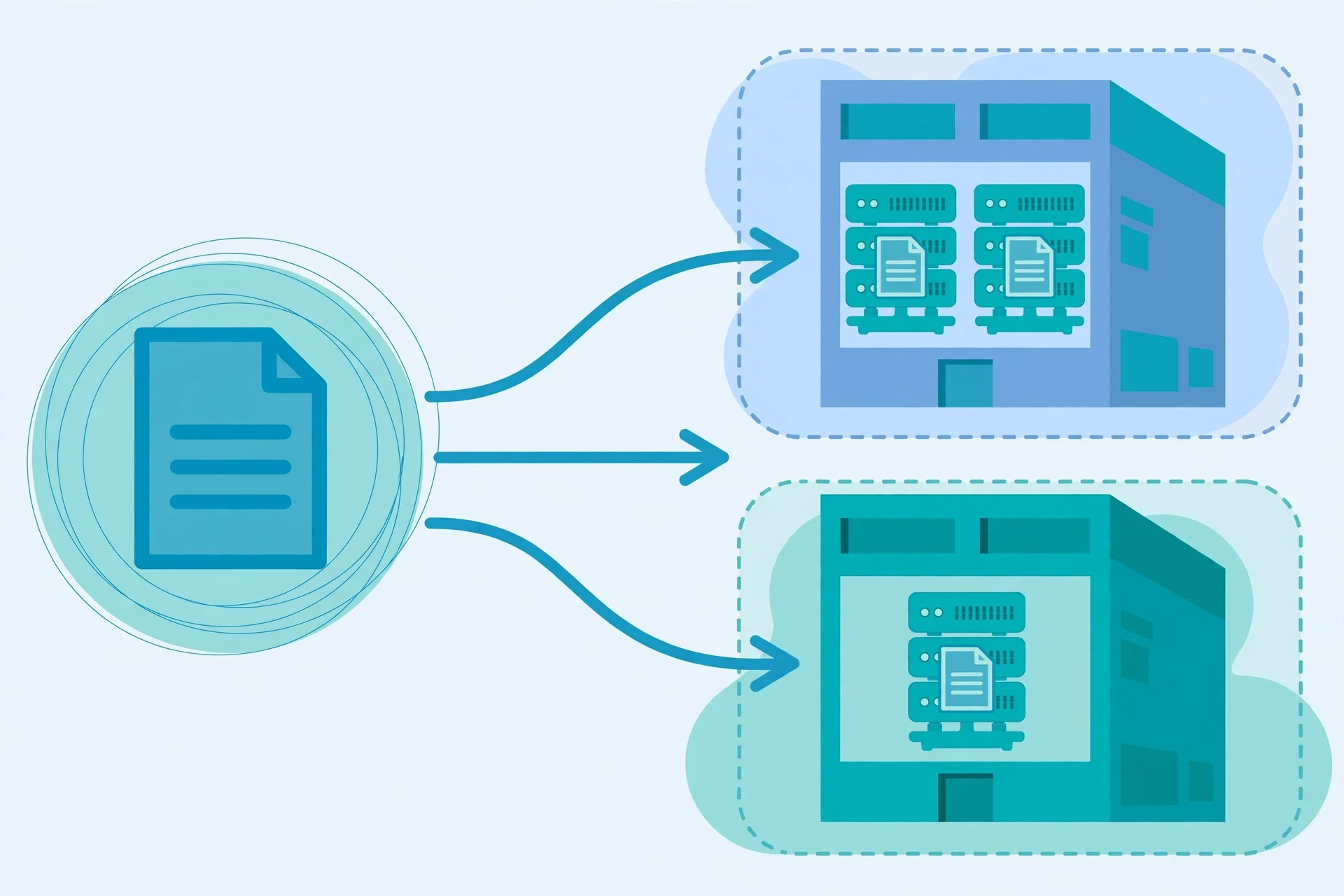
The engineers who run cloud computing data centers have a saying: everything fails, eventually. Hard drives fail. Power supplies fail. Whole buildings fail — a flood, a fire, an earthquake, a digger through a cable. The cloud's answer is redundancy: keep multiple copies of everything, in different places, so that no single failure can destroy the data.
A typical cloud storage service keeps at least three copies of your data, on different machines, in different racks, in different halls of the same data center. Many services go further, copying your data to a second data center in a different city, or even a different country. If one copy is lost, the system notices, makes a new copy from the survivors, and carries on. This happens silently, thousands of times a day, across the world's data centers, and the user never sees it.
This is also why cloud providers can promise such high durability. A well-known figure, quoted by the largest providers, is eleven nines of durability — 99.999999999 percent — which means that if you store ten thousand objects, you can expect to lose one of them, on average, once every ten thousand years. That number is a design target, not a guarantee you can hold in your hand, and it assumes the provider's systems work as designed. But it shows the scale of the engineering: the cloud does not trust any single machine, and that distrust is what makes your data safe.
There is a catch, and it is worth stating plainly. Redundancy protects you against hardware failure. It does not protect you against your own mistakes. If you delete a file, the cloud will faithfully delete all three copies. If ransomware encrypts your data, the encrypted copies will be replicated just as efficiently as the originals. That is why backups — separate copies, kept apart from the live data, ideally with versioning so you can step back in time — still matter, even in the cloud. The cloud is not a backup strategy. It is a place where a backup strategy can live.
8. Security and Privacy: Who Guards the Cloud?
8.1 The shared responsibility model
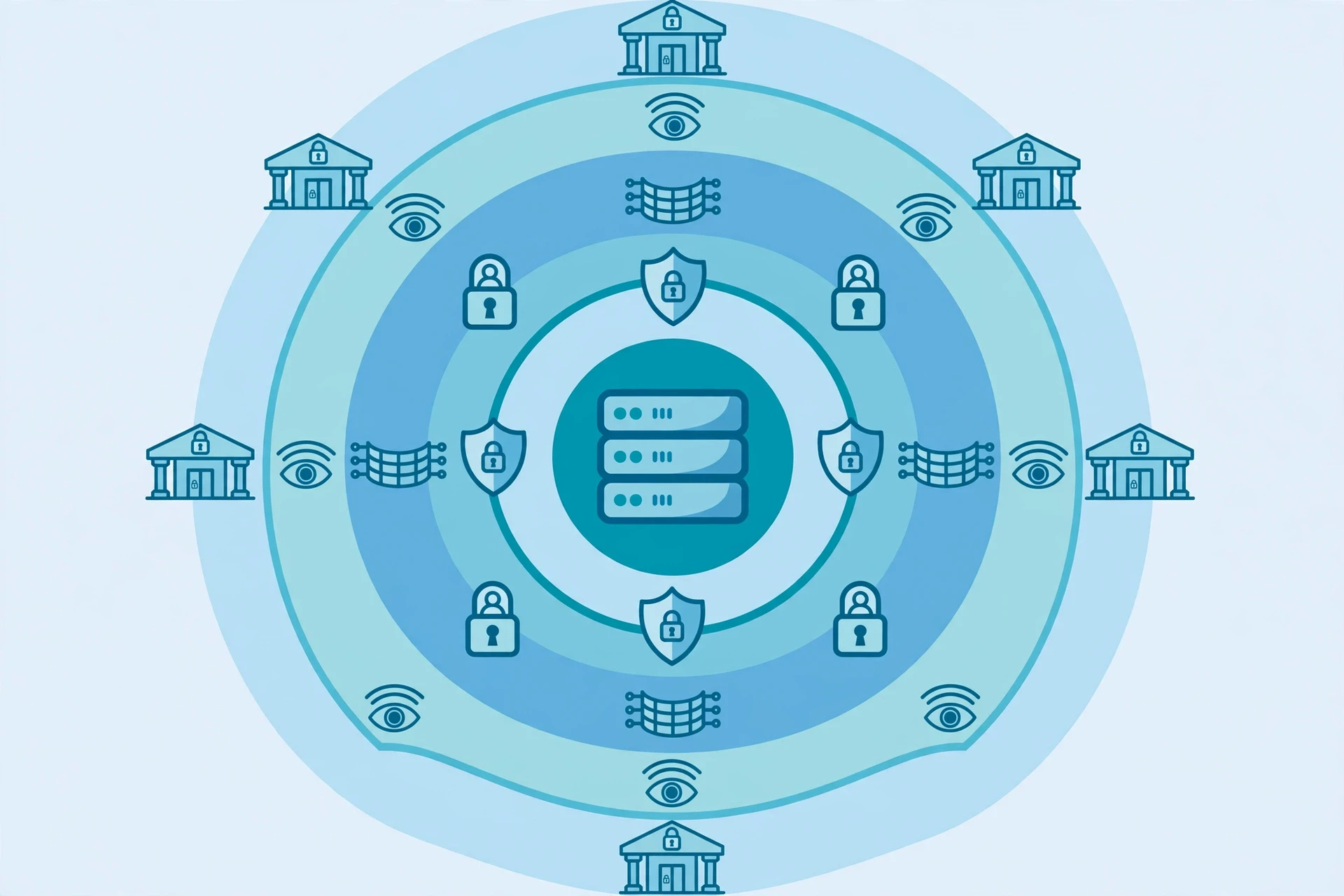
Security in cloud computing is a shared job, and the division of labour depends on which service model you use. The provider secures the cloud itself — the buildings, the hardware, the network, the hypervisor. You secure what you put in the cloud — your data, your accounts, your applications, and who is allowed to reach them. In an IaaS arrangement, you carry most of the responsibility; in SaaS, the provider carries most of it, and your job shrinks to managing your accounts and your data. The US Cybersecurity and Infrastructure Security Agency (CISA) publishes practical guidance on this division and on the basic hygiene that matters most: strong authentication, careful access control, and keeping software up to date.
This is where most cloud security failures actually happen — not in the provider's fortress, but at the customer's front door. The common causes are depressingly ordinary: a password reused across services, an administrator account with no second factor of authentication, a storage bucket left open to the whole internet, an employee who clicked a convincing-looking email. The cloud provider can build the strongest walls in the world, and it will not help if someone leaves the gate open.
8.2 How the cloud protects data
When it works well, cloud security is layered, and the layers are worth knowing. Encryption scrambles your data so that anyone who steals it cannot read it — in transit, as it travels across the internet, and at rest, as it sits on a disk. Modern cloud services encrypt by default, and you can add your own keys on top. Identity and access management decides who can do what: which people, which applications, and which machines are allowed to touch which resources, with the principle of least privilege — nobody gets more access than their job requires. Firewalls and network segmentation divide the cloud into zones, so that a breach in one corner cannot wander freely through the rest. Logging and monitoring record everything, so that unusual behaviour — a login from an unexpected country at 3 a.m., a sudden flood of downloads — is noticed quickly.
There is a hard truth underneath all of this. No system is perfectly secure, and cloud computing is no exception. The largest providers are attacked constantly, by criminals, by spies, and by curious amateurs, and they employ some of the best security teams on Earth to defend themselves. A small organization, running its own servers in a basement, is defended by whoever happens to be available — and that is often nobody, after hours. For most organizations, the cloud is more secure than what they could build themselves, not because the cloud is perfect, but because the alternative is worse.
8.3 Privacy, location, and the law
Where your data physically sits matters, because the law follows the data. Some countries require certain kinds of data — health records, financial records, government files — to stay inside their borders. Some governments can demand access to data held by companies under their jurisdiction, even if the servers are elsewhere. Cloud providers respond by letting you choose the region where your data lives, and by publishing detailed information about which laws apply. Before putting sensitive data in the cloud, it is worth asking three questions: where will it live, who can legally demand it, and what happens to it when the contract ends? The answers should be written down, in the contract, before the first file is uploaded.
Security in the cloud is shared, and the customer's share is where most failures happen. Strong passwords, a second factor of authentication, and storage that is private by default will prevent more breaches than any single piece of technology a provider can sell you.
9. What the Cloud Costs — and How the Meter Runs
Cloud computing is often sold with a simple promise: pay only for what you use. That promise is true, and it is also the source of the most common surprise in the field — the bill that arrives larger than expected. The meter runs on many things at once: the hours your virtual machines run, the amount of data you store, the amount of data you send out of the cloud (egress), the number of requests your database answers, and the managed services you switched on and forgot. Each item is cheap on its own. Together, they add up.
The economics work best when usage is uneven. A website that is busy for one week a year — a tax service in April, a ticket seller on the day a tour is announced — would waste money owning servers that sit idle for fifty-one weeks. In the cloud, it rents a hundred servers for one week and pays for one week. The economics work worst when a machine is left running and forgotten. An engineer I know once found a test server that had been running, untouched, for fourteen months, quietly billing its owner every hour. The cloud does not judge. It meters.
There are ways to keep the meter honest. Set budgets and alarms, so you are warned when spending crosses a line. Turn off what you are not using — the cloud's greatest strength is that resources can be deleted as easily as they are created. Choose the right size: a machine twice as powerful as you need costs twice as much and gives you nothing. Use the provider's cost tools, which show exactly where the money goes, service by service. And remember that the cheapest option is not always the cheapest bill: moving data out of the cloud is often charged, while moving it in is usually free, so a design that shuffles data back and forth can cost more than one that keeps it still.
A useful way to think about the bill is to compare it with the true cost of owning your own machines: the purchase price, the electricity, the cooling, the floor space, the person who replaces the failed drive at 2 a.m., and the machines you bought for the busiest day of the year that sit idle the other 364. For most organizations, the cloud wins that comparison. For a workload that is perfectly steady, running at full capacity all day, every day, owning the hardware can still win. The honest answer is that it depends — and anyone who tells you otherwise is selling something.
10. Energy Use and the Climate Question
A data center — the physical home of cloud computing — is, among other things, a building that turns electricity into heat and answers. The scale of that electricity use is now large enough to matter to national grids. The International Energy Agency (IEA), which tracks global energy use, reports on data centres and data transmission networks as a distinct and growing part of the world's electricity demand, and its Electricity 2024 report places that demand in the context of a grid that is adding new loads — electric vehicles, heat pumps, industry — all at once. The US Department of Energy (DOE) publishes guidance on data centers and servers, including how their efficiency is measured and improved.
How much electricity does the cloud use? The honest answer is that nobody knows exactly, because the numbers depend on what you count. Data centers themselves use roughly one to two percent of the world's electricity, and the cloud is the largest and fastest-growing part of that. A single large data center can draw as much power as a small town. The good news is that the industry has become dramatically more efficient: the amount of computing done per unit of electricity has improved year after year, through better chips, better cooling, and better use of idle capacity. The worrying news is that demand has grown even faster, so total consumption keeps rising.
The cloud computing providers know this, and energy use is now a competitive question. The largest cloud companies buy renewable energy at enormous scale, build data centers in cold climates where cooling is cheaper, design their own efficient chips, and publish detailed reports on their energy use and emissions. Some have pledged to run entirely on carbon-free energy within the decade. Whether those pledges are kept, and how they are counted, is a live debate — and one worth following, because the cloud's climate footprint is now part of its product, not an afterthought.
There is also a greener side to the story. A shared, efficient data center uses far less electricity than thousands of small, inefficient server rooms doing the same work — the same sharing logic that makes the cloud cheaper also makes it greener per unit of computing. The cloud enables things that save energy elsewhere: video calls instead of flights, smart grids that balance renewable power, climate models that help us understand a warming world. Climate Change Explained covers the science of the warming itself, and the cloud's energy story is one small chapter in it. The question is not whether the cloud uses energy — it does, a great deal — but whether the work it does is worth the energy it takes, and whether that energy can be clean. That is a question for all of us, not just for the engineers.
11. Edge Computing and What Comes Next
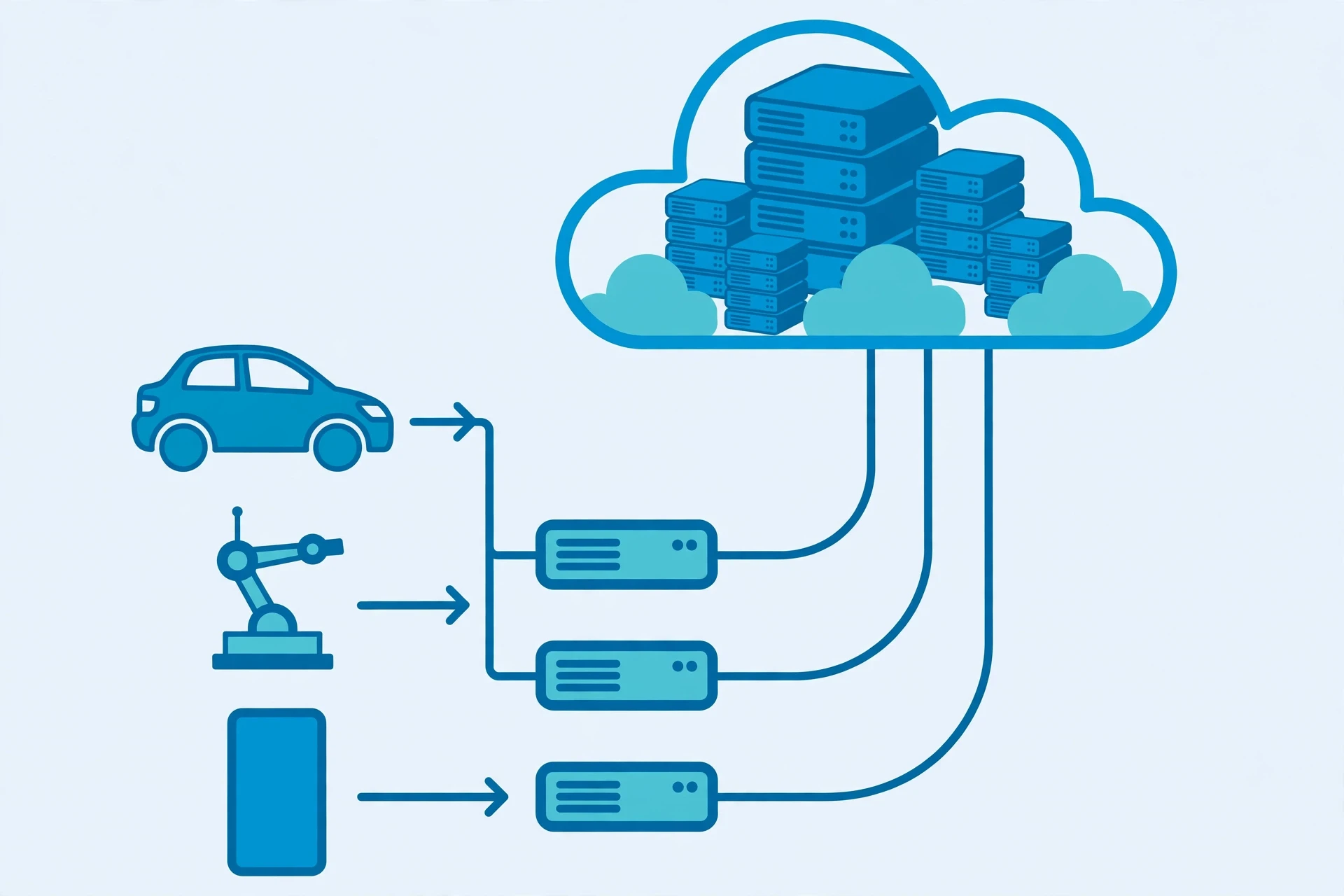
For most of the history of cloud computing, the model was simple: your device asks, a distant data center answers. That model works beautifully for email, documents, and streaming. It works less well when the answer must arrive in milliseconds, or when the connection itself cannot be trusted. A self-driving car cannot wait for a data center on another continent to decide whether to brake. A factory robot cannot pause while its instructions cross an ocean. A surgeon operating a remote instrument cannot tolerate a delay of half a second.
Edge computing is the answer: move some of the computing out of the distant data center and closer to where the data is made — to the base of a cell tower, to a box on a factory floor, to the device itself. The "edge" is whatever sits between your device and the distant cloud, and the idea is to do the urgent work there and send only the results, or the less urgent work, back to the cloud. Your phone already does this: face recognition runs on the phone, not in a data center, because it is faster and more private that way.
Cloud computing is not going away because of the edge. The two work together, in a pattern engineers call cloud-to-edge: heavy, patient work — training a machine-learning model, storing a year's worth of data, running a complex simulation — happens in the cloud, where the power is, and quick, local decisions happen at the edge, where the action is. A wind turbine, for example, might adjust its own blades at the edge in response to a gust, while the cloud analyses the data from a thousand turbines to predict maintenance needs.
The pattern is the same one we have seen throughout this article: put the work where it belongs, and let the network connect the pieces.
What comes next for cloud computing is harder to predict, and anyone who claims certainty is guessing. A few directions are clear enough to name. Artificial intelligence is the cloud's biggest new customer — training a modern AI model takes computing power on a scale that only the largest data centers can provide, and it is reshaping what data centers look like. Quantum computing, still young, may one day be offered as a cloud service, so that researchers can rent time on a machine they could never afford to own. And the push for cleaner energy will continue to shape where data centers are built and how they are powered. The cloud began as a way to rent a server. It has become the place where the world's computing happens — and the question of how we power it, secure it, and share it is now one of the defining questions of the digital age.
12. Common Misconceptions About Cloud Computing
Most people get cloud computing wrong in at least one way. Here are the mistakes I hear most often, and what the evidence actually shows.
"The cloud is just a hard drive in the sky." It is storage, yes, but storage is the smallest part. The cloud is computing — processors, memory, networks, software — rented by the minute. A hard drive stores your files. The cloud runs the programs that make sense of them.
"The cloud is less secure than my own servers." For most organizations, the opposite is true. A cloud provider's security team is larger than most companies' entire IT department, and its buildings are guarded around the clock. Your own server, in a cupboard, protected by a password someone chose in 2019, is not the fortress people imagine. That does not mean the cloud is safe by default — your settings still matter — but the provider's half of the job is usually stronger than anything you could build alone.
"The cloud is free." It is not. Free tiers exist, and they are generous, but they are designed to get you started, not to run your business. The meter is always running, and the most expensive cloud bill is the one nobody was watching.
"If I put it in the cloud, it is backed up." Not necessarily. The cloud replicates your data to protect it against hardware failure, but replication is not a backup. If you delete a file, or ransomware encrypts it, the replicas follow. A real backup is a separate copy, with version history, kept apart from the live data.
"The cloud means I don't need IT people anymore." The work changes; it does not disappear. Someone still has to decide what to build, how to secure it, how much it should cost, and what to do when it breaks. Cloud computing moves the work from tending machines to designing systems — and that work takes more judgement, not less.
"My data is in the cloud, so I don't know where it is." You can know, and for sensitive data, you should. Providers let you choose the region and the country, and the contract should say where the data lives. Not knowing is a choice, not a feature of the technology.
Most people assume the cloud is mysterious, but what the evidence shows is that it is ordinary engineering, done at extraordinary scale. It is not magic. It is not a metaphor. It is thousands of computers, in big cold buildings, rented out by the minute, and guarded by people who have thought very hard about what can go wrong.
Conclusion
Cloud computing began with a simple frustration: computers are expensive, they break, and most of them sit idle most of the time. The answer was to gather the computers together, in buildings designed to keep them alive, divide them with software into slices that can be rented by the minute, and deliver them over the internet to anyone who needs them. That answer — cloud computing — now underpins almost everything digital — the photos on your phone, the films you stream, the email you send, the research that runs while you sleep.
The ideas that matter are not complicated. The cloud is someone else's computers, organized so you do not have to think about them. Virtualization is what makes one machine into many. The five NIST characteristics — on-demand self-service, broad network access, resource pooling, rapid elasticity, and measured service — are the test of whether something is really a cloud. IaaS, PaaS, and SaaS are three answers to the question of how much you want to manage yourself. Public, private, hybrid, and multi-cloud are four answers to the question of who the cloud belongs to. And behind all of it are the same engineering virtues: expect failure, copy everything, measure everything, and keep the meter honest.
If you take one thing from this article, let it be this: cloud computing is not a place in the sky, and it is not a mystery. It is a human achievement — imperfect, energy-hungry, sometimes surprising in its bills — and it works because thousands of people, over decades, solved one problem after another: how to keep the machines cool, how to keep the data safe, how to make a computer in another country answer your question in a tenth of a second. The next time you tap a button and the answer arrives, spare a thought for the cold, roaring hall of machines that made it possible. They are the cloud, and now you know how they work.
Frequently Asked Questions
What is cloud computing in simple terms?
Cloud computing is renting computing power — servers, storage, and software — over the internet instead of owning the machines yourself. Your files and apps live on computers in data centers run by a provider, and you reach them through the internet, paying for what you use.
Is the cloud just someone else's computer?
In a real sense, yes — that is the most accurate short definition there is. Every file and app in the cloud lives on a physical computer in a data center. The difference is that the provider organizes thousands of those computers so you can rent a slice of one in seconds, with backups, security, and redundancy included.
What is the difference between IaaS, PaaS, and SaaS?
IaaS rents you raw infrastructure — virtual machines, storage, and networking — and you manage the rest. PaaS rents you a ready platform, so you bring only your code. SaaS rents you a finished application, such as email or online documents, that you simply use. The three layers stack, with SaaS usually running on PaaS, which usually runs on IaaS.
Is my data safe in the cloud?
Usually safer than on a computer you own, because providers invest heavily in physical security, encryption, and monitoring. But safety is shared: you must use strong passwords, a second factor of authentication, and private-by-default settings. Most breaches come from the customer's settings, not from the provider's walls.
What are the five characteristics of cloud computing?
The five characteristics defined by NIST are on-demand self-service, broad network access, resource pooling, rapid elasticity, and measured service. A service that offers all five counts as cloud computing under the official definition.
How does the cloud store my files without losing them?
Your data is copied several times, across different machines and often across different data centers. If one copy fails, the system rebuilds it from the survivors. This redundancy protects against hardware failure, but it does not protect against accidental deletion — that is why separate backups with version history still matter.
What is edge computing, and how is it different from cloud computing?
Edge computing moves some processing closer to where data is made — near the device, rather than in a distant data center — so answers arrive faster and keep working when the connection is poor. It complements the cloud rather than replacing it: urgent decisions happen at the edge, and heavy, patient work still happens in the cloud.