

Every day, without thinking about it, you hand your most private words to strangers. You type a password into a website, send a message to a friend, tap your card at a coffee shop, and check a medical result on your phone. Each of those actions travels across networks owned by people you will never meet, through cables under oceans and routers in buildings you will never see. The reason none of it is simply read along the way is encryption — and understanding how encryption works is less about mathematics than it is about a very old human problem: how do you share a secret with someone when you cannot be sure who is listening?
I learned that lesson the embarrassing way. Years ago, in a research lab, I kept a backup of an experiment archive on an external drive and protected it with a password I was certain I would remember. I did not. The drive sat on my desk for a week, a small grey box holding months of work, and I could not open it. The encryption had done its job perfectly — it kept the data safe from everyone, including me. That week taught me something no textbook had: encryption is not magic. It is a set of rules, and those rules are only as good as the keys that unlock them and the people who keep them.
This article explains how encryption works from the ground up. We will start with the simplest ideas — plaintext, ciphertext, and keys — then walk through two thousand years of history, from Julius Caesar's battlefield messages to the Enigma machine, and on to the systems that protect your phone today: AES, RSA, Diffie-Hellman key exchange, hashing, digital signatures, and the TLS that puts the padlock in your browser. We will finish with the next big shift, post-quantum cryptography, and the mistakes that still undo good encryption in practice.
1. What Encryption Actually Is
Strip away the jargon and encryption is a promise: a message transformed so that only the intended reader can turn it back into sense. The original readable message is called plaintext. The scrambled version is called ciphertext. The process of turning one into the other is encryption; reversing it is decryption. The thing that controls both directions is the key — a piece of secret information, usually a long string of numbers, that makes the transformation possible.
Think of a key as the combination to a safe, except the safe and the combination are both made of mathematics. Anyone can see the safe. Anyone can try the handle. Without the combination, the contents stay out of reach. And unlike a physical safe, a well-encrypted message does not even hint at what is inside: a one-word message and a thousand-word message can produce ciphertext that looks equally random.
1.1 Plaintext, ciphertext, and keys
Here is the whole system in one picture. You start with plaintext — "Meet me at noon." You feed it into an encryption algorithm along with a key, and out comes ciphertext — something like "X7kQ9mZ2pL4." The person at the other end feeds the ciphertext and the same key (or a matched key, as we will see) into the algorithm, and the plaintext comes back. Anyone who intercepts the ciphertext without the key gets nothing but noise.
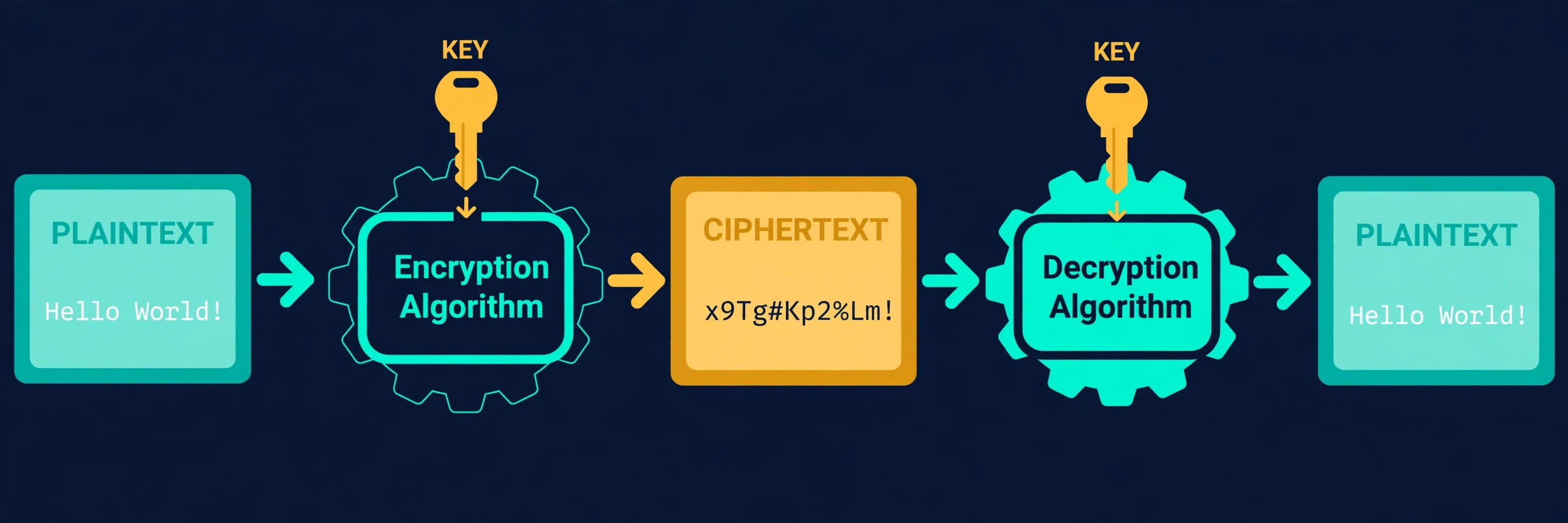
Two details matter here, and they shape everything that follows. First, the algorithm itself is usually public. The world's most trusted encryption standards are published openly, studied by thousands of researchers, and attacked constantly by experts trying to find flaws. That openness is a strength, not a weakness: an algorithm that survives years of public attack is far more trustworthy than a secret one nobody has tested. Second, the key must stay secret. This is the one hard rule of modern cryptography, known as Kerckhoffs's principle after the nineteenth-century Dutch cryptographer Auguste Kerckhoffs: a system should remain secure even if everything about it is public except the key.
That principle flips a common instinct. People often assume the safest approach is to hide how the scrambling works. History says the opposite. Secret algorithms fail quietly and catastrophically, because their flaws are found by attackers, not by their designers. Public algorithms fail loudly, in the open, where they can be fixed.
1.2 Encryption is not the same as encoding
A confusion I meet constantly, even among technically minded people, is the idea that any transformation of text counts as encryption. It does not. Encoding changes the representation of data so different systems can handle it — turning text into binary, or compressing a file. There is no secret involved, and anyone who knows the encoding scheme can reverse it instantly. Base64, the encoding you may have seen in email attachments, is a classic example: it looks scrambled, but it is not secret at all.
Encryption, by contrast, is designed so that reversing it without the key is infeasible — not merely inconvenient, but so expensive in time and computing power that it is practically impossible. The difference is the key and the intent. Encoding is about compatibility. Encryption is about secrecy.
"The security of a cryptographic system should rest on the secrecy of the key, not on the secrecy of the algorithm." — a paraphrase of Kerckhoffs's principle, and still the single most useful sentence in all of cryptography.
1.3 Why the key is everything
If encryption is a locked safe, the key is the combination, and losing control of the key is the same as losing control of the safe. A 256-bit key — the standard size used by modern AES encryption — has more possible values than there are atoms in the observable universe, many times over. No computer, present or foreseeable, can try them all. That is why attackers almost never try to break the mathematics directly. Instead they steal keys, trick people into revealing them, or exploit mistakes in how the system is built. Keep that in mind as we go: the mathematics of encryption is remarkably strong. The human parts around it are where things usually break.
2. A Short History of Keeping Secrets
Encryption is far older than computers. For as long as people have written things worth stealing, they have found ways to hide the meaning of their words. The story of how encryption works today only makes sense if you see how each generation solved the same problem with the tools it had — and how each solution was eventually broken, forcing the next one.
2.1 The Caesar cipher: shifting letters
The earliest well-documented cipher comes from Julius Caesar, who reportedly shifted each letter of his military messages three places forward in the alphabet. A became D, B became E, and so on. "ATTACK AT DAWN" became "DWWDFN DW GDZQ." The recipient, knowing the shift, simply moved each letter back three places.
As a child I had a cardboard decoder wheel from a puzzle book, two discs that rotated against each other, and I spent a rainy afternoon encoding notes to my friends with a shift of five. It felt like real spycraft. It was not, of course. A Caesar cipher has only 25 possible shifts, and anyone who guesses that letters have been shifted can try all of them in minutes. Worse, language itself gives the game away: in English, the letter E appears far more often than any other, so the most common letter in the ciphertext is almost certainly E, and the shift falls out from there. This technique — frequency analysis — was described by the ninth-century scholar Al-Kindi, and it broke simple substitution ciphers for good.
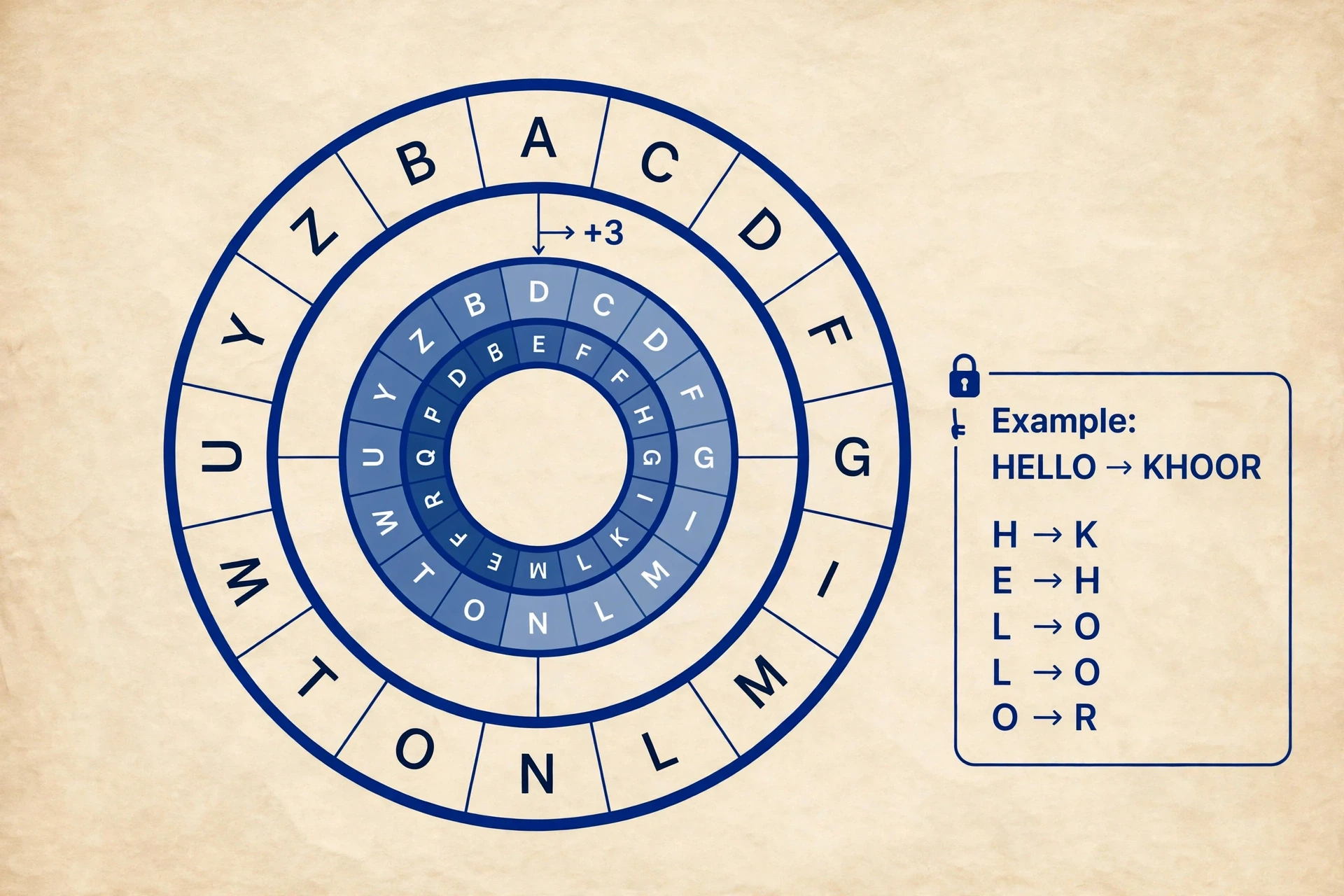
Still, the Caesar cipher matters, because it introduced the two ingredients every later system would keep: an algorithm (shift the letters) and a key (by how many). Every encryption system since, no matter how complex, is a descendant of that idea.
2.2 The Enigma machine and the birth of modern codebreaking
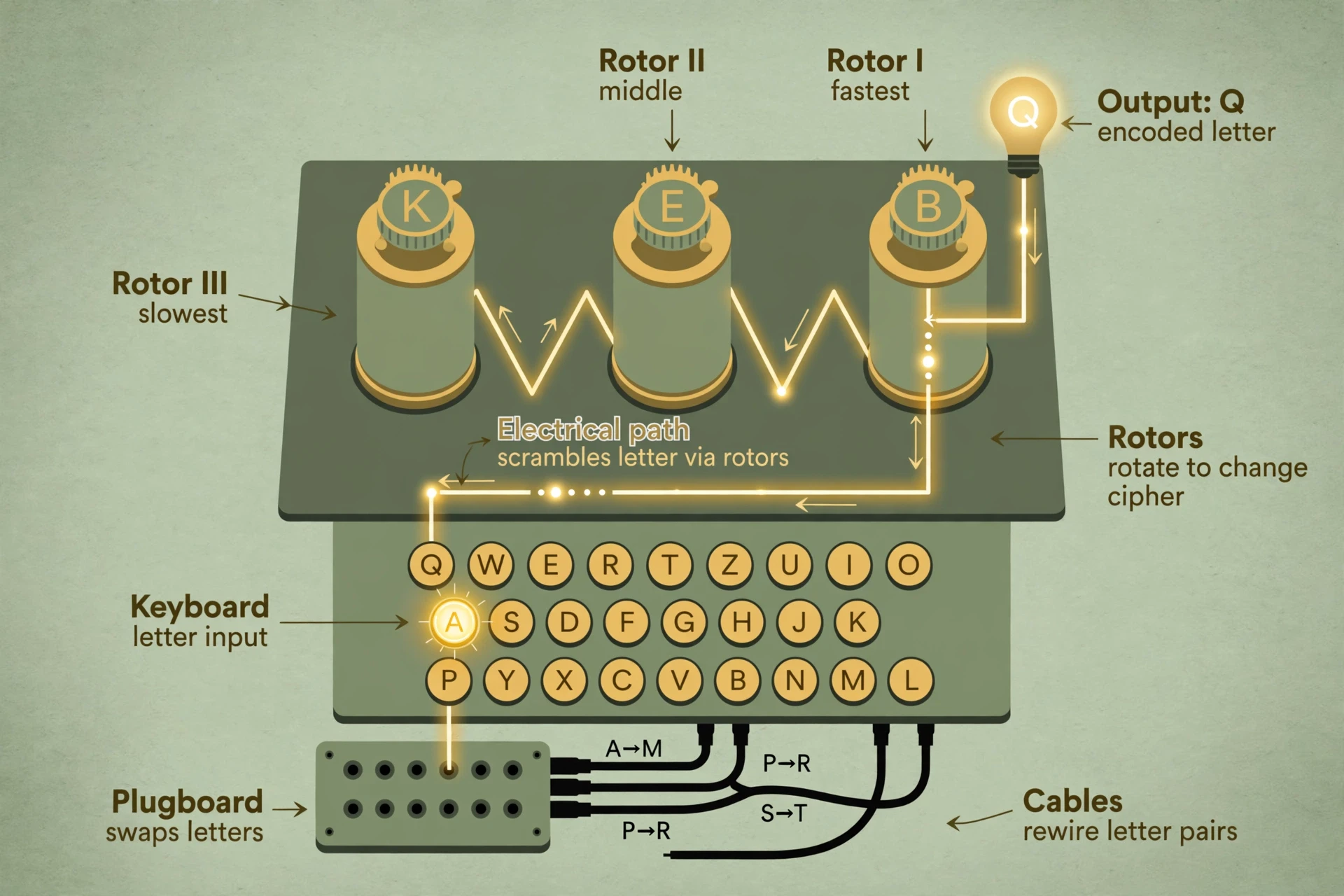
Fast-forward to the Second World War, and the German military's Enigma machine turned the Caesar cipher's simple idea into something genuinely frightening. Enigma was an electromechanical device with rotors that scrambled each letter differently, and the scrambling changed with every single keystroke. A message of a few hundred letters might never repeat the same substitution twice. The number of possible settings was astronomically large, and the settings changed daily.
The story of how the codebreakers at Bletchley Park in England, building on earlier Polish work, broke Enigma is one of the great turning points in the history of science. They did not break it by trying every setting. They broke it by finding weaknesses in how the machine was used — predictable message formats, operators repeating phrases, and a quirk of the machine's design that meant a letter could never encrypt to itself. Combined with early computing machines called bombes, those small human and mechanical flaws were enough.
Enigma taught the world two lessons that still shape how encryption works. First, a huge number of possible keys is not enough on its own; the system must also be used correctly. Second, codebreaking had become a job for machines, and from then on, cryptography and computing would grow up together.
2.3 From wartime secret to everyday tool
For decades after the war, strong encryption was treated as a military matter, restricted and classified. That changed in the 1970s, when two developments dragged cryptography into the open. The first was the publication of the Data Encryption Standard (DES) in 1977, a public standard anyone could study. The second was the invention of public-key cryptography, which we will meet in Section 4 — an idea so strange that when it was first proposed, many experts thought it could not possibly work.
The internet finished the job. Once ordinary people started banking, shopping, and talking online, encryption stopped being a spy's tool and became plumbing — invisible, everywhere, and essential. Today, the question is no longer whether your messages are encrypted, but how well, and by whom.
3. Symmetric Encryption: One Key for Both Sides
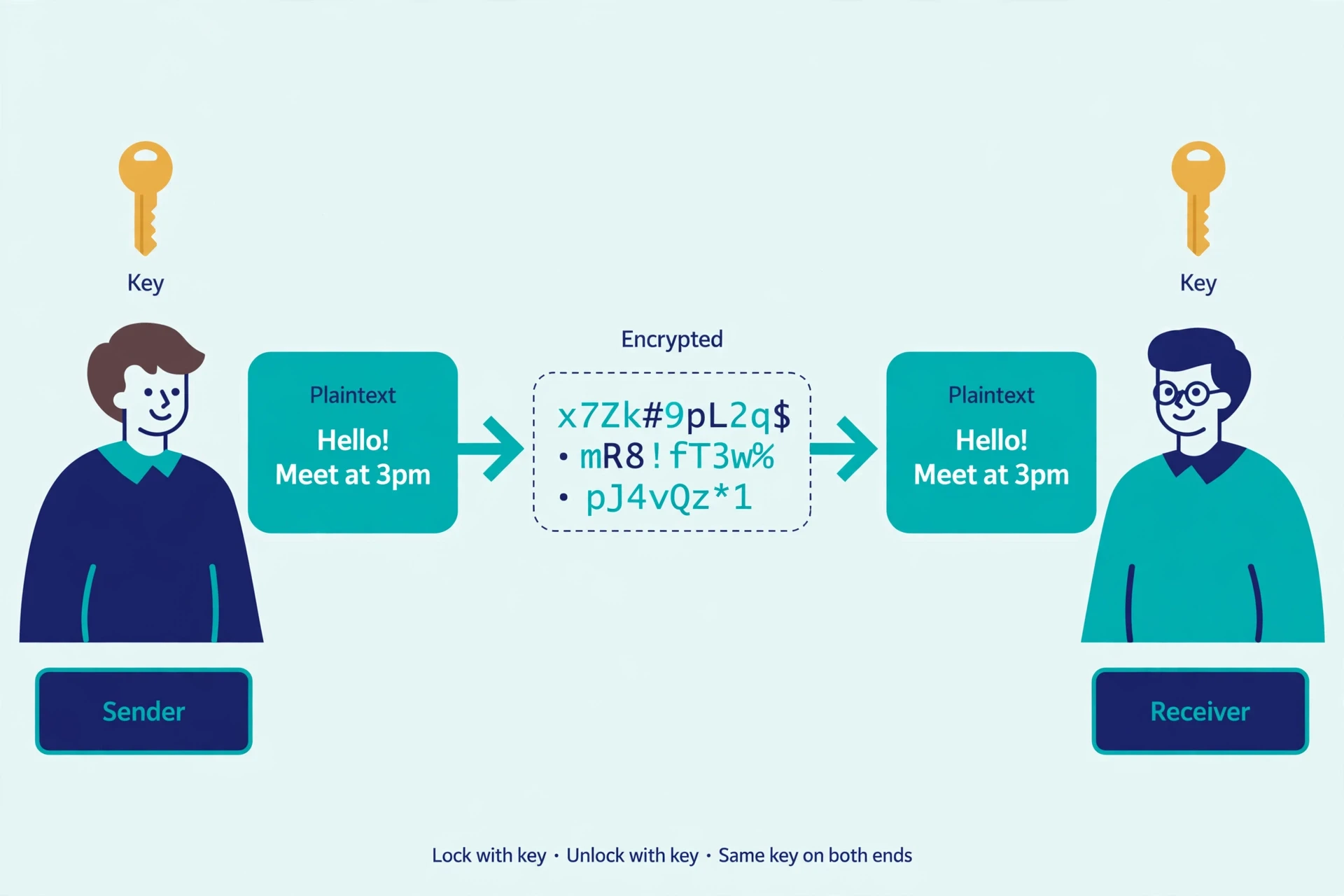
The simplest arrangement, and still the workhorse of the digital world, is symmetric encryption: the sender and the receiver use the same key. To understand how encryption works at the scale of the modern internet, start here, because this is the mechanism doing most of the actual scrambling. You lock the message with the key, and the other person unlocks it with an identical copy. Everything in Sections 2.1 and 2.2 was symmetric. So is most of the encryption happening on your phone right now.
The strength of symmetric encryption is speed. Modern symmetric algorithms can encrypt gigabytes of data in seconds, which is why they handle the actual bulk of your messages, files, and video calls. The weakness is obvious once you think about it: how do the two sides get the same secret key in the first place, without anyone else copying it along the way? That problem — key distribution — haunted cryptography for centuries, and its solution is one of the cleverest ideas in computer science. We will come back to it in Section 5.
3.1 AES: the standard that guards the modern world
The symmetric algorithm that matters most today is the Advanced Encryption Standard, or AES. It was chosen by the U.S. National Institute of Standards and Technology (NIST) in 2001 after a public competition in which cryptographers from around the world submitted candidates and attacked one another's designs for years. The winner, originally called Rijndael after its Belgian designers Joan Daemen and Vincent Rijmen, became the standard — and it has held up ever since. The full specification is published openly as FIPS 197, and NIST maintains a dedicated page on its block cipher work.
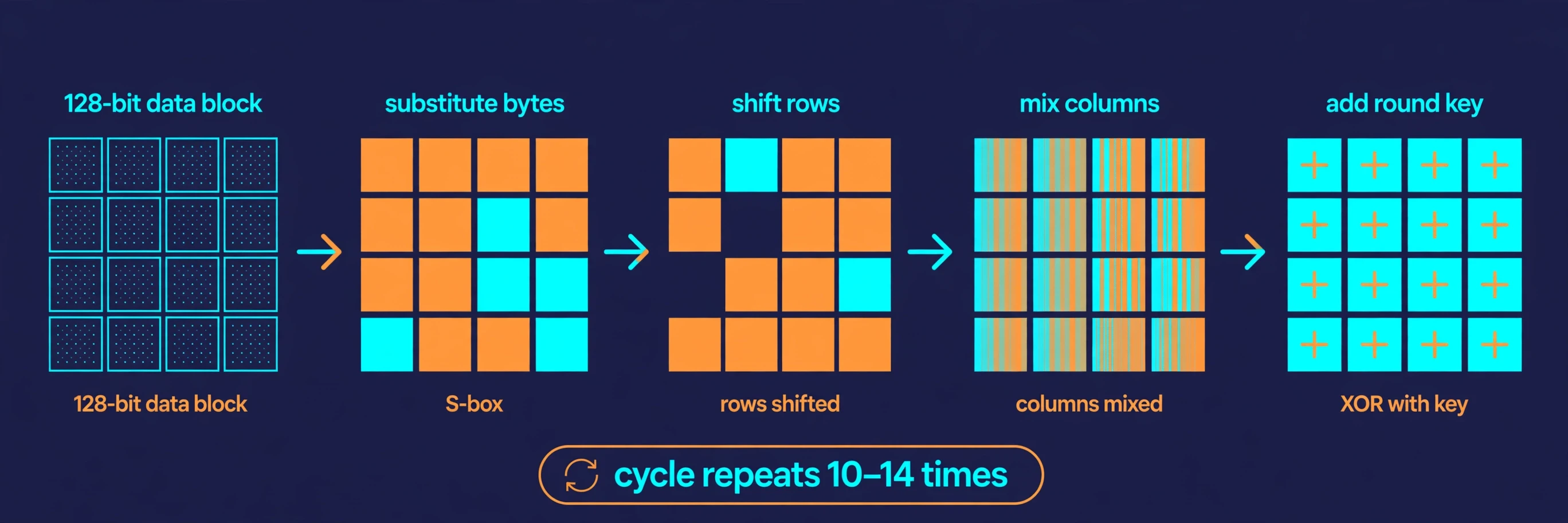
So how does AES actually work? At its heart, AES is a series of substitutions and shuffles applied to blocks of data, repeated many times. Here is the shape of it:
Your message is split into blocks of 128 bits — 16 bytes each.
Each block is arranged into a four-by-four grid of bytes.
The algorithm then runs a series of rounds: each round substitutes bytes according to a fixed table, shuffles the rows and columns of the grid, and mixes in part of the key.
A 128-bit key runs 10 rounds, a 192-bit key runs 12, and a 256-bit key runs 14. More rounds mean more scrambling, and more scrambling means more security.
Each individual step is simple — a lookup here, a shuffle there — but layered ten or more times, the result is a transformation so tangled that changing a single bit of the plaintext or the key changes roughly half the bits of the ciphertext. Cryptographers call this the avalanche effect, and it is what makes AES so hard to reverse without the key. There is no known practical attack that breaks full AES. The best-known attacks are only slightly better than trying every key, which, for a 256-bit key, would take far longer than the age of the universe.
3.2 Why key length matters — and where it stops mattering
Key length is the single number most often quoted about an encryption system, and it deserves a careful look. A 128-bit key has about 340 undecillion possible values. A 256-bit key has vastly more — so many that writing the number out takes 78 digits. Both are far beyond brute-force attack by any computer that exists or is on the drawing board.
Here is the part people usually miss: beyond a certain point, a longer key does not buy you more real-world security, because attackers do not attack the key. They attack the implementation — the software around the algorithm, the way keys are stored, the way random numbers are generated. A 256-bit key stored in a sticky note on a monitor is worth less than a 128-bit key stored properly. The lesson is not to chase the biggest number. It is to protect the key and use the algorithm correctly.
That said, 256-bit keys are the standard choice today, partly because they provide a safety margin against future advances, including quantum computing, which we will discuss in Section 10. When you see "AES-256" in a product description, that is what it means: AES with a 256-bit key, the strongest commonly used setting.
3.3 Where symmetric encryption lives in your life
Symmetric encryption is doing quiet work all around you. When your phone backs up to the cloud, the files are encrypted with a symmetric key before they leave the device. When you encrypt a hard drive — FileVault on a Mac, BitLocker on Windows — a symmetric cipher scrambles every sector. Messaging apps encrypt the content of your chats symmetrically, because it is fast enough to keep up with a conversation. Even the Wi-Fi in your home uses a symmetric cipher to protect the traffic between your laptop and the router.
I once watched a colleague lose a laptop on a train and spend the weekend in a cold sweat — until we confirmed the drive was fully encrypted. The laptop was gone, but the data was useless to whoever found it. That is symmetric encryption at its best: not exciting, not visible, and exactly what you want when something goes wrong.
4. Asymmetric Encryption: Two Keys, One Clever Trick
Symmetric encryption has one great weakness: the shared secret. If you have never met the person you want to message, how do you agree on a key without someone listening in? For centuries, the answer was couriers, sealed envelopes, and trust — none of which scale to a world where you buy a book from a website you have never visited.
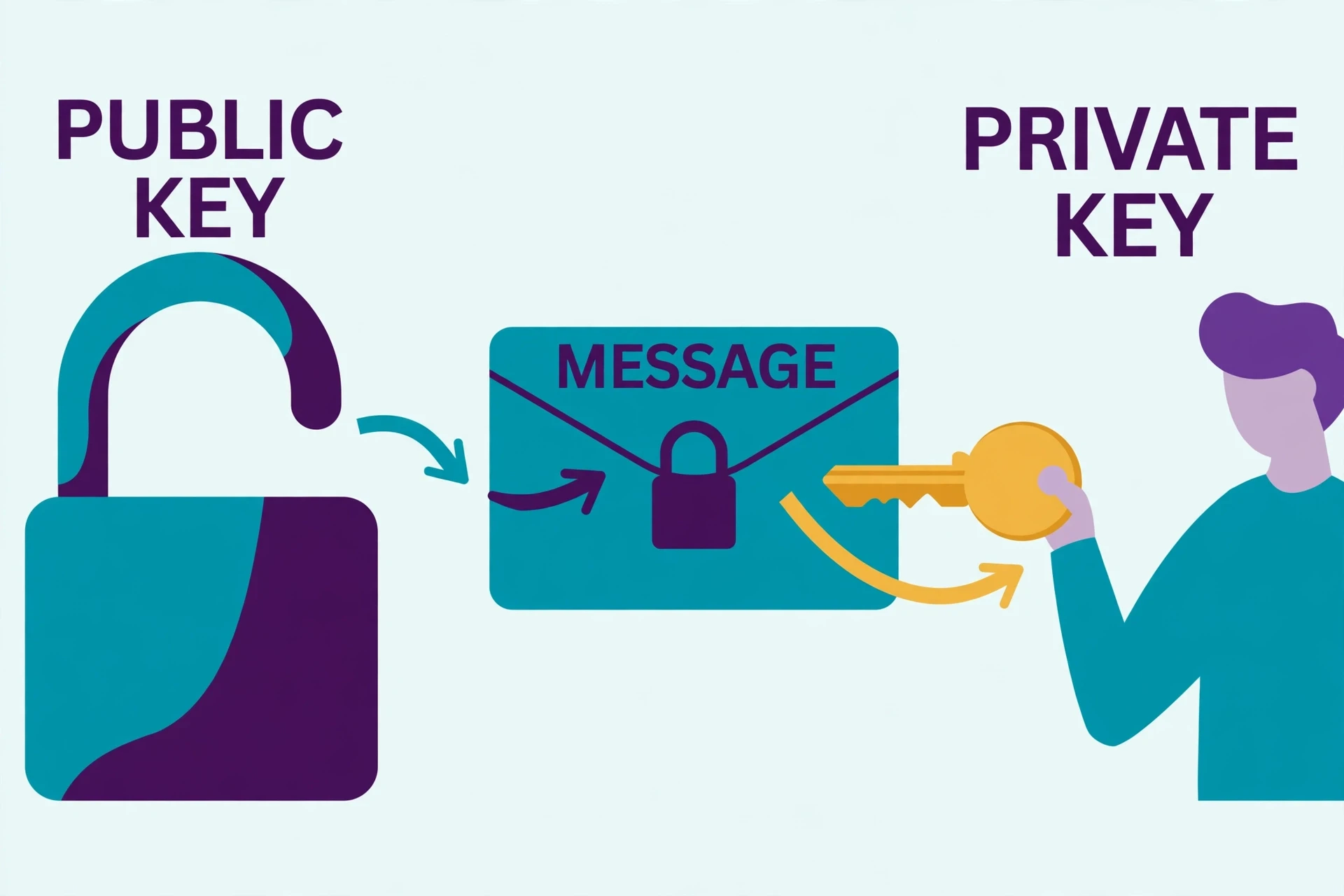
Asymmetric encryption, also called public-key cryptography, solves this with an idea that sounds impossible at first — and it is the part of how encryption works that surprises newcomers most: use two different keys, mathematically linked, where one can be shared with the entire world and the other stays private. Anything locked with the public key can only be unlocked with the private key. You can hand your public key to strangers, print it on a business card, or post it on a website, and it does not help an attacker read your messages — because the public key only locks things. Only the private key unlocks them.
4.1 Public and private keys
Here is the everyday analogy that finally made this click for me. Imagine a padlock that anyone can snap shut, but only you hold the key that opens it. You hand out copies of the open padlock to everyone who wants to send you something. They put their message in a box, snap your padlock on it, and send it back. Nobody else can open the box — not even the person who locked it — because snapping the padlock shut and opening it are different operations. That is asymmetric encryption: the public key is the open padlock, the private key is the only key that opens it.
The mathematics behind this trick relies on problems that are easy in one direction and brutally hard in the other — so-called one-way functions. The classic example is multiplication versus factoring: multiplying two large prime numbers is quick, but given only the product, working out which two primes were multiplied is enormously hard when the numbers are large enough. That asymmetry — easy one way, hard the other — is the engine of public-key cryptography.
4.2 RSA: the algorithm that started it all
The first practical public-key system, published in 1977 by Ron Rivest, Adi Shamir, and Leonard Adleman at MIT, is called RSA after their initials. RSA builds its key pair from two very large prime numbers. Multiply them together and you get part of the public key; the primes themselves, kept secret, form the basis of the private key. Anyone can encrypt a message using the product, but decrypting it requires knowing the original primes — and factoring a 2,048-bit number, the product of two primes each about 300 digits long, is beyond any known computer.
RSA was a breakthrough, and it still secures a huge share of the internet's key exchanges and digital signatures. But it is slow compared with symmetric ciphers — hundreds of times slower for bulk data — so in practice RSA is almost never used to encrypt the message itself. Instead, it is used to protect something small and precious: the symmetric key. That combination is the standard pattern of modern secure communication, and it is worth stating plainly: asymmetric encryption sets up the secret, symmetric encryption does the heavy lifting. We will see this hybrid pattern in action in Section 8.
4.3 Symmetric versus asymmetric at a glance
The two approaches are not rivals. They are partners, each covering the other's weakness. The comparison below is the one I wish someone had shown me when I was first learning this, because it turns a confusing landscape into a simple division of labour.
Feature | Symmetric encryption | Asymmetric encryption |
|---|---|---|
Keys used | One shared secret key | A public key and a private key |
Speed | Very fast, even for large files | Much slower, suited to small data |
Main job | Encrypting the actual message or file | Exchanging keys and proving identity |
Key distribution | Hard — both sides need the same secret | Easy — the public key can be shared openly |
Examples | AES, ChaCha20 | RSA, elliptic-curve cryptography |
Typical key size | 128 or 256 bits | 2,048 bits (RSA) or 256 bits (elliptic curve) |
One more point deserves attention: key sizes are not directly comparable across the two families. A 256-bit elliptic-curve key offers roughly the same security as a 3,072-bit RSA key, because the underlying mathematics is different. Judging an encryption system by key length alone, without knowing which algorithm the key belongs to, is like judging a lock by the size of its key without knowing what kind of lock it is.
5. The Key Exchange Problem and Diffie-Hellman
Symmetric encryption needs a shared secret. Asymmetric encryption provides a way to share one — but how do two people who have never met agree on that secret over a channel that anyone can eavesdrop on? The answer, published in 1976 by Whitfield Diffie and Martin Hellman, is one of the most elegant ideas in all of computer science, and it is the missing piece that explains how encryption works between strangers — it works a little like mixing paint.
Imagine you and a friend each have a secret colour. You both agree publicly on a common starting colour — say, yellow — and anyone listening hears it. You mix your secret colour into the yellow and send the result to your friend; your friend does the same with their secret colour and sends their mixture to you. Now each of you mixes your own secret colour into the mixture you received. The result is the same colour on both sides — a shared secret that neither of you ever sent across the channel, and that no eavesdropper can reproduce, because un-mixing paint is effectively impossible.
5.1 How Diffie-Hellman actually works
Replace paint with numbers, and the analogy becomes the real protocol. Both sides agree publicly on two numbers. Each side picks a secret number, combines it with the public numbers, and sends the result across. Each side then combines the number they received with their own secret, and both arrive at the same shared value. An eavesdropper sees everything that crossed the channel — the public numbers and both exchanged values — but working backwards to either secret number requires solving a mathematical problem called the discrete logarithm problem, which is believed to be extremely hard for large numbers.
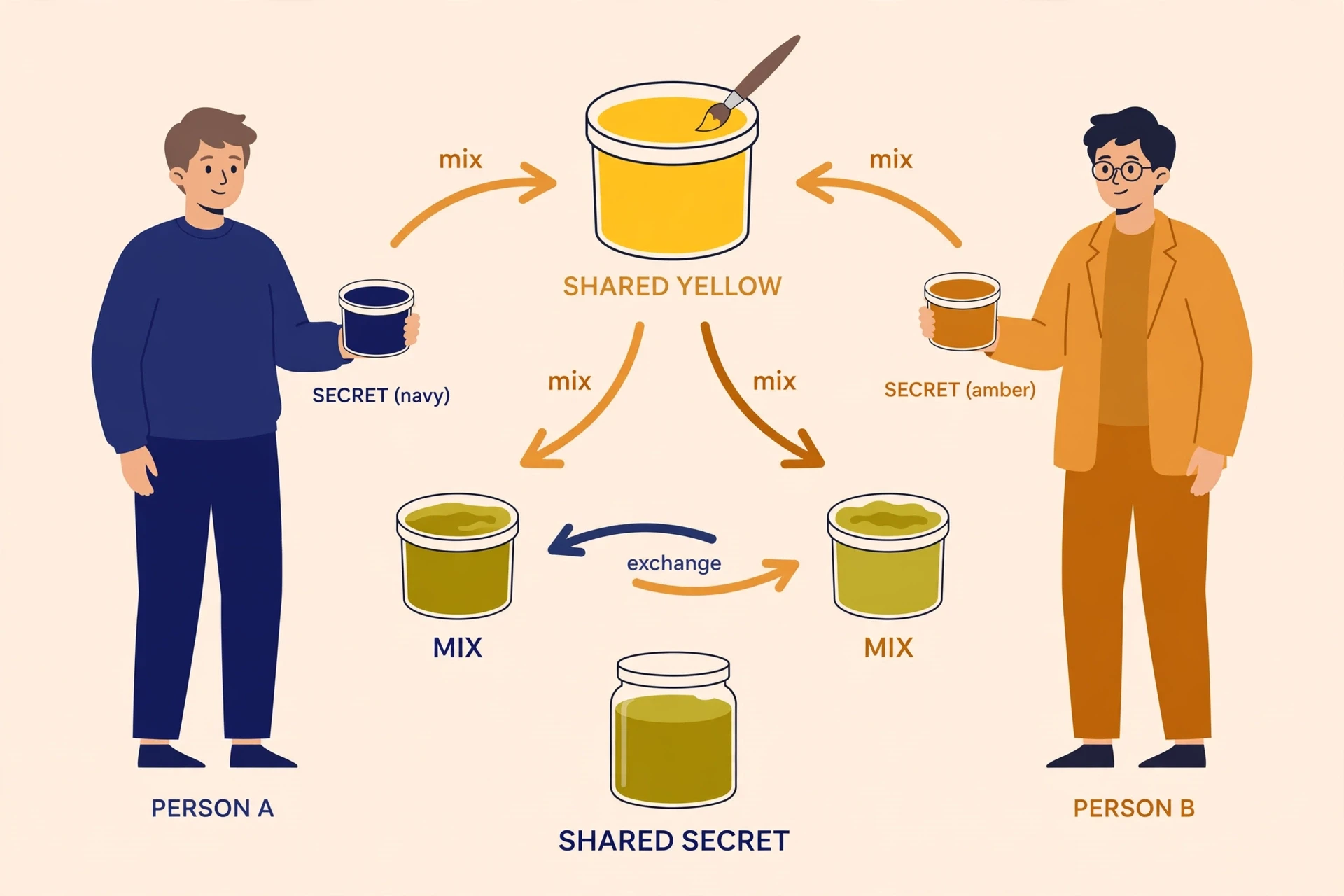
The paint analogy is not perfect — paint mixing is not quite as one-way as the mathematics — but it captures the essential surprise: two people can build a shared secret together without ever sending the secret itself. Every time your browser opens a secure connection to a website, a version of this exchange is happening behind the scenes.
5.2 The catch: authentication
Diffie-Hellman has one serious gap, and it is a gap that matters. The exchange creates a shared secret, but it does nothing to prove who you are talking to. An attacker sitting in the middle could run the exchange with each side separately, pretending to be the other party to both — a man-in-the-middle attack. Both victims would believe they had a secure channel, and the attacker would be reading everything.
The fix is authentication, and it is where digital signatures come in. If each side can prove its identity — typically with a certificate signed by a trusted authority — then the key exchange is anchored to a real identity, and the middle attacker is shut out. This is why the padlock in your browser is not just about encryption. It is about encryption plus identity, and the identity half is what certificates and signatures provide. Section 7 takes that half apart.
6. Hashing Is Not Encryption
One of the most persistent misunderstandings I encounter about how encryption works is the idea that hashing is just another word for encryption. It is not, and the difference matters — especially when you are trying to decide whether your password is actually safe.
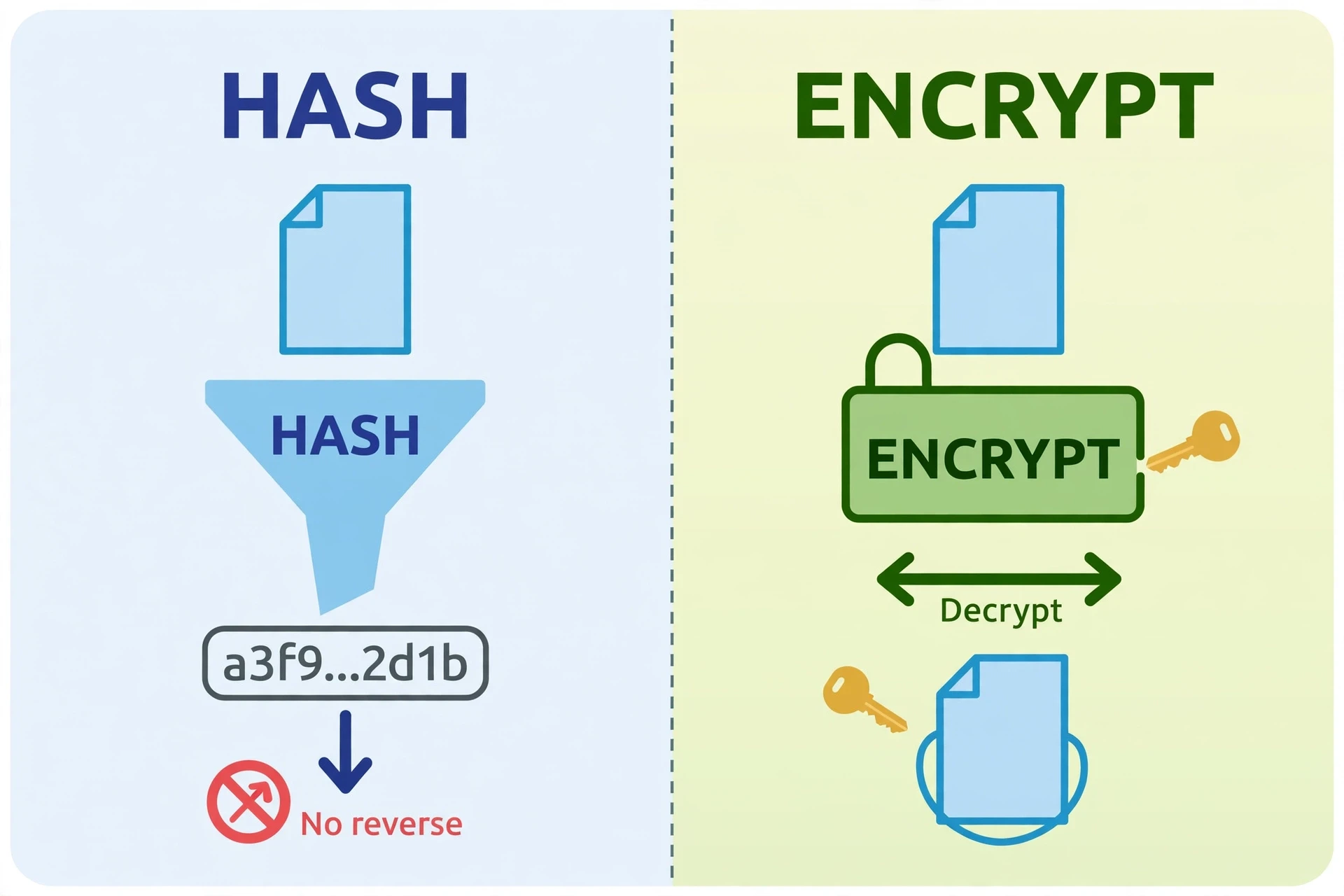
A hash function takes any input — a word, a file, an entire book — and produces a fixed-length string of characters called a hash or digest. The same input always produces the same hash. Change one letter of the input and the hash changes completely. But unlike encryption, hashing is one-way by design: there is no key, and there is no decryption. You cannot turn a hash back into the original input, any more than you can turn a fingerprint back into a person.
That is exactly what makes hashing useful for passwords. When you create an account, the website does not store your password. It stores the hash of your password. When you log in, it hashes what you typed and compares the two hashes. If they match, you are in — and the site never needed to know your actual password. If the site's database is stolen, the attacker gets hashes, not passwords. NIST maintains a project page on hash functions and publishes the standards for the SHA family of hash algorithms, including SHA-256, the workhorse of the field.
6.1 Hashing in practice: passwords and integrity
Hashing has a second everyday job: proving that data has not been changed. Download a piece of software and you will often see a SHA-256 checksum published next to it — a long string of hexadecimal characters. Hash the file you downloaded and compare it with the published value. If they match, the file arrived intact. If they differ by even one character, something changed it along the way, whether by accident or by attack.
But hashing has its own weaknesses, and the history of password breaches is largely a history of people learning them the hard way. A fast hash function is a bad choice for passwords, because an attacker with a stolen database can simply hash millions of guessed passwords per second and look for matches. Modern password storage therefore uses deliberately slow, salted hashing — adding a random value called a salt to each password before hashing, and using algorithms like bcrypt or Argon2 that are intentionally expensive to compute. The slowness that would be a flaw anywhere else is the whole point here: it makes guessing expensive for the attacker while barely affecting a legitimate login.
6.2 The fingerprint analogy, and its limits
A fingerprint identifies a person, but it is not the person. A hash identifies a piece of data, but it is not the data. Both are useful, and both can be misused if you forget what they are. A hash cannot keep a message secret — anyone who can guess the input can compute the hash. Hashing proves identity and integrity. Encryption provides secrecy. A secure system usually needs both, doing different jobs, and confusing them is one of the fastest ways to build something that looks safe and is not.
7. Digital Signatures: Proving Who Wrote It
Encryption answers the question "can anyone else read this?" A different question — "did this really come from who it claims to come from, and has it been changed?" — needs a different tool, and it is a part of how encryption works that many guides skip entirely. That tool is the digital signature, and it is asymmetric encryption used in reverse.
Here is how it works. To sign a message, you first hash it, producing a short fingerprint. Then you encrypt that hash with your private key. Anyone can verify the signature by decrypting it with your public key and comparing the result with a fresh hash of the message. If they match, two things are proven at once: the message came from the holder of the private key (authenticity), and the message has not been altered since it was signed (integrity). NIST publishes the standards for digital signatures through its digital signatures project.
The beauty of this arrangement is that verification needs no secret. Anyone with your public key can check your signature, but nobody can forge one without your private key. That is why digital signatures are everywhere in modern life, usually invisibly: software updates are signed by their makers so your computer can reject tampered downloads; legal documents and contracts are signed digitally; and the certificates that identify websites to your browser are themselves signed by certificate authorities.
I once received an email that looked exactly like a message from a colleague, complete with the right signature block and tone, asking me to open an attachment. The one thing it could not fake was a valid digital signature from my colleague's key. The absence of that signature was the clue — and the email went in the bin. Signatures do not stop someone from pretending to be another person. They give you a way to check whether the pretence holds up.
7.1 Certificates: who vouches for the public key?
A digital signature is only as trustworthy as the public key used to verify it. If an attacker can trick you into accepting their public key as if it belonged to your bank, the whole system collapses. Certificates solve this by having a trusted third party — a certificate authority — sign a statement binding a public key to an identity: "this key belongs to this website, and we checked." Your browser ships with a list of certificate authorities it trusts, and it checks that chain of signatures every time you visit a secure site. The system is not perfect — certificate authorities have been compromised before — but it is the reason you can trust that the padlock in your browser means what it says, most of the time.
8. HTTPS and TLS: The Padlock in Your Browser
When you visit a website and see a padlock in the address bar, you are looking at the result of a carefully choreographed handshake that happens in a fraction of a second. The protocol behind it is called TLS — Transport Layer Security — and its predecessor was called SSL, which is why people still say "SSL certificate" even though SSL itself has been retired for years. TLS is what turns plain HTTP into HTTPS, the S in HTTPS standing for secure.
Understanding how encryption works in your browser means understanding this handshake, because it brings together almost everything we have covered: asymmetric encryption, key exchange, symmetric encryption, hashing, and digital signatures, all working in sequence.
8.1 The TLS handshake, step by step
Here is what happens when your browser connects to a secure website:
Hello. Your browser sends a greeting, listing the versions of TLS and the cipher suites — combinations of algorithms — it supports.
Certificate. The server replies with its certificate, which contains its public key and is signed by a certificate authority. Your browser verifies that signature against its list of trusted authorities.
Key exchange. The browser and server run a key exchange — typically a modern form of Diffie-Hellman — to agree on a shared secret, without ever sending that secret across the network.
Session keys. From that shared secret, both sides derive symmetric session keys, unique to this one connection.
Encrypted conversation. From here on, everything — your login, your search, the page itself — is encrypted with fast symmetric encryption, usually AES.
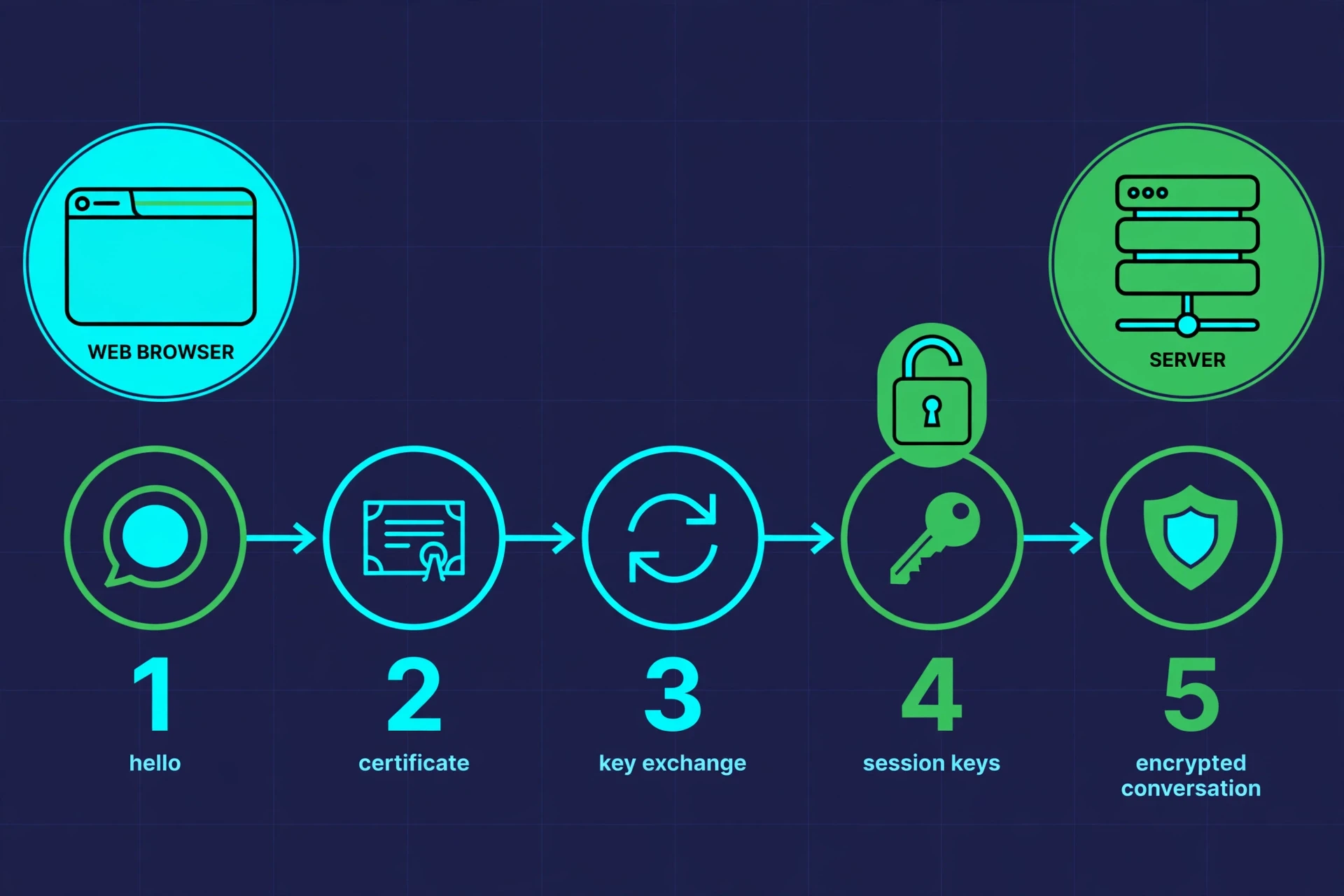
The elegance of this design is that the slow, expensive asymmetric steps happen only once, at the start, to establish trust and agree on a key. The fast symmetric cipher then carries the conversation. It is the hybrid pattern from Section 4, scaled up to the whole web.
8.2 What the padlock does — and does not — guarantee
Most people assume the padlock means a website is safe. It means something narrower and more specific: your connection to that website is encrypted, and the site's identity has been checked against a certificate. It does not mean the website itself is honest. A phishing site can have a perfectly valid certificate and a padlock, and still be a phishing site. The padlock protects your data in transit. It says nothing about what the site does with your data once it arrives.
There is a second limitation worth knowing. TLS encrypts the content of your traffic, but not all of its metadata. An observer on your network can often still see which website you visited — the domain name leaks through the Server Name Indication in the handshake and through DNS lookups — even if they cannot see which pages you read or what you typed. Newer technologies, including encrypted DNS and Encrypted ClientHello, are closing some of these gaps, but the distinction between content and metadata remains one of the most misunderstood parts of web security.
8.3 Why the whole web moved to HTTPS
Not long ago, most of the web ran on unencrypted HTTP, and encryption was reserved for banks and shops. That changed for a simple reason: the risks of an unencrypted web turned out to be everyone's problem. On an open Wi-Fi network, anyone could read unencrypted traffic — passwords, emails, messages — with free tools. Internet providers and other intermediaries could inject advertisements or alter pages in transit. The push to encrypt everything, led by browser makers marking HTTP sites as "not secure" and by free certificate authorities making certificates available to anyone, has made HTTPS the default for most of the web today. Your connection to this site, and to nearly every site you visit, is encrypted by default. That is a remarkable change, and it happened in less than a decade.
9. End-to-End Encryption: When Even the Service Cannot Read It
TLS protects your data while it travels. But it does not protect your data from the service itself. When you send a message through a typical chat app, TLS encrypts it on its way to the company's server — and the company decrypts it there, stores it, processes it, and re-encrypts it on its way to your friend. The company can read your messages. So can anyone who compromises the company's servers, or anyone the company is compelled to share data with.
End-to-end encryption (E2EE) closes that gap, and it is the strictest answer to the question of how encryption works in messaging. With E2EE, messages are encrypted on your device and can only be decrypted on the recipient's device. The service in the middle carries ciphertext it cannot read. Even if the company's servers are breached, or seized, or subpoenaed, the messages remain unreadable — because the company never held the keys.
This is the encryption used by Signal, by WhatsApp's default chats, and by Apple's iMessage, among others. The keys live on the users' devices, and the exchange of keys is handled through protocols — the best known is the Signal Protocol — that combine Diffie-Hellman key exchange with a clever trick called forward secrecy: the encryption keys change with every message, so even if one key is somehow compromised, it only exposes one message, not the whole conversation.
9.1 The trade-offs nobody can avoid
End-to-end encryption is powerful, and it is also contested. The same property that protects a journalist talking to a source also protects a criminal planning a crime, and that tension has produced years of public debate between technology companies, governments, and privacy advocates. Some governments have pressed for "backdoors" — ways for authorised parties to read end-to-end encrypted messages. Cryptographers are near-unanimous that this cannot be done safely: a backdoor built for one party is a vulnerability for everyone, because there is no way to guarantee that only the intended party will find and use it. A lock with a secret master key is a lock with a weakness, and weaknesses get found.
There are also practical trade-offs for ordinary users. With E2EE, the service cannot help you recover messages if you lose your device and your backup, because it cannot read them either. Features like searching your message history from the cloud, or scanning for spam on the server, become harder or impossible. None of this makes E2EE wrong — it makes it a choice, and like every choice in security, it depends on what you are protecting and from whom.
9.2 How to tell whether your messages are end-to-end encrypted
Look for the words "end-to-end encrypted" in the app's own description of a conversation, and be wary of apps that say merely "encrypted" — that usually means TLS, which is the weaker claim. Some apps let you verify the other person's identity by comparing a safety number or scanning a code in person, which guards against the man-in-the-middle attack from Section 5. It takes thirty seconds, and it is the single most useful thing most people can do to confirm that their encrypted conversation is really with the person they think it is.
10. Post-Quantum Cryptography: Preparing for a Computer That Does Not Exist Yet
Everything we have covered so far rests on mathematical problems that are hard for ordinary computers: factoring large numbers, computing discrete logarithms. A sufficiently powerful quantum computer could change how encryption works at its foundations. Quantum computers exploit the strange rules of quantum mechanics — superposition and entanglement — to solve certain problems far faster than classical machines. The same principles that make Understanding Quantum Mechanics such a strange and fascinating subject are what make quantum computing a threat to today's encryption.
In 1994, mathematician Peter Shor showed that a large enough quantum computer could factor large numbers efficiently — the very problem RSA depends on. A related algorithm threatens the discrete logarithm problem behind Diffie-Hellman and elliptic-curve cryptography. If such a machine were built, much of today's public-key encryption would fall. Symmetric encryption like AES would be weakened but not broken: quantum algorithms can speed up brute-force key searches, but doubling the key length restores the security margin, which is one reason AES-256 is the recommended choice.
10.1 The standards are already here
The striking thing about the quantum threat is how early the response has come. NIST ran a multi-year public competition to find new cryptographic algorithms that resist quantum attack, and in August 2024 it released the first three finalized post-quantum encryption standards — FIPS 203, FIPS 204, and FIPS 205 — covering key encapsulation and digital signatures based on lattice mathematics, a family of problems believed to be hard even for quantum computers. You can read the announcement on NIST's own news page, and the programme continues through NIST's post-quantum cryptography project.
That may seem premature — no quantum computer today can come close to breaking RSA — but the urgency has a name: "harvest now, decrypt later." An adversary can record encrypted traffic today and store it, waiting for the day a quantum computer can decrypt it. Secrets with a long shelf life — government cables, medical records, trade secrets — are already at risk from that strategy. The migration to post-quantum standards is therefore not a reaction to a machine that exists, but insurance against one that might.
10.2 What changes for ordinary users
For most people, the shift to post-quantum cryptography will be invisible. It will arrive inside software updates: browsers, messaging apps, and operating systems will quietly swap in new algorithms, and the padlock will keep working as before. The people who need to act now are the ones building systems meant to last decades, and the ones holding secrets that must stay secret for decades. For the rest of us, the lesson is simpler: cryptography is not a finished subject. It is a living one, and the systems protecting us today were designed by people who expected them to be replaced.
11. Common Mistakes and Misconceptions
Most encryption failures are not failures of mathematics. They are failures of assumption — small, understandable beliefs that turn out to be wrong. Here are the ones I see most often, and the corrections that matter.
"I have nothing to hide, so I don't need encryption." Privacy is not only about hiding wrongdoing. Your medical records, your finances, your location, your conversations with your family — all of these are things you reasonably keep from strangers, and encryption is what keeps them that way. You lock your front door even though you have done nothing wrong. Encryption is the same instinct, applied to data.
"The padlock means the site is trustworthy." As Section 8 explained, the padlock means the connection is encrypted and the certificate checks out. It says nothing about whether the site is honest. Phishing sites use HTTPS too.
"A longer password is automatically safer than a shorter one." Length helps, but only if the password is unpredictable. A long password made of common words in a predictable order can be weaker than a shorter, random one. What matters is entropy — how hard the password is to guess — and the best practical advice remains: use a password manager, let it generate long random passwords, and never reuse one across sites.
"Encryption makes data completely safe." Encryption protects data from being read. It does not protect it from being deleted, corrupted, or held for ransom. Backups are a separate problem, and encryption does not solve them. It also does not protect data while it is being used: when you open an encrypted file, it is decrypted in memory, and at that moment it is vulnerable to anything else running on the same machine.
"If the algorithm is public, attackers know how to break it." The opposite is true, as Section 1 explained. Public algorithms are attacked by the best minds in the field, and the ones that survive are the strongest we have. Secret algorithms, by contrast, fail silently.
"Deleting a file removes it." On most systems, deleting a file only removes the pointer to it; the data remains until it is overwritten. Encrypting a drive before you use it is the reliable way to make sure that deleted data stays unreadable — because even if the data is recovered, it is ciphertext without the key.
The strongest cipher in the world cannot protect a key that is written on a sticky note, typed into a phishing page, or stored in a database without protection. Security is a chain, and the mathematics is only one link.
11.1 The human half of the system
If there is one thread running through this whole article, it is this: encryption is mathematics wrapped around human behaviour. The algorithms are strong. The failures come from passwords reused across sites, software left unpatched, phishing emails that persuade someone to hand over a key, and systems designed without thinking about how real people will actually use them. Good security design respects that. It makes the safe choice the easy choice — encrypting by default, warning clearly when something is wrong, and never asking a user to make a decision they are not equipped to make.
That is also why the scientific method matters to cryptography. Claims about security are tested, attacked, and revised in the open, and a system is trusted because it has survived that process — not because someone important said it was safe. The same habits of evidence, scepticism, and replication that drive science drive the field that protects your secrets.
12. Encryption in Your Everyday Life
It is easy to read about encryption as an abstract subject. It is harder to notice how much of your day already depends on it, and seeing how encryption works in ordinary moments is the fastest way to make the ideas stick. Here is a short tour of the places encryption touches your life, and what you can actually do about each one.
Your phone. Modern phones encrypt their storage by default. That encryption is tied to your lock screen, which means a strong passcode is not a minor preference — it is the key to everything on the device. A four-digit code is far weaker than a six-digit one, and a passphrase is stronger still.
Your messages. Use apps with end-to-end encryption for private conversations, and verify the other person's safety number when the conversation matters. The difference between "encrypted" and "end-to-end encrypted" is the difference between the company being able to read your messages and not.
Your web browsing. Check for HTTPS before entering sensitive information, and keep your browser updated — the TLS handshake depends on software that is patched against newly discovered flaws.
Your Wi-Fi. Your home router encrypts traffic between your devices and the router, but that only covers the first hop. On public Wi-Fi, assume the network itself is hostile and rely on HTTPS and your apps' encryption instead.
Your backups. Cloud backups are usually encrypted, but ask the question that matters: who holds the key? If the provider holds it, the provider can read your backup. Some services offer end-to-end encrypted backups where only you hold the key — stronger, but it means losing the key loses the backup.
Your accounts. Turn on two-factor authentication wherever it is offered. A password is one factor — something you know. Adding a second factor — something you have, like your phone — means a stolen password alone is not enough.
None of this requires technical skill. It requires a handful of decisions, made once, that quietly protect everything else. The underlying physics of your devices — the circuits and signals that carry all this encrypted data — is itself a story worth knowing, and Fundamentals of Electricity is a good place to start if you want to understand the layer beneath the cryptography.
13. The Latest Research: Where Encryption Goes Next
Cryptography is not standing still. A few directions are worth watching, because they show how the field is responding to the pressures of the next decade.
Post-quantum migration is under way. With NIST's first post-quantum standards finalized in 2024, major technology companies and governments have begun the long process of replacing vulnerable algorithms. The transition will take years — some systems, like the ones embedded in satellites or infrastructure, cannot be updated quickly — but the direction is set. Researchers are also testing hybrid approaches, combining a classical algorithm with a post-quantum one, so that a system remains secure even if one of the two is broken.
Homomorphic encryption is moving from theory to practice. This is the idea of computing on encrypted data without decrypting it first — a hospital could let researchers analyse patient records, for example, without anyone ever seeing the raw data. For decades it was far too slow to be useful. Recent advances have made it practical for some real applications, and it is now being tested in healthcare and finance.
Passwordless authentication is spreading. Passkeys, built on public-key cryptography, replace passwords with a key pair: your device holds the private key, and the website holds the public key. You authenticate with your fingerprint or face, and no password ever crosses the network. Because there is no password to steal, phish, or reuse, passkeys eliminate the most common way accounts are compromised.
Formal verification is reaching cryptography. Researchers are increasingly proving the correctness of cryptographic software mathematically, rather than merely testing it. The goal is to eliminate the implementation bugs — the misused libraries, the flawed random-number generators — that cause most real-world failures. It is slow, painstaking work, and it is exactly the kind of work that prevents the next big breach.
The common thread is humility. The field has learned, repeatedly, that the cleverest algorithm is not enough. The future of encryption is not only better mathematics — it is better engineering, better defaults, and systems designed around the way people actually behave.
Conclusion
Encryption began as a shift of three letters on a battlefield, and it became the invisible infrastructure of modern life. The idea at its heart has never changed: a message, a key, and a transformation that only the right key can reverse. What changed is the scale. That simple idea now protects your bank account, your medical records, your conversations with the people you love, and the infrastructure of entire countries — and it does so with mathematics that anyone can study, attack, and verify.
Understanding how encryption works will not make you a cryptographer. It will do something more useful: it will let you see the padlock in your browser for what it is, tell the difference between a service that encrypts your data and one that cannot read it, and recognise the moments when the human half of the system — a weak password, an unverified contact, a key stored carelessly — is the part that needs your attention. The mathematics is strong. Your job is to make sure the rest of the chain is too.
The next time you send a message and see the words "end-to-end encrypted," you will know what happened behind that label: a key exchange across a public channel, a symmetric cipher doing the fast work, a hash proving nothing was changed, and a signature proving who sent it. Two thousand years of people trying to keep secrets, distilled into a fraction of a second. That is how encryption works — and now that you know, the secrets you keep are a little safer, because you understand the locks that guard them.
Frequently Asked Questions
What is encryption in simple terms?
Encryption is a way of scrambling a message so that only someone with the right key can read it. The original message is called plaintext, the scrambled version is ciphertext, and the key is the secret that controls the transformation. Without the key, the ciphertext looks like random noise. That, in one sentence, is how encryption works.
How does encryption work step by step?
First, the sender takes the plaintext message and a key and runs them through an encryption algorithm, producing ciphertext. The ciphertext travels to the recipient, who runs it through the same algorithm with the matching key to recover the plaintext. Anyone who intercepts the ciphertext without the key cannot read it, because reversing the algorithm without the key is computationally infeasible.
What is the difference between symmetric and asymmetric encryption?
Symmetric encryption uses one shared secret key for both encrypting and decrypting, and it is very fast — it does the bulk of the work in modern systems, usually with AES. Asymmetric encryption uses a pair of keys: a public key that anyone can use to encrypt, and a private key that only the owner holds to decrypt. It is slower, so it is mainly used to exchange symmetric keys securely and to create digital signatures.
Is hashing the same as encryption?
No. Hashing is a one-way process that turns any input into a fixed-length fingerprint, with no key and no way to reverse it. Encryption is reversible with the right key. Hashing is used to store passwords safely and to check that data has not been changed; encryption is used to keep data secret.
What is end-to-end encryption?
End-to-end encryption means a message is encrypted on the sender's device and can only be decrypted on the recipient's device. The service carrying the message cannot read it, because it never holds the keys. This is stronger than ordinary encryption in transit, where the service decrypts and re-encrypts the message on its servers.
Can encryption be broken?
In practice, strong modern encryption like AES-256 cannot be broken by trying every key — there are far too many possibilities for any computer to try them all. Real breaks almost always come from elsewhere: stolen or weak keys, software bugs, phishing, or poor implementation. Quantum computers could one day threaten today's public-key algorithms, which is why post-quantum standards are already being adopted.
What is post-quantum cryptography?
Post-quantum cryptography is a new generation of encryption algorithms designed to resist attacks from quantum computers, which could break today's RSA and elliptic-curve systems. NIST finalized the first three post-quantum standards in 2024, and the migration to these algorithms is now under way across the technology industry.